Easy Way to GAC Many DLLS at a time in a Server
Hi All,
We have a situation in which we need to GAC 100 missing DLLs in one of the server, so we gathered missing DLLs in one folder.
We have taken below steps to work on this hassle-free .
1. Put all the DLLs in one folder, suppose put it into D:\GAC in the server
2. Open the command prompt in administrator mode and go to above mentioned folder location and check all the DLLs with DIR command
3. Run the below command in the command prompt to get the complete file path information of the DLLs information into one text file
dir /s/b > E:\ assemblyList.txt
4. Copy this file into location where GACutil.exe is present. You can download gacutil tool from Bing. Or you can find in the below link
http://cid-5ae3f43b1d873a75.office.live.com/self.aspx/Public/gacutil.zip
5. Run the below command to GAC all the Dlls that are present in the File
gacutil /il assemblyList.txt
Regards,
Visit site: http://www.sqlblogging.com
Send an Email: sqlblogging
Exporting and Importing BizTalk Rules
Hi All,
When you are importing the business rules from old servers to new servers In BizTalk Migration, better you should export the rules from the MSI export option.
If you export the rules using the MSI export option, the rules will be binded to the application at that time, so that you can identify which policy belongs to which application.
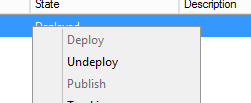
Below is the screen shot of the rules that were deployed with rules export option from old server.

While importing the rules using the MSI in the BizTalk, you will see the policies are already there error, in that case you need to change the status of the policies from the deployed to Published.
This can be done by in the All Artifacts Policies section and select all the policies and right clickà un-deploy
Regards,
Visit site: http://www.sqlblogging.com
Send an Email: sqlblogging
How To Get Parties,RoleLinks and their associated Send ports
Hi All,
We have a requirement to compare all the Parties that are enlisted in the role links in 2013 servers to 2009 servers, so I quickly created one Sql query to get the latest Role Links and their associated parties and send ports information in the 2009 BizTalk servers, so that it will be compared with 2013 Server information
Query:
USE BizTalkMgmtDb
SELECT party.nvcname [PartyName],
role.nvcname [RoleLink],
assembly.nvcfullname [Assembly],
sendport.nvcname [SendPort]
FROM bts_sendport sendport
INNER JOIN bts_party_sendport partysendport
ON partysendport.nsendportid = sendport.nid
INNER JOIN bts_enlistedparty_operation_mapping operationmapping
ON operationmapping.npartysendportid = partysendport.nid
INNER JOIN bts_enlistedparty_port_mapping portmapping
ON portmapping.nid = operationmapping.nportmappingid
INNER JOIN bts_enlistedparty enlistedparty
ON portmapping.nenlistedpartyid = enlistedparty.nid
INNER JOIN bts_party party
ON enlistedparty.npartyid = party.nid
INNER JOIN bts_role role
ON role.nid = enlistedparty.nroleid
INNER JOIN bts_rolelink_type rolelinktype
ON rolelinktype.nid = role.nrolelinktypeid
INNER JOIN bts_assembly assembly
ON assembly.nid = rolelinktype.nassemblyid
GROUP BY party.nvcname,
assembly.nvcfullname,
role. nvcname,
sendport.nvcname
Result:

Get the above result from 2009 and 2013 environments and copy into excel sheets and compare with beyond compare tool, if the e role link migration in 2013 was completed. Else use the 2009 result while applying the parties in BizTalk 2013 role links
Regards,
Visit site: http://www.sqlblogging.com
Send an Email: sqlblogging
How to Get the Latest Policies from BizTalk Server
Hi All,
We have a requirement to compare all the business Policies fter migrating from 2009 to 2013 servers, so I quickly created one Sql query to get the latest rules in the 2009 BizTalk servers, so that it will be compared with 2013 latest rules.
Query:
USE BizTalkDTADb
USE BizTalkDTADb
SELECT drs.strName[PolicyName],cast(drs.nmajor as varchar(2))+’.’+cast(drs.nminor as varchar(2))’PolicyVersion’
FROM (SELECT ROW_NUMBER() OVER(PARTITION BY strName order by strName asc, nmajor desc,nminor desc) [Rownum],strName,
nmajor,nminor
FROM dta_RuleSets(nolock) where dtUnDeployTime IS NULL ) AS drs
WHERE drs.[Rownum] = 1
Result:

Regards,
Visit site: http://www.sqlblogging.com
Send an Email: sqlblogging
An error occurred while attempting to install the BizTalk application: A file load exception occurred while attempting to install the assembly into the Global Assembly Cache. This error may occur if the assembly is delay signed, or if assembly was renamed
Hi All,
While doing the migration, we need to deploy and install the MSI from old server to new server, while Installing the MSI after we successfully imported into BizTalk Administration console, we are getting the below error.
An error occurred while attempting to install the BizTalk application: A file load exception occurred while attempting to install the assembly into the Global Assembly Cache. This error may occur if the assembly is delay signed, or if assembly was renamed after creating/signing. The given assembly name or codebase was invalid. (Exception from HRESULT: 0x80131047)
Solution that worked for me:
Go to each and every server and import the MSI Manually in to the administration console, don’t do the installation of MSI
When you are doing the MSI import, MSI will be imported in to BizTalk Mgmt DB and also it will be GACed.
Regards,
Visit site: http://www.sqlblogging.com
Send an Email: sqlblogging
Document for BizTalk Migration 2013
Hi All,
You can find the below Document if you are performing your BizTalk Migration to 2013 Version.
Regards,
Visit site: http://www.sqlblogging.com
Send an Email: sqlblogging
Unable to cast object of type ‘Microsoft.BizTalk.Streaming.VirtualStream’ to type ‘System.IO.MemoryStream’.
During our BizTalk migration, we have encountered below error in the BizTalk administration console
Reason: Unable to cast object of type ‘Microsoft.BizTalk.Streaming.VirtualStream’ to type ‘System.IO.MemoryStream’.
We thought it would be certificate error and we are checking partner certificate and our certificate.
But when we checked the event viewer, we are seeing the below error and interestingly we are not seeing this Error in our old server when the partner is sending the same file again and again
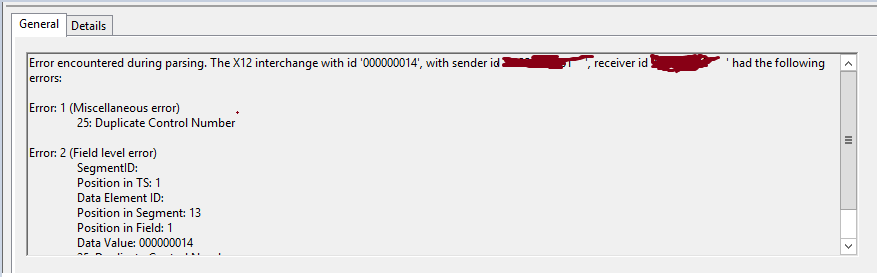
So we compared the EDI settings of same party in Old server with new server and we identified the issue
Duplicate check functionality is enabled in new server and it was disabled in old server for interchange settings
New Server Interchange Settings

Old Server Interchange Settings

So disabled the settings and issue got fixed.
Regards,
Visit site: http://www.sqlblogging.com
Send an Email: sqlblogging@outlook.com
BizTalk Msgbox Settings that should not be changed.
Hi Folks,
Below Is the official document where MS clearly given which setting you should not change in the BizTalk Msgbox database.
http://msdn.microsoft.com/en-us/library/gg634496.aspx
Regards,
Chaitanya
Visit site: http://www.sqlblogging.com
Send an Email: sqlblogging
Twitter: @chaitanya512
What you can and can’t do with the Message box Database server
Hi Folks,
Below is the article which explained well by the BizTalk core engine team w.r.t what you can do and you cannot do with Message Box Database
Regards,
Chaitanya
Visit site: http://www.sqlblogging.com
Send an Email: sqlblogging
Twitter: @chaitanya512
What you can and can’t do with the Message box Database server
Hi Folks,
Below is the article which explained well by the BizTalk core engine team w.r.t what you can do and you cannot do with Message Box Database
Regards,
Chaitanya
Visit site: http://www.sqlblogging.com
Send an Email: sqlblogging
Twitter: @chaitanya512


 SQL BLOGGING