Hi All,
When you are importing the business rules from old servers to new servers In BizTalk Migration, better you should export the rules from the MSI export option.
If you export the rules using the MSI export option, the rules will be binded to the application at that time, so that you can identify which policy belongs to which application.
Below is the screen shot of the rules that were deployed with rules export option from old server.

While importing the rules using the MSI in the BizTalk, you will see the policies are already there error, in that case you need to change the status of the policies from the deployed to Published.
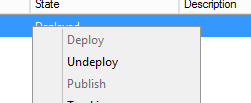
This can be done by in the All Artifacts Policies section and select all the policies and right clickà un-deploy
Regards,
Visit site: http://www.sqlblogging.com
Send an Email: sqlblogging


 SQL BLOGGING