Transactions in SSIS with example
Hi Folks,
Today we will discuss about transactions in SSIS (sql server integration services)
Transactions in SSIS allows you to commit the group of data flow tasks (or) allows you to roll back the group of dataflow tasks as single logical unit of work
Transactions supported by every executable (i.e. package level, task level, container level)
For this 2 properties have to be set for executable
1. Transaction option
2. Isolation level
Transaction option is of 3 types
1. Not supported: executable will not support transactions
2. Supported: executable will join the transaction if transaction exists.(default)
3. Required: executable join the transaction if exists else it creates new transaction
Process:
If any tasks are executed, then tasks are executed under transaction if transaction option for executable is set to supported.
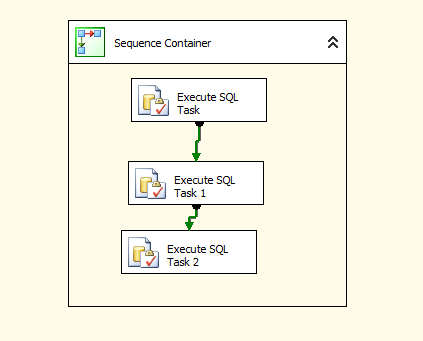
Suppose sequence container having 3 sql execute tasks and it is sequence container is having transaction option =required
Isolation level =serilizable(default).
Then it creates new transaction when executed the sequence container.
All the tasks in sequence container is having transaction option set to supported means these asks run under transaction created by sequence container.
If the tasks having transaction option set to Required, it will join the existing transaction , if no transaction is there, it will create new transaction and executes
Example:
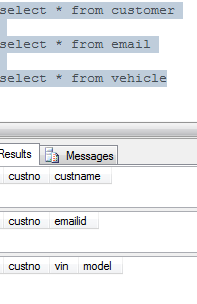
Create 3 tables with names as
1.Customer
2.Email
3.Vehicle
Syntaxes:
create table customer(custno int,custname varchar(10))
create table email(custno int,emailid varchar(20))
create table vehicle(custno int,vin char(5) not null,model char(3))
Where VIN-Vehicle identification number
Open Business intelligence development studio and click on file->new->project->integration services project
Place sequence container and drag 3 execute sql tasks like below
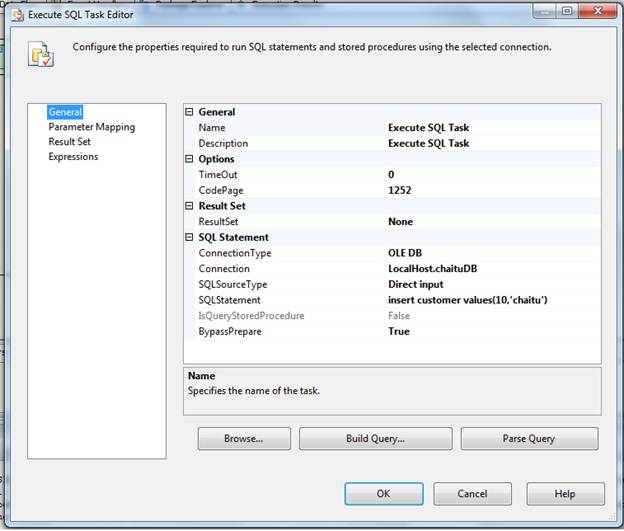
Double click on first execute sql task and set the properties
In general page, connection type =OLEDB
Connection: select new connection, a window occurs, specify the data source information give server name and database information and test the connection
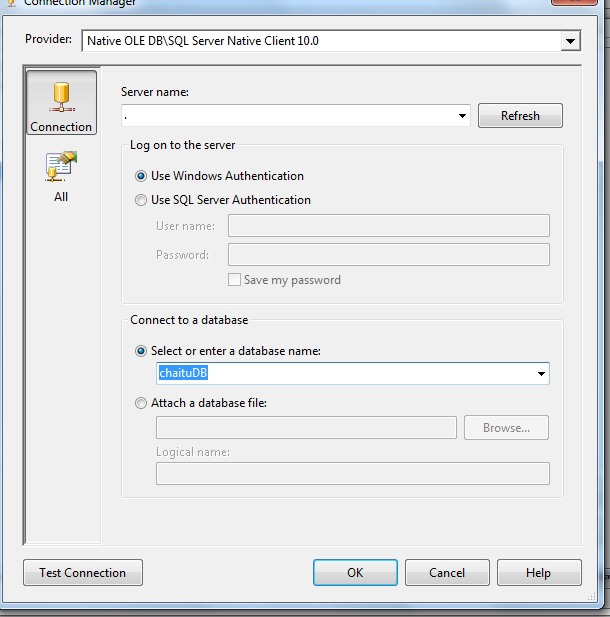
Click OK and we got below screen
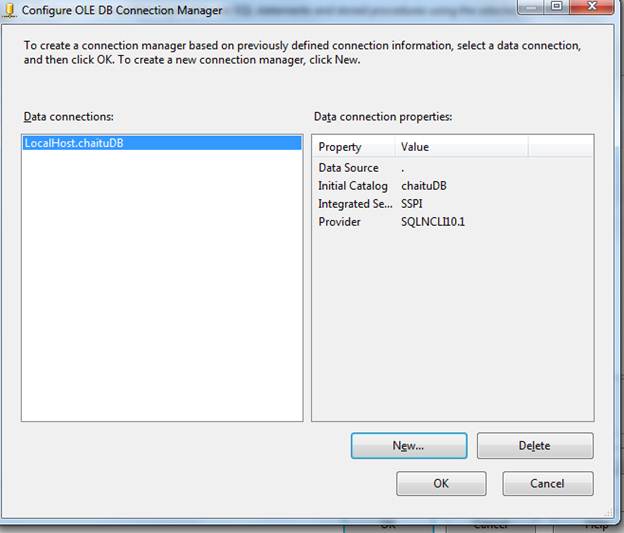
General page,
Sql source type=Direct input
Sql statement=insert customer values(10,’chaitu’)
This is looks like below.
Same can be done for other execute sql tasks with same connection but different sql statement
Set Execute sql task 1 Properties

Set Execute SQL task 2 properties
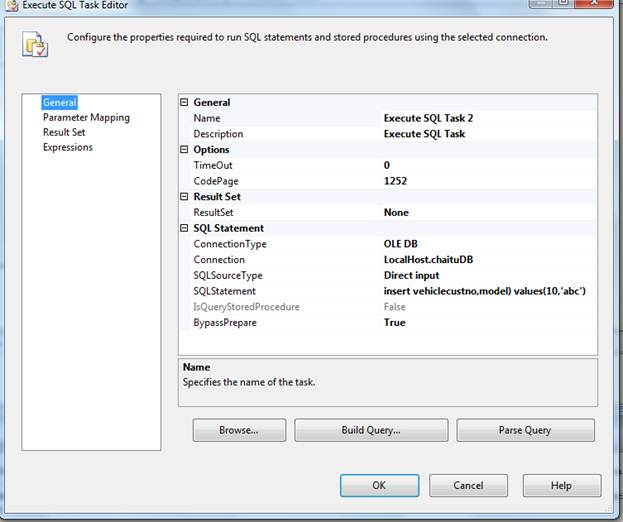
insert vehiclecustno,model) values(10,’abc’)
We have passed values to the insert statement for 3rd task but the table is having not null column. We are not passing information to that column. So this task must fail.
Transaction in SSIS makes use of the Distributed Transaction Coordinator (MSDTC) service which must be running in services. MSc. MSDTC also allows you to perform distributed transactions e.g. updating a any RDBMS database. If you execute an SSIS package that utilizes the built-in transaction support and MSDTC is not running, you will get an error message like the following:
Error: 0xC001401A at Transaction: The SSIS Runtime has failed to start the distributed transaction due to error 0x8004D01B "The Transaction Manager is not available.". The DTC transaction failed to start. This could occur because the MSDTC Service is not running.
Execute the package by pressing f5
We got below error like this
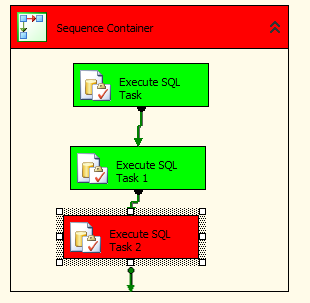
First two execute sql tasks are success. 3rd task is failed. So transaction is roll backed. Because these 3 tasks are running under single transaction
To implement package scope transactions, place another sequence container move execute sql task 2 to that sequence container. Go to properties window of package by clicking f4
Transaction property: required
Isolation: serilizable(default)
Sequence containers properties are:
Transaction property: Supportes
Isolation: serilizable(default)
It will be looks like below

Execute the package by clicking on F5
It will be failed as 3rd task is failed.
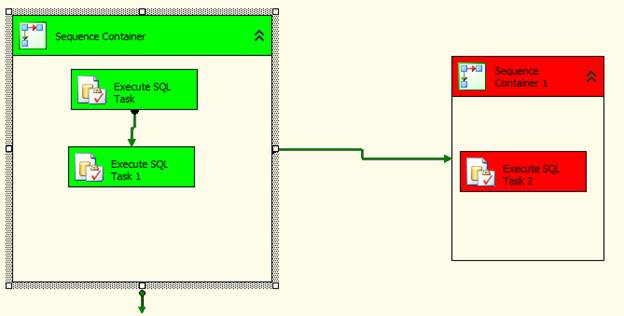
So first and second task inserts data, that is roll backed.
This is all about transactions in SSIS.
Thanks for viewing.
Regards,
Chaitanya,
Webiste : https://mssqlbuzz.wordpress.com/
To Send Mail : mssqlbuzz
to know the sql services information and system registery information in sql server denali
Hi All,
Microsoft introduced 2 DMV’s(Dynamic management view) for viewing sql services information and system registery information in sql server denali
SELECT *
FROM sys.dm_server_services

And for the registery information , we have another DMV
SELECT *
FROM sys.dm_server_registry

Reference : Pinal Dave(http://blog.sqlauthority.com)
Please check and let us know if you have any concerns on this.
Thanks for viewing.
Regards,
Chaitanya
Visit site: https://mssqlbuzz.wordpress.com
Send an Email : mssqlbuzz
Fix: Unable to open physical file – Operating system error 5: 5(error not found) Microsoft SQL Server
Hi Folks,
When we are attaching the mdf file to the sql server instance, we got the below error like this
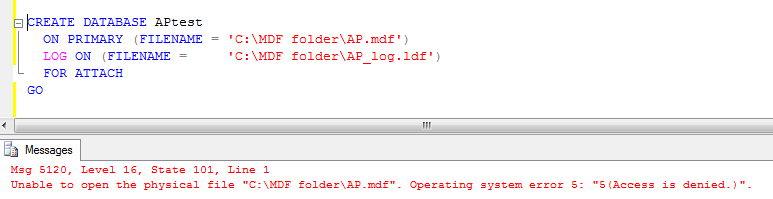
Means the account that you are using in sql server for attaching data file has no permissions for the folder where these files are placed
First check service account under which sql server instance is running
Check the sql server instance name where your query is executing using t-sql
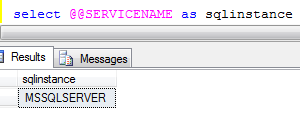
In order to check this we have options like
1. Go to run ->services.msc->check the sql nstance service

Here the service account you are using is local system means the your windows login
2. Use the t-Sql in the query analayser
declare @sqlser varchar(20)
EXEC master..xp_regread @rootkey=’HKEY_LOCAL_MACHINE’, @key=’SYSTEMCurrentControlSetServicesMSSQLSERVER’,
@value_name=’objectname’, @value=@sqlser OUTPUT
PRINT ‘Account for sql server Instance:’ +convert(varchar(30),@sqlser)
3. Go to serface area configuration manager and check the account name

Means your windows login did not have the permissions for the folder where you have the mdf file.
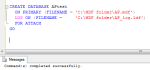
Go to that folder and right click and select security tab and give the full control like below and execute the attached script
-

- image0055
-
- image0064
Please check and let us know if you have any questions
Thanks for viewing
Regards,
Chaitanya
Visit site: https://mssqlbuzz.wordpress.com
Send an Email : mssqlbuzz
Bulk Insert command Explaination for loading data from text or csv file in to Sql Server
Hi All,
To insert the data from file to sql server we are using
1. BCP utility
2. Bulk insert
3. Open rowset
Today we will discuss the Bulk Insert command
It imports a data from the file like flat file, CSV file into the database
We have text file like below

In order to load the data from the text file into sql server table, first we need to create the table
CREATE TABLE Empbulkinsert
(
empno int,
empname varchar(10),
salary money
)
And we are using the below command for loading the data from the file to sql server table
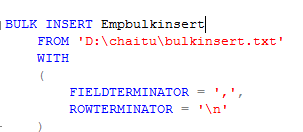
In the above file, we have seen for every field is separated by Comma (,) and every row is separated by enter
Execute the script so that, we will got
Result:
-

- image0036
-

- image0054
You can see the syntax of the bulk insert command

Reference http://msdn.microsoft.com/en-us/library/ms188365(v=SQL.90).aspx
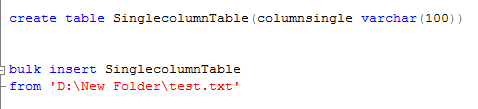
If the file is containing only single column of data
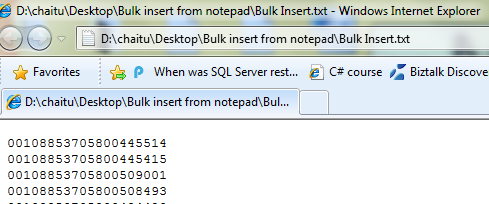
You can use the bulk insert command without using with key word
If you have the column names in the file,
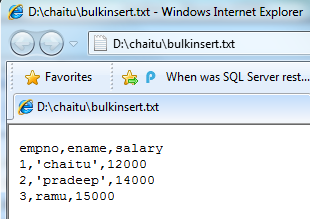
And we are trying to loading in to sql server, we got the below error

To fix this, we have first row argument, specify from which line number the data is coming

We can also specify how many errors you want to allow before considering that the BULK INSERT failed
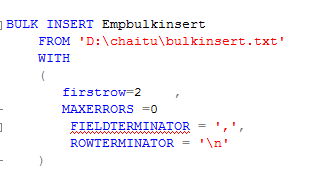
From above if error is greater than >0, then bulk insert operation failed
We can use the arguments above to perform validations
We can import the data from the remote system using \ServernameSharenamePathFilename
BULK INSERT AdventureWorks2008R2.Sales.SalesOrderDetail
FROM ‘\computer2salesforcedailyordersneworders.txt’;
Tomorrow we will discuss about Open rowset provider.
Please check and let us know if you have any concerns on this.
Thanks for viewing
Regards,
Chaitanya,
Webiste : https://mssqlbuzz.wordpress.com/
To Send Mail : mssqlbuzz@gmail.com
to check service pack of sql server
Hi All,
If you want to check the service pack of sql server, please run the below sql query
SELECT CONVERT(char(20), SERVERPROPERTY(‘productlevel’));
Result:
SP1
Regards,
Chaitanya
Visit site: https://mssqlbuzz.wordpress.com
Send an Email : mssqlbuzz
List All Stored Procedure Modified in Last N Days
Hi All,
We have sys.objects catalog view that is used from the sql server 2005
Below script is used to find the stored Procedures that are modified with in week
SELECT name
FROM sys.objects
WHERE type = ‘P’
AND DATEDIFF(D,modify_date, GETDATE()) < N
Where N is Number of days
Same can be done using the views sys.system_objects, sys.all_objects
You can place any object like table, views etc except dml triggers and these are found in the another system catalog view sys.triggers.
We have these many types of objects that are referened in this view
Regards,
Chaitanya,
Webiste : https://mssqlbuzz.wordpress.com/
To Send Mail : mssqlbuzz
SQL server 2005 Training day2 — Installing and configuring sql server 2005
Installing and configuring Sql server 2005
Installing sql server 2005
1. enterprise edition:
No processor and memory limits, more processors in the server means more memory24/7 environment and minimal downtime. It supports high availability features like online indexing operations, parallel index operations, failover clustering, database mirroring
And online indexing and parallel index operations are not supported in the standard edition and Enterprise and standard editions supports 64 bit architecture
2. Standard edition:
4 processors and no memory limits , in previous version high availability features like failover clustering and database mirroring is not there and afterwards Microsoft decides to gives the failover clustering and database mirroring. So that MS gives more features for your money
And online indexing and parallel index operations are not supported in the standard edition and for these features we need to go for enterprise edition
Differences:
1. Standard edition is also same as enterprise edition but enterprise edition will provide the extra feuatures.
2. SQL Server Reporting Services (SSRS) is available in both Standard and Enterprise editions of SQL Server. However, Enterprise edition offers substantially more BI features, such as parallel processing, cube partitioning, and text mining.
3. Enterprise is the only edition that allows you to replicate data from Oracle.
4. SQL Server Standard is significantly less expensive than Enterprise when licensed per cp
5. If you need your systems should have a high-availability, mission-critical environment.
6 . If you are working with large volumes of data
3. Work group editions:
It does not supports high availability and business intelligence features and supports 64 bit architecture
4. Express edition: its free and for learning
Developer edition: its same as enterprise edition but not licensed for production
And it is used only for development and testing
5. Mobile edition:
It supports the mobile device and smart devices stores the information in sql server mobile edition
Installer enhancements:
1. Windows installer:
Like Microsoft office, we can choose the peaces(Components) you want to install in the sql server
Like DB engine, sql server integration services , sql server reporting services,sql server analasis services. We can install what you need
2. Improved error logging: each component has separate error log. If there is any issue , so it will give the error information related to that component. Its nice enhancement introduced
3. System configuration checker:
It will check the entire machine and gives the result that machine has the required components to install the sql server
4. Remote installation is simplified here
Upgrading the Engine:
Sql server 2000 and service pack 3 is there in the server then it will be upgraded to sql server 2005
If sql server 7.o and service pack 4 is there in the server, then it will be upgraded to sql server 2005
If sql server 6.5 installed in the server, then upgrade to sql 7.o version and then upgrade to sql server 2005
Sql server upgrade advisor:
Microsoft provides the SQL Server 2008 Upgrade Advisor (SSUA) to help you detect upgrade issues before they occur. This tool examines your SQL Server 2000 and SQL Server 2005 databases and checks for any potential conflicts. I strongly recommend using this tool in advance of any attempted upgrade.
Difficulty: Average
Time Required: One hour
Down time is decreased due to this
Upgrading the components:
Analysis services:
Analysis service migration wizard is there for up gradation of 2000 packages to 2005 packages
Integration services:
Package migration wizard: in 2000 DTS packages are there and these are converted to ssis packages with this wizard.
Reporting services:
In this report server migration: it is clearly explained in Books online
Reports migration: deploy the reports of sql server 2000 to sql server 2005 report server and 2005 server recognizes the reports and converts to the 2005 format.
We cannot convert back to sql server 2000 reports
Upgrade advise take all the components and analyzed and nice reports on the issues that are stopping the reports.
We have 2 cd’s and in the first CD have the below look
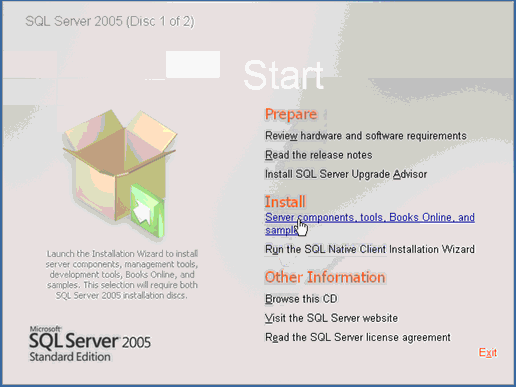
Run Sql server native wizard for the client components
Click on server components and it is used for installing sql server
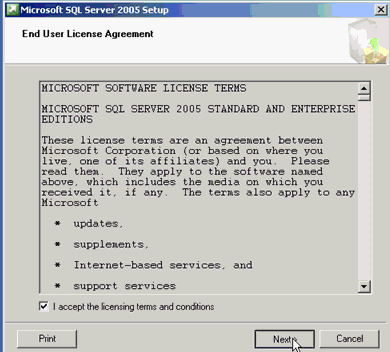
Click on next
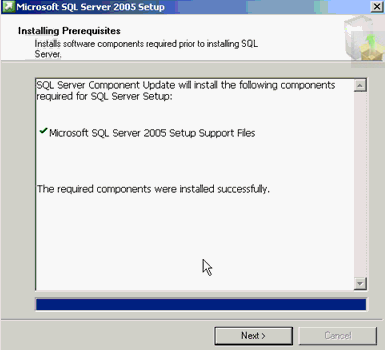
It will check and install the sql server 2005 pre requisites like .net framework
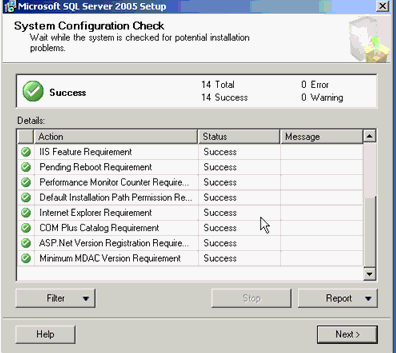
This check will perform the analyses and let us know if there is any problems are occurring during this installation and it gives the report of the analysis.
After click next and give the CD key and you got the below screen
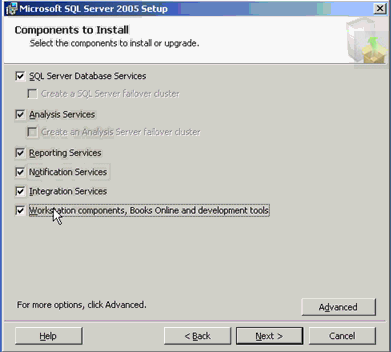
We can choose the components what we need to install in the sql server
If we click on advanced, you will get the what are the feuatures are installing with these components
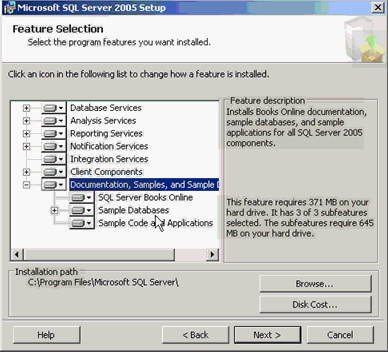
Click next

Default instance is it will take the name of the computer as the instance name
Named instance means we can give any name
I am selected the named instance with the name as below
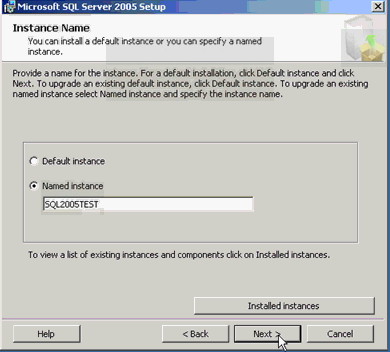
And we can view the installed instances on the machine by clicking installed instances options
We can install as many as instances in the machine and click next we got the below screen
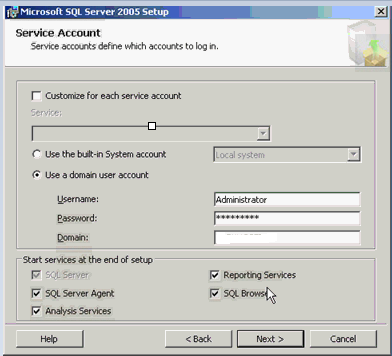
We can services like sql server,ssrs,ssis,ssas etc that needs to be run under some account
You can give the system account or user account
I am selecting the our own account
Click on next, and choose the authenctication mode
We have 2 authentication modes:
Windows and mixed authentication mode
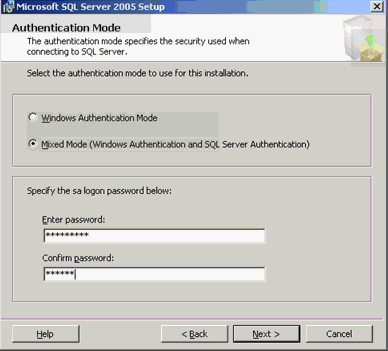
During setup, you must select an authentication mode for the Database Engine. There are two possible modes: Windows Authentication mode and mixed mode. Windows Authentication mode enables Windows Authentication and disables SQL Server Authentication. Mixed mode enables both Windows Authentication and SQL Server Authentication. Windows Authentication is always available and cannot be disabled.
 Configuring the Authentication Mode
If you select Mixed Mode Authentication during setup, you must provide and then confirm a strong password for the built-in SQL Server system administrator account named sa. The sa account connects by using SQL Server Authentication.
If you select Windows Authentication during setup, Setup creates the sa account for SQL Server Authentication but it is disabled. If you later change to Mixed Mode Authentication and you want to use the sa account, you must enable the account. Any Windows or SQL Server account can be configured as a system administrator. Because the sa account is well know and often targeted by malicious users, do not enable the sa account unless your application requires it. Never set a blank or weak password for the sa account. To change from Windows Authentication mode to Mixed Mode Authentication and use SQL Server Authentication,
Click on next, we got collation settings screen

Collation tells sql server how to sort the data and the how to interpret the character set
Because data from the different regions will come and sql server will check the data according to collation settings
2 types of collations, sql server and windows collation. Default sql server collations are there, we can change the collation to windows collation also.
To know the collation of the sql server instance
select serverproperty(‘collation’)
Result:SQL_Latin1_General_CP1_CI_AS
What this collation means
We have sql server built in function for displaying the collatin description
SELECT *
FROM fn_helpcollations() where name =’SQL_Latin1_General_CP1_CI_AS’
Latin1-General, case-insensitive, accent-sensitive, kanatype-insensitive, width-insensitive for Unicode Data, SQL Server Sort Order 52 on Code Page 1252 for non-Unicode Data
This collation is at server level
We have the collation for every database
To know the what databases uses what collation, use the below script
SELECT collation_name,name
FROM sys.Databases

In order to find the column level collations
SELECT name, collation_name
FROM sys.columns
WHERE OBJECT_ID IN (SELECT OBJECT_ID
FROM sys.objects
WHERE type = ‘U’)
But for analysis service collation used is windows collations.
Click on next, you will get the Reporting services configuration
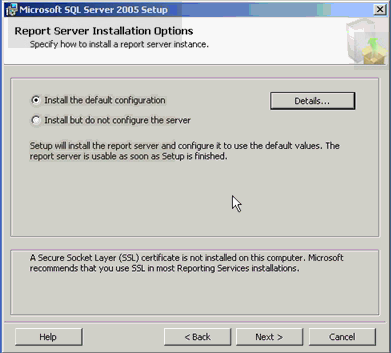
We can choose default configuration or customized configuration.i am choosing default one.
After,

We can send the error reports to Microsoft if there are any issues in the installation
Click next and we got below screen
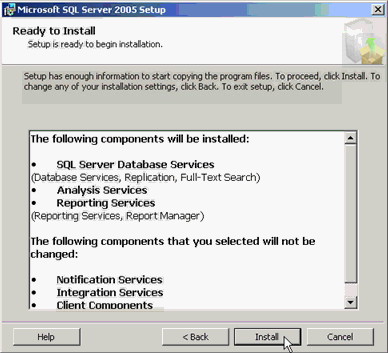
Click on install and after installation completed, we got the summary of the log and the component log
By clicking on the below link
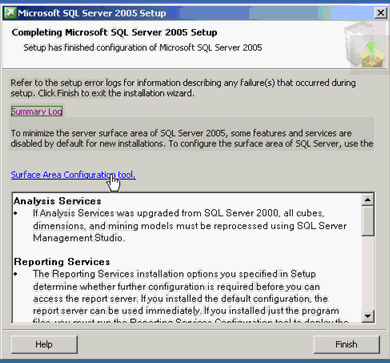
We can see these log files , in the below folder
C:Program FilesMicrosoft SQL Server90Setup BootstrapLog and you can see the summary of the log
And you can see the component log in the
C:Program FilesMicrosoft SQL Server100Setup BootstrapLogfiles directory
We can see the what we have installed in the sql server configuration manager
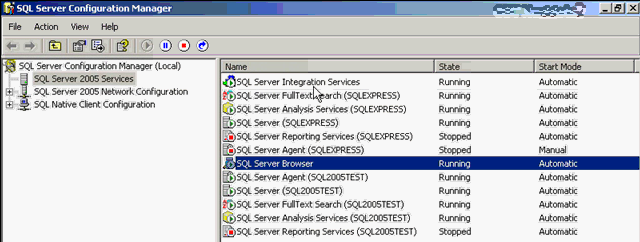
Integration services is not instance specific and sql browser also and other services are instance specific
We can see these services in services window
Go to run and type services. MSc and enter we can see the services.
If we go to services, we will see the properties of services by right clicking on the service
We explained this in the below post
http://mssqlbuzz.com/2011/10/05/sql-server-configuration-manager-tool-explanation/
Please check and let us know if you have any concerns on this.
Thanks for viewing
Regards,
Chaitanya
Visit site: https://mssqlbuzz.wordpress.com
Send an Email : mssqlbuzz
Reverse of a string with out using Reverse function
Hi All,
Below is the script to find the reverse of the given string without using built in function Reverse
To display the reverse of the string like a scalar variable
use tempdb
go
if object_id(‘tempdb..#temp’) is not null
begin
drop table #temp
end
go
declare @test varchar(100)
set @test=’chaitanya’
declare @count int
select @count=len(@test)
declare @i int
set @i=1
create table #temp
(
column1 varchar(100)
)
declare @result varchar(100)
set @result=”
while(@i <=@count)
begin
select @result = substring(@test,@i,1)+@result
set @i=@i+1
end
insert #temp(column1)
select @result
select * from #temp
Result:

If you want to display the string with incremental values and it should be in reverse order
use tempdb
go
if object_id(‘tempdb..#temp’) is not null
begin
drop table #temp
end
go
declare @test varchar(100)
set @test=’chaitanya’
declare @count int
select @count=len(@test)
declare @i int
set @i=1
create table #temp
(
column1 varchar(100)
)
declare @result varchar(100)
set @result=”
while(@i <=@count)
begin
select @result = substring(@test,@i,1)+@result
set @i=@i+1
insert #temp(column1)
select @result
end
select * from #temp
Result:
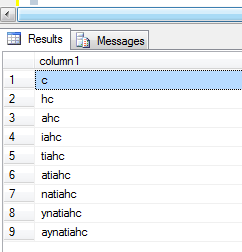
Please check and let us know if you have any doubts on this.
Thanks for viewing
Regards,
Chaitanya
Visit site: https://mssqlbuzz.wordpress.com
Send an Email : mssqlbuzz@gmail.com
SQL server 2005 Training day1 — Introduction to sql server 2005
SQL server 2005 Training day1 — Introduction to sql server 2005
From today onwards I am going to write about sql server training 2005
It is mainly for DBA’s and useful for developers and support folks and it covers exam (70-431)
In sql server 2005 , Microsoft changed lot in sql server product
Before there is no integration of developers and DBA‘s and now MS introduced integration of Developers and DBA’s
3 types of roles in sql server
1. DBA
2. Developers
3. Users
Roles of DBA:
Managing, monitoring and changing the health performance, reliability, security of the system
Developer will develop the objects in sql server
Users will use the results from the sql server
Roles and responsibilities are same for the developers and DBA’s but in 2000 DBA‘s uses enterprise manager for admin tasks and developers used query analyzer
Now in 2005, these are gone and they are integrated into sql server management studio
Sql server 2005 breaking all the records of bench mark testing and there is 7% increase in performance
Over oracle 10g and 37% lower cost so many people will get the product at low cost
We can install different instances of sql server on one server
In one machine, we can have the sql server 2000 instance, sql server express instance, sql server 2005 test instance like that
SQL Server from beginning:
1987:-
Sybase company created the Sybase sql server for Unix ,at the time oracle is the having the biggest database in the industry.so Microsoft decided to partner with Sybase
1993 – 4.2.1 version :-
They developed the Sybase sql server i.e. integrated with Windows NT 3.1 operating system
most of code is for Sybase developed and this Sybase sql server is coded for Unix also called Sybase sql 4.0
1995:-
MS and Sybase divided and MS developed the own sql server of version 6.0 for Windows NT 3.1 and 3.5
but the code is Sybase code and Microsoft decided to use their own code. Introduced the replication concept
1996:-
MS released 6.5 version with better features with integration with windows NT 4.o and it is poor in performance, but lots of new features
1999-7.0 version:-
Microsoft did the new code (all MS code)
New GUI, OLAP, Dataware houses,scalable,fast,reliable
2000: 8.0 version:-
Sql server 2000 with many enhancements like analysis services
2005: 9.0 version:-
Reporting services, service broker,ssms. here everything is touched.
Sql Server tools and components:
Management tools:
1. Sql server management studio
Here the sql server enterprise manager and sql server query analyser in sql server 2000 are integrated and developed this tool.
2. Sql server configuration manager
It will replace the client network utility, server network utility and service manager in the sql server 2000
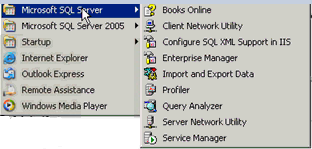
And these three tools are integrated and replaced by the sql server configuration manager like below in sql server 2005

I explained about this tool in my blog
http://mssqlbuzz.com/2011/10/05/sql-server-configuration-manager-tool-explanation/
Development tools:
1. SSMS(sql server management studio) for writing the queries and creating the objects in sql
Server.
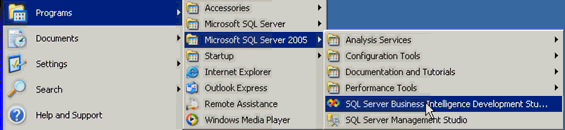
2. Business intelligence development studio : for developing SSIS,SSRS,SSAS applications
Called as BIDS
Performance tools:
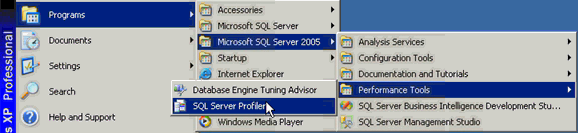
1. Database engine tuning advisor:
The Database Engine Tuning Advisor enables you to tune databases for improved query processing. Database Engine Tuning Advisor examines how queries are processed in the databases you specify and then it recommends how you can improve query processing performance by modifying physical design structures such as indexes, indexed views, and partitioning.
It replaces the Index Tuning Wizard from Microsoft SQL Server 2000, and offers many new features. For example, Database Engine Tuning Advisor provides two user interfaces: a graphical user interface (GUI) and the dta command prompt utility. The GUI makes it easy to quickly view the results of tuning sessions, and the dta utility makes it easy to incorporate Database Engine Tuning Advisor functionality into scripts for automated tuning. In addition, Database Engine Tuning Advisor can take XML input, which offers more control over the tuning process.
2. sql server profiler :
Microsoft SQL Server Profiler is a graphical user interface to SQL Trace for monitoring an instance of the Database Engine or Analysis Services. You can capture and save data about each event to a file or table to analyze later. For example, you can monitor a production environment to see which stored procedures are affecting performance by executing too slowly etc.
Sqlcmd is the sql version of command line tools: it replaces the Osql.Osql is completely gone
Before Sql DMO (data management objects) is the object library for sql server and now it is replaced with SMO(sql management objects) .
Components of Sql server:
1. database engine: it is not changed for execution
2. SSAS (SQL server analysis services): we can develop multi-dimensional objects such as cubes etc.
3. SSIS(sql server integration services): for developing ETL packages
4. SSRS(sql server reporting services): for developing the reports
5. SSNS(sql server notification services):send the notifications to anybody on any device
And it is removed in sql server 2008
6. SQL server service broker: it like the message queuing system which keeps the messages and other application will pick those messages and process
In configuration tools, we have tools like
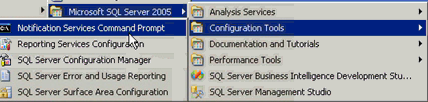
1. Sql server configuration manager:
I already posted one post on this
http://mssqlbuzz.com/2011/10/05/sql-server-configuration-manager-tool-explanation/
2. Notification services command prompt
For managing notification services. It is removed in sql server 2008
3. Reporting services configuration: we can configure the reporting services instances here
If you open this tool, you will get like below

We can connect to the report server instance and manage the properties
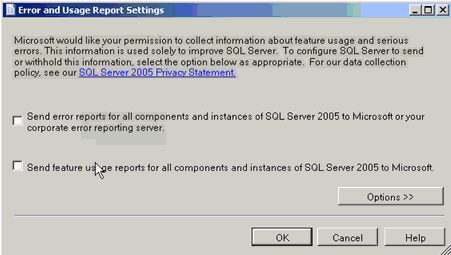
4. Sql server error and usage reporting:
We can send the errors to the Microsoft that are occurred in sql server by using this tool
Sql server surface area configuration Manager:
It will do all the checks and Surface area reduction is a security measure that involves stopping or disabling unused components
It is removed in sql server 2008
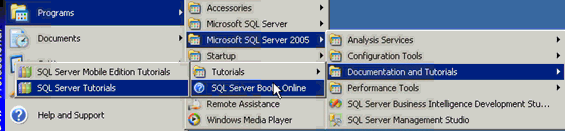
We can have the documentation and tutorials: and it have mobile edition tutorial and sql server tutorial and sql server tutorials and sql server books online for learning
BIDS:
SSMS:
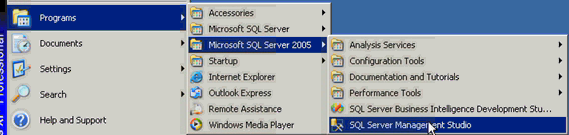
We can register the server s here in the SSMS so that we will query and manage them whenever you want
In sql server 2000, we have register servers like this
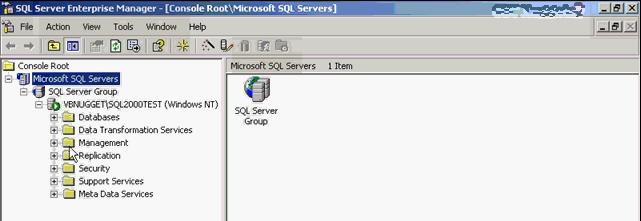
We can query and manage these servers.
Here Green mark represent the server is connected
In ssms(sql server 2005) for registration of servers, go to view and registered servers you got window like below
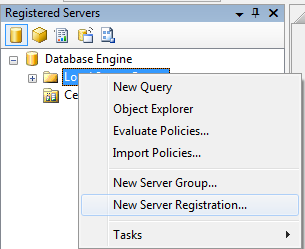
By clicking and register the server
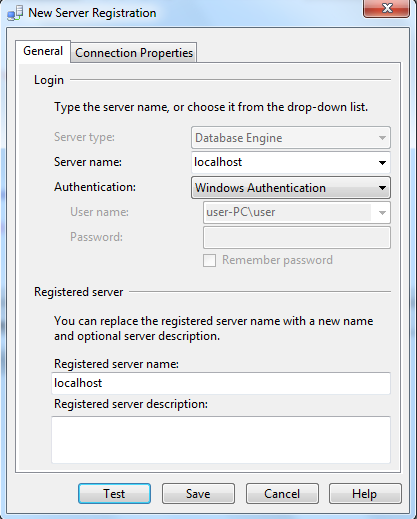
Save it and you can see the registered servers like below
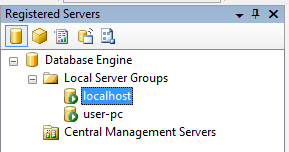
Here Green symbol means the server is up and running fine, but we are not connected to the server
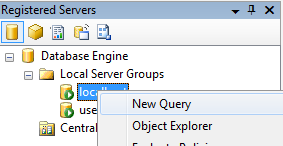
So to connect right click on registered server and new query so that it is connect to server and shown in the right window
If we go to any database and see the reports of database, follow like below
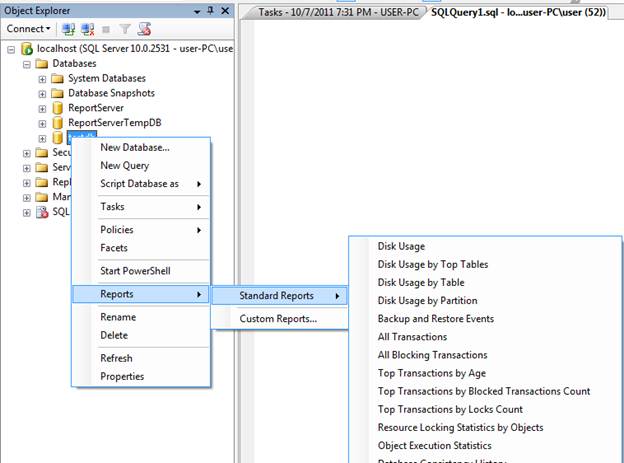
These are reports, and we have bunch of reports and gives the all details about the database
Solution explorer: it is used to for maintaining the projects
For creating the projects, file-> new-> projects-> select the project type and —- and click ok . you will get the project in the solution explorer in the right side and it is like below

Running the queries in ssms is very easy, go to database and right click and select new query
And you can create the queries and execute the queries
Please check and let us know if you have any concerns on this.
Thanks for viewing this.
Regards,
Chaitanya
Visit site: https://mssqlbuzz.wordpress.com
Send an Email : mssqlbuzz
Number of Processors in your sql server machine
Hi Folks,
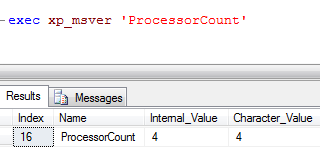
To know the number of Processors in your sql server machine
We have xp_msver extended procedure
to find out the number of processors on the server where SQL Server is installed.
|
Regards,
Chaitanya,
Webiste : https://mssqlbuzz.wordpress.com/
To Send Mail : mssqlbuzz

 SQL BLOGGING