We have the extended stored procedure in the sql server master database
go to object exploerer-> databases-> system databases-> programmability->extended stored procedures
Extended stored procedures are created and loaded using DLL’s (which are created in C/C++), and offer more independent functionality than standard procedures (such as access to the Win32 API, services, direct disk/network etc), and because they’re compiled externally as dynamic linking libraries (DLL’s) and these are very faster
sending the error message to the event viewer functionality is supported by one of the extended Procedure xp_logevent
which is used to send the user defined message to the event viewer through the t-sql
syntax:
xp_logevent {error_number, ‘message’} [, ‘severity’]
The error_number parameter is a user-defined error number greater than 50,000. The message parameter is the actual message that will be shown in the event viewer. Lastly, severity is an optional parameter containing one of three character strings that represents how bad the error that occurred was. The three possible values are INFORMATIONAL, WARNING, and ERROR. If you don’t include this parameter, the INFORMATIONAL is used.
Example:
Exec master..xp_logevent 65000, “User defined Error message”, WARNING
or
use master
exec xp_logevent 65000, “User defined Error message”, INFORMATIONAL

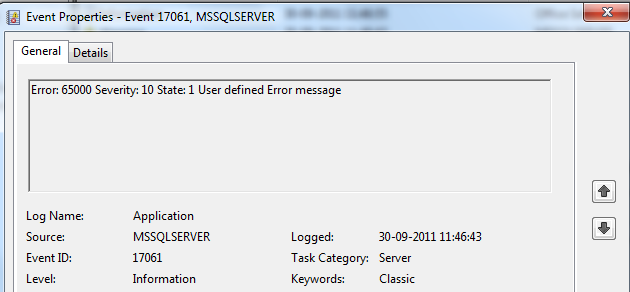
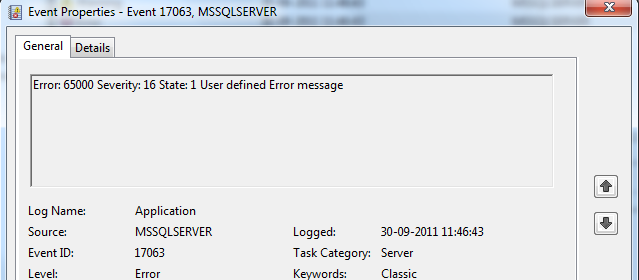
Next, run event viewer (Start -> Programs -> Administrative Tools -> Event Viewer) and click on the application log node. Look at the top couple of lines and find an entry with a source of “MSSQLSERVER”; double-click on it. It should load a property page showing our error message, number, and severity, like this:
you will see the message .

if we double click on these , they are like below

Please let us know if you have any other options for this..
thanks for viewing

 SQL BLOGGING