Auto recovering of your queries in query editor
Hi All,
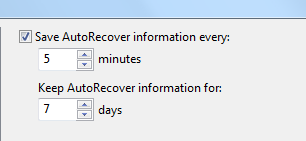
Sql server will automatically save the information for every five minutes. You can set this to 1 minute to reduce the work loss
Go to tools menuàoptionsàEnvironmentàAuto Recover
Set the save auto recovery information every 1 Minute.
Default it is 5 minutes.
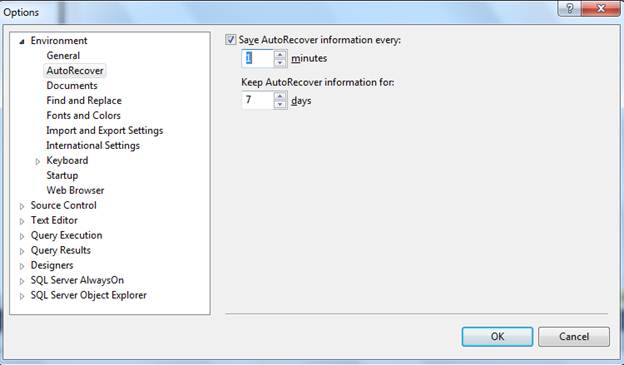
The location of this Auto Recover document is located in “My DocumentsSQL Server Management StudioBackup FilesSolution [n]”.
The [n] represents an integer that corresponds to how many SSMS IDE windows you have open
If you open 2 instances, N will be 2
For each instances, the number of query editors opens will be saved for every 1 minute
Open the folder mentioned above and open a new SSMS IDE and Query window and start typing
SELECT statement .
After about 1 minute, you will see a new file prefixed with “~AutoRecover.~vsXXXX.sql”. created
If you close the window, sql server will delete these files. And these files will be there in this folder up to 7 days.
Please check and let us know if you have any concerns on this.
Thanks for viewing this.
Regards,
Chaitanya
Visit site: http://www.sqlblogging.com
Send an Email: sqlblogging
Don’t want the dialogue box when you are opening the sql server?
Hi All,
If you are opening the sql server management studio, and SSMS will ask the dialogue box to give the server name.
Every time, you are opening sql server, you are getting the dialogue box ,
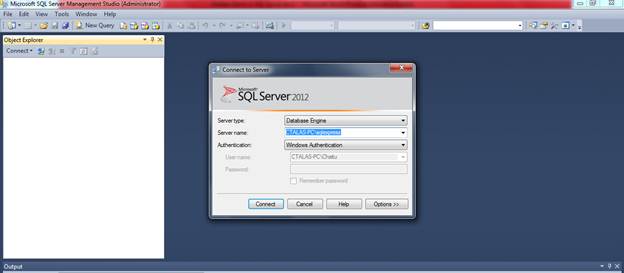
If you don’t want this dialogue box, then go to properties of management studio tab
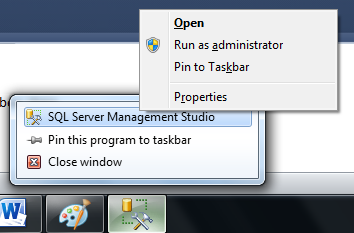
Then in the target, at the end of line add space –E like below
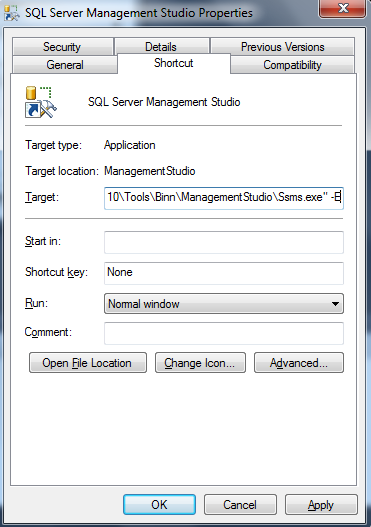
after this modification done, Click on the Sql server management studio ICON
Please check and let us know if you have any concerns on this.
Thanks for viewing this.
Regards,
Chaitanya
Visit site: http://www.sqlblogging.com
Send an Email: sqlblogging
Sql Server Development Series – Installation and configuration of Sql Server Day 4 of 60
Hi folks,
Below is the installation of sql server 2005 and you need to go to servers folder, you have to follow the below instructions
We can click on the setup.exe for windows server and the splash.hta for Linux and MAC servers

Microsoft strictly told to use sql server in windows server for more security
Click on the set up and you will get the below screen
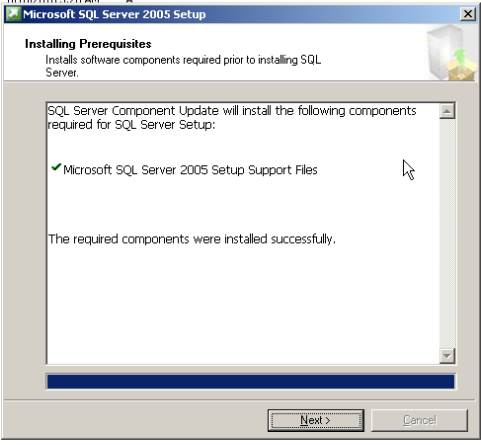
The above phase will install the pre requisite for sql server means .Net frame work
And it will be installed by this set up automatically, no need of .net framework manually.
This was applicable for non-express editions.
You can see the manifest files in the sql server installation folders

This will have the links for other files.
Click on next, it will Scan the your system configuration

Click on next, and you will be go to sql server installation window
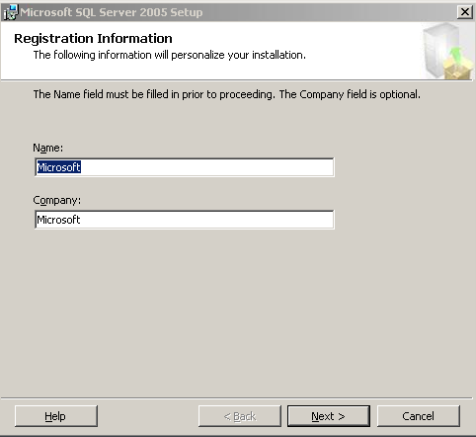
Click on next, we can have below different components to choose.
SQL server is installed on windows server and sql have below components.
-

- image0101
-
- image009
We can install 50 sql server instances w.r.t edition and version
Each and every successful installations are called instances
We can have 50 unique instances in the one OS
If we have default instance, the instance name is same as machine name

SSIS and Work station components can be shared among 50 instances.
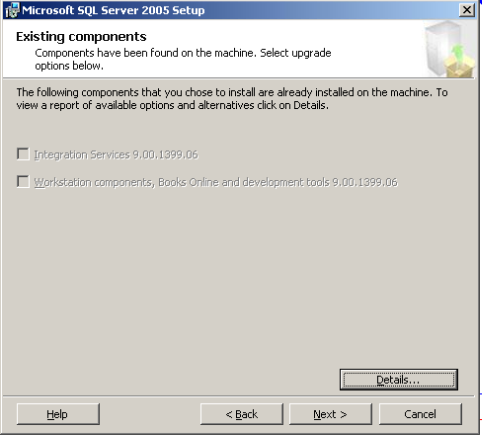
Click on next, you will get below window

Based on the components we have selected for installation we can have the services that needs to be started at the end of installation
Sql browser component will always run on the network security account not on the local system account
Click on next, we can have the authentication types,
Windows authentication- only windows users can login
Sql server authentication- non windows user can login

If you have both type of users, select mixed mode else select windows authentication mode
Click on next, we have collation settings windows, using this we can give the case sensitivity and ascending /descending order
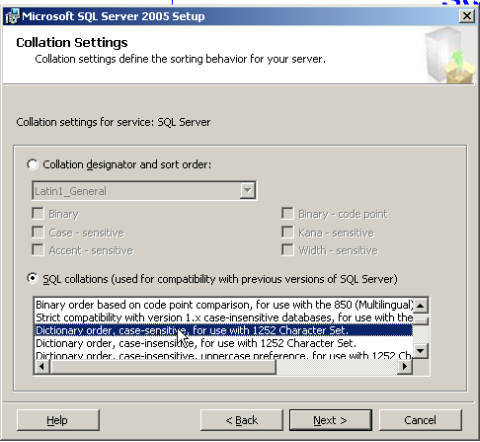
Sql server will have 31 languages support, it is default supporting Latin language
Click on next,
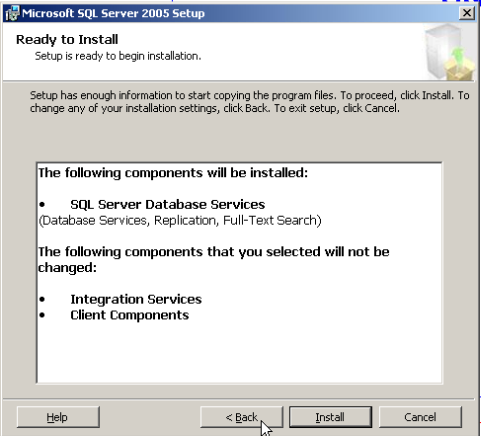
Click on install. It will install the sql server on your machine.
For 2008 installation, Please watch the below video
( Courtesy : Rick Morlean)
Please check and let us know if you have any concerns on this.
Thanks for viewing this.
Regards,
Chaitanya
Visit site: http://www.sqlblogging.com
Send an Email: sqlblogging@outlook.com
Want Query results in separate tab?
Hi All,
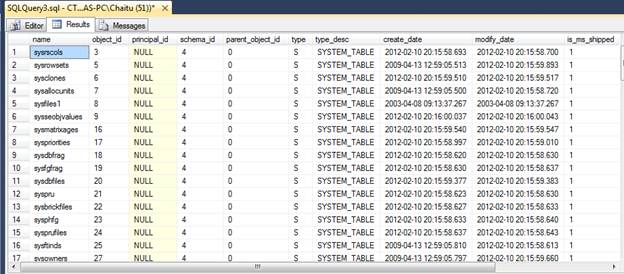
If you want query results in the separate tab of query result window follow the below options.
Go to Tools à optionsàQuery resultsàsql serveràResults to Grid
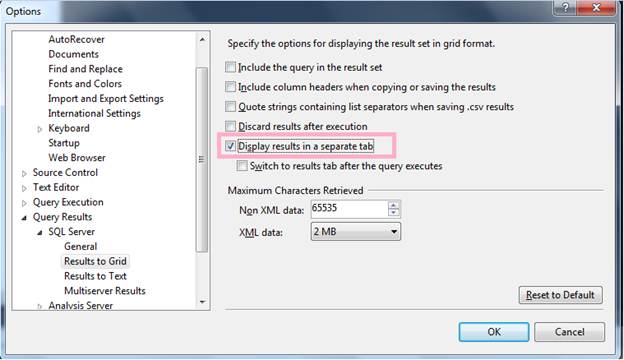
You will get the query results in separate tab
Please check and let us know if you have any concerns on this.
Thanks for viewing this.
Regards,
Chaitanya
Visit site: http://www.sqlblogging.com
Send an Email: sqlblogging@outlook.com
Sql Server Development Series – Sql server configuration manager Day 3 of 60
Hi Folks,
Below is the discussion on the Sql server configuration manager
Mainly it is used for playing with the services.
1. Starting and stopping of service
2. Password change
3. Configure the startup mode of services
4. Enabling the database with single user mode or multi user mode
This is the sql server tool for playing with the sql server services
Another way to go to run -> services. MSC
We have sql server services in this
Don’t start sql server services all if we don’t have requirement as each service will consume minimum of 50mb and max of 8GB
Apart from the services, we have network configuration in the Sql server configuration manager(SCM)
Network configuration in SCM is like below

TCP/IP:
We are mainly using the TCP/IP protocol mostly called transmission control protocol /internet protocol
Coming to the protocols, this are used for data communication between client and server and this data is of encrypted TDS packets
We have already discussed this in the below post
if you have trusted internet connection you can connect to the sql server using the TCP/IP protocol
client and server will talk to each other using TDS packets and TCP/IP protocol is used for converting the data in to encrypted packets
Named Pipes:
if we are using the client and server in the same machine, we can use the named Pipes
it is also applicable for machines across the LAN
Shared memory:
clients and server can use the common memory and these are in single machine
before sql server 2005, we have option to install client components or server components
VIA-virtual access
mainly for internet and it is very faster, but not much secure than TCP/IP protocall
we can define protocols independently for each instance of sql server
by default
shared memory and TCP/IP protocol is enabled and others are in disabled mode and we can change it as part of requirement
how the sql server will check these protocols in the order
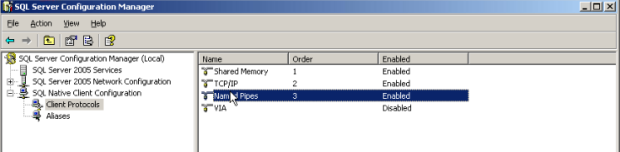
We have the client protocols in the sql native client configuration and it is defined with order
First shared memory is with 1st order, so sql server will check the shared memory and if the client is not in same machine, then sql server will skip this and check the TCP/IP and if TCP/IP is not working then sql server will go to named pipes
We can change the order of these protocols in configuration manager
Aliases:
An alias is an alternate name that can be used to make a connection. The alias encapsulates the required elements of a connection string, and exposes them with a name chosen by the user. To create an alias for the Microsoft SQL Server clients on this computer, right-click Aliases in the console pane, and then click New Alias. To configure an existing alias for the SQL Server clients on this computer, click Aliases in the console pane, right-click the desired existing alias in the details pane, and then click Properties.
Configuring client aliases for SQL Server
1. Open SQL Server Configuration Manager, and expand the SQL Native Client Configuration node.
2. Right-click Aliases, and then click New Alias.
3. In the Alias Name box, type the alias you wish to use when connecting to the database server.
4. In the Port No field, type the port number that you assigned to your SQL Server instance.
5. In the Server field, type the name of your database server.
6. Click Apply, and then click OK.
Alternatively
Start, Run, clicnfg
Enable TCP/IP protocol
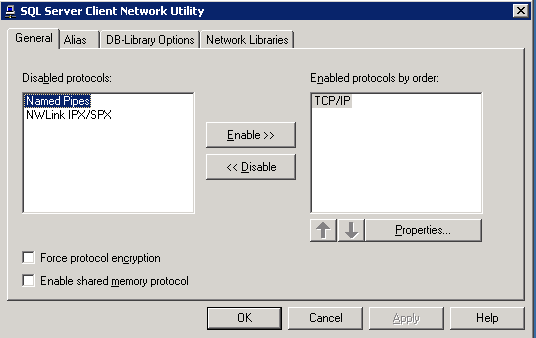
Select properties
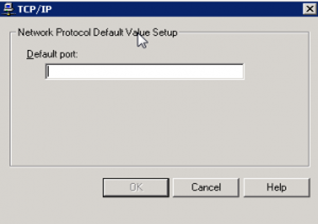
Select Alias Tab

Please check and let us know if you have any concerns on this.
Thanks for viewing this.
Regards,
Chaitanya
Visit site: http://www.sqlblogging.com
Send an Email: sqlblogging@outlook.com
Activity Monitor – Gem of Sql Server
Activity Monitor:
Previously we have this feature in management tab of sql server
Now it was moved to top of the SSMS

Or you can invoke using the at server level

I have ran below query to open a session

And I am opening the activity monitor, now we can see the processes and their information
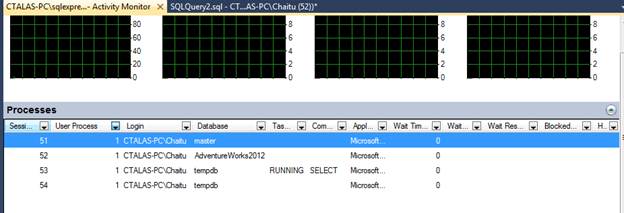
We can kill the process from activity monitor also.
You can see the not only the processes, you can see below features also.
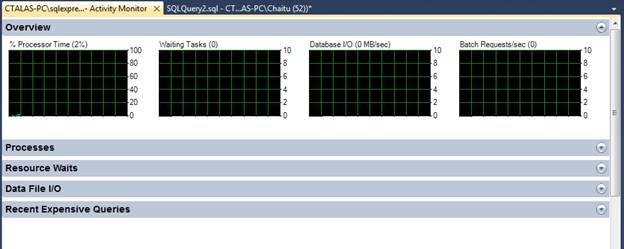
Please check and let us know if you have any concerns on this.
Thanks for viewing this.
Regards,
Chaitanya
Visit site: http://www.sqlblogging.com
Send an Email: sqlblogging@outlook.com
Sql Server Development Series – SQl Server Architecture Day 2 of 60
Sql Server is perfect RDMS product from Microsoft used to perform day to day operations and management activities
How sql server manages Client server communication:
MSN uses sql server as backend
Below is the picture of sql server architecture
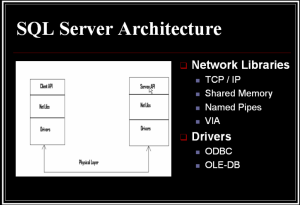
Whenever you are login into the msn account using the credentials these credentials are passed from the client API to server API (sql server)and validation is done
If we are sending directly the credentials from the client API to server API , security issues will raise.
So we are using the encryption here
At the client API, the credentials are encrypted so that only target server can only understand. For this we are sending the data in the TDS (tabular data stream) format to the protocols
API (application programming interface): in order to interact with database or s/w to pull or push the data ( Ex:HTML )
For the encryption at sql server, we are using the protocols and these protocols are also called network libraries (net Libs)
TCP/IP, named pipes, shared memory, VIA
TCP/IP is mostly and widely used protocol
After data is encrypted using the protocols and this data is routed to specific destination server using the drivers (OLEDB,ODBC)
OLEDB- specific for Microsoft technologies like IE->sql server,.net to sql server, SharePoint to sql server, sql server to sql server
ODBC is used for data communication of sql server with non-MS technologies.
Driver should not know what the data it contains and how the data is encrypted and its job is to route the data
And these encrypted information (packets) are called TDS packets and why we are converting these into tabular formats is RDBS only understands tabular formats
After the data is converted Tabular format, we are applying security mechanisms and send to server
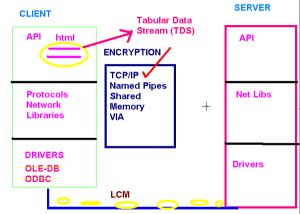
Client is sending the data to the server using the LCM (least cost method)
At the server we are taking the data using drivers and gave to netlibs(protocol’s) and they will convert the encrypted data to decrypted one using the same protocol the client is using for the encryption. Otherwise the connection failures will occur even though the server is up and running fine
Here client net lib and server net lib should be same
After the data is converted into decrypted format(TDS packets) then this data is given the server and server executed and gives the response to the client
There are 2 types of connections:
Server centric connection: syntax check will occur at server
Client centric: syntax check will occur at client
Now – a –days, we are using client centric connections so that traffic to the server will be reduced and performance will be increased
Please check and let us know if you have any concerns on this.
Thanks for viewing this.
Regards,
Chaitanya
Visit site: http://www.sqlblogging.com
Send an Email: sqlblogging@outlook.com
enable Line numbers for the query editor in your sql server
To enable Line numbers for the query editor in your sql server
Go to tools windows, select options, in that select Transact- SQL window, select general, you have line numbers option which was un – Checked.

Check the option.

Click OK. Now open the new query window using CTRL+N
You will get the lines for each and every statement in the query editior

Please check and let us know if you have any concerns on this.
Thanks for viewing this.
Regards,
Chaitanya
Visit site: http://www.sqlblogging.com
Send an Email: sqlblogging@outlook.com
Sql Server Development Series – Introduction to Sql Server Day 1 of 60
It is mainly for DBA’s and useful for developers and support folks and it covers exam (70-431)
From sql server 2005, Microsoft changed lot in sql server product
Before there is no integration of developers and DBA‘s and now MS introduced integration of Developers and DBA’s
3 types of roles in sql server
1. DBA
2. Developers
3. Users
Roles of DBA:
Managing, monitoring and changing the health performance, reliability, security of the system
Developer will develop the objects in sql server
Users will use the results from the sql server
Roles and responsibilities are same for the developers and DBA’s but in 2000 DBA‘s uses enterprise manager for admin tasks and developers used query analyzer
Now in 2005, these are gone and they are integrated into sql server management studio
Sql server 2005 breaking all the records of bench mark testing and there is 7% increase in performance
Over oracle 10g and 37% lower cost so many people will get the product at low cost
We can install different instances of sql server on one server
In one machine, we can have the sql server 2000 instance, sql server express instance, sql server 2005 test instance like that
SQL Server from beginning:
1987:-
Sybase company created the Sybase sql server for Unix ,at the time oracle is the having the biggest database in the industry.so Microsoft decided to partner with Sybase
1993 – 4.2.1 version:-
They developed the Sybase sql server i.e. integrated with Windows NT 3.1 operating system
Most of code is for Sybase developed and this Sybase sql server is coded for Unix also called Sybase sql 4.0
1995:-
MS and Sybase divided and MS developed the own sql server of version 6.0 for Windows NT 3.1 and 3.5
But the code is Sybase code and Microsoft decided to use their own code. Introduced the replication concept
1996:-
MS released 6.5 version with better features with integration with windows NT 4.o and it is poor in performance, but lots of new features
1999-7.0 version:-
Microsoft did the new code (all MS code)
New GUI, OLAP, Data ware houses,scalable,fast,reliable
Sql server 2000: 8.0 Version:- with many enhancements like analysis services
SQL Server 2005: 9.0 version:-Code Name (Yukon)
Reporting services, service broker, SSMS. Here everything is touched.
SQL Server 2008: 10.0 Version:-Code Name (Katmai)
File Stream Data, Data Compression, Log Stream Compression, Language-Integrated Query, Spatial data, User-Defined Table Type, hierarchy ID, New Collations, Sparse Columns
SQL Server 2008 R2: 10.5 Version:-Code Name (Kilimanjaro )
SQL Server 2008 R2 includes a number of new services, including Power Pivot for Excel and SharePoint, Master Data Services,
Stream Insight, Report Builder 3.0, and Reporting Services Add-in for SharePoint, Master Data services, hierarchies, Multi Server Management
SQL Server 2012: 11.0 Version:-Code Name (Denali)
File Table, Statistical Semantic Search, Improved Full text Search, new and enhanced spatial data types, Paging, new Throw Statement, Sequence Object, and new Functions for development.
Sql Server tools and components:
Management tools:
1. Sql server management studio
Here the sql server enterprise manager and sql server query analyser in sql server 2000 are integrated and developed this tool.
2. Sql server configuration manager
It will replace the client network utility, server network utility and service manager in the sql server 2000

And these three tools are integrated and replaced by the sql server configuration manager like below from sql server 2005 onwards
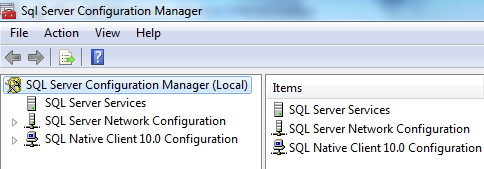
I explained about this tool in my blog
https://sqlblogging.com/2011/10/05/sql-server-configuration-manager-tool-explanation/
Development tools:
1. SSMS (sql server management studio) for writing the queries and creating the objects in sql Server.
2. Business intelligence development studio: for developing SSIS, SSRS,SSAS applications Called as BIDS
Performance tools:
1. Database engine tuning advisor:
The Database Engine Tuning Advisor enables you to tune databases for improved query processing. Database Engine Tuning Advisor examines how queries are processed in the databases you specify and then it recommends how you can improve query processing performance by modifying physical design structures such as indexes, indexed views, and partitioning.
It replaces the Index Tuning Wizard from Microsoft SQL Server 2000, and offers many new features. For example, Database Engine Tuning Advisor provides two user interfaces: a graphical user interface (GUI) and the dta command prompt utility. The GUI makes it easy to quickly view the results of tuning sessions, and the dta utility makes it easy to incorporate Database Engine Tuning Advisor functionality into scripts for automated tuning. In addition, Database Engine Tuning Advisor can take XML input, which offers more control over the tuning process.
2. Sql Server Profiler :
Microsoft SQL Server Profiler is a graphical user interface to SQL Trace for monitoring an instance of the Database Engine or Analysis Services. You can capture and save data about each event to a file or table to analyze later. For example, you can monitor a production environment to see which stored procedures are affecting performance by executing too slowly etc.

Sqlcmd is the sql version of command line tools: it replaces the Osql. Osql is completely gone
Before Sql DMO (data management objects) is the object library for sql server and now it is replaced with SMO (sql management objects) .
Components of Sql server:
1. Database engine: it is not changed for execution
2. SSAS (SQL server analysis services): we can develop multi-dimensional objects such as cubes etc.
3. SSIS (sql server integration services): for developing ETL packages
4. SSRS (sql server reporting services): for developing the reports
5. SSNS (sql server notification services): send the notifications to anybody on any device
And it is removed in sql server 2008
6. SQL server service broker: it like the message queuing system which keeps the messages and other application will pick those messages and process
In configuration tools, we have tools like

1. Sql server configuration manager:
I already posted one post on this
https://sqlblogging.com/2011/10/05/sql-server-configuration-manager-tool-explanation/
2. Notification services command prompt
For managing notification services. It is removed in sql server 2008
3. Reporting services configuration: we can configure the reporting services instances here
If you open this tool, you will get like below

We can connect to the report server instance and manage the properties
4. Sql server error and usage reporting:
We can send the errors to the Microsoft that are occurred in sql server by using this tool
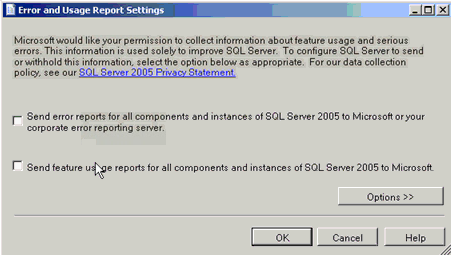
Sql server surface area configuration Manager:
It will do all the checks and Surface area reduction is a security measure that involves stopping or disabling unused components
It is removed in sql server 2008
We can have the documentation and tutorials: and it has mobile edition tutorial and sql server tutorial and sql server tutorials and sql server books online for learning
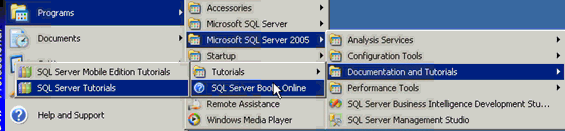
BIDS:

SSMS:
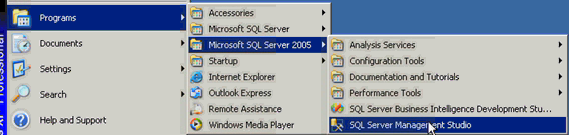
We can register the server s here in the SSMS so that we will query and manage them whenever you want
In sql server 2000, we have register servers like this
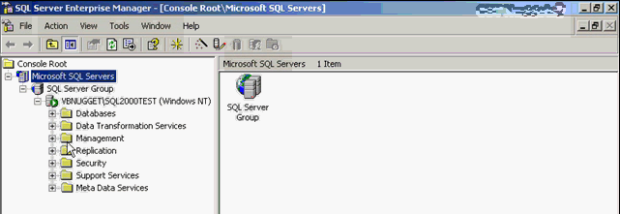
We can query and manage these servers.
Here Green mark represent the server is connected
In SSMS(from Sql server 2005) for registration of servers, go to view and registered servers you got window like below
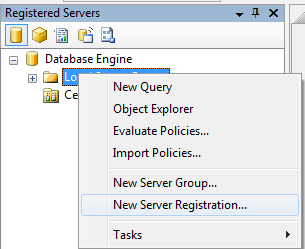
By clicking and register the server
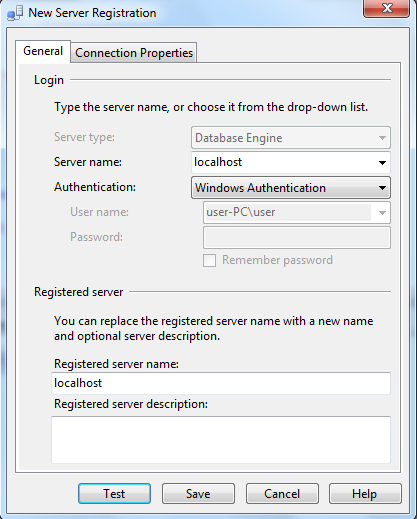
Save it and you can see the registered servers like below

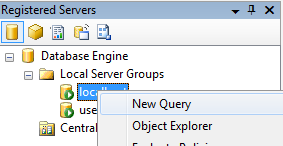
Here Green symbol means the server is up and running fine, but we are not connected to the server
So to connect right click on registered server and new query so that it is connect to server and shown in the right window
If we go to any database and see the reports of database, follow like below
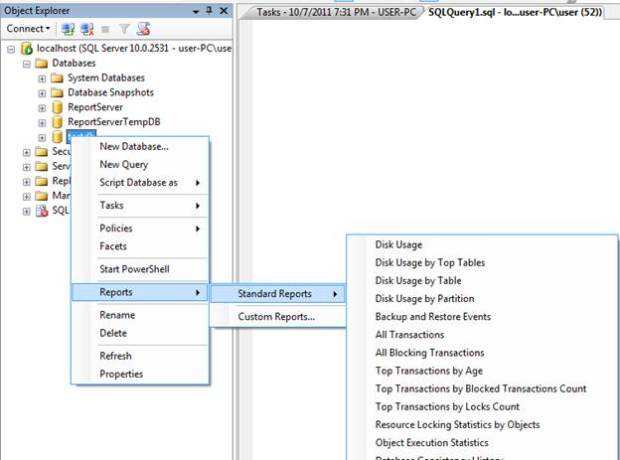
These are reports, and we have bunch of reports and gives the all details about the database
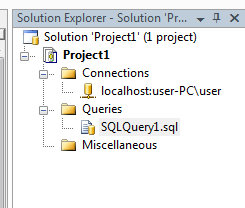
Solution explorer: it is used to for maintaining the projects
For creating the projects, file-> new-> projects-> select the project type and —- and click ok. You will get the project in the solution explorer in the right side and it is like below
Running the queries in ssms is very easy, go to database and right click and select new query
And you can create the queries and execute the queries
Please check and let us know if you have any concerns on this.
Thanks for viewing this.
Regards,
Chaitanya
Visit site: http://www.sqlblogging.com
Send an Email: sqlblogging@outlook.com
sql server equality operator will not work with strings with trailining spaces
Hi All,
sql server equality operator will not work with strings with trailining spaces.
below is the script for this. Please check at your end using query explorer
it will work fine for the leading space strings also
declare @string varchar(100)
set @string=’mssqlbuzz’
select len(@string) as [string without spaces]
set @string=’mssqlbuzz ‘
select LEN(@string) as [string with trailing spaces]
set @string=’ mssqlbuzz’
select LEN(@string) as [string with leading spaces]
result:

Regards,
Chaitanya
Visit site: https://mssqlbuzz.wordpress.com
Send an Email : mssqlbuzz


 SQL BLOGGING

