Sargability and Non-Sargability in Sql Server
Hi All,
We always listen the words like sargable, non- sargable in performance tuning. Below is the small understanding of those words
Queries which avoid WHERE clauses are non-sargable. If a WHERE clause is sargable, this means that it can take advantage of a useful index (assuming one is available) to speed completion of the query.
If a WHERE clause is non-sargable, this means that the WHERE clause (or at least part of it) cannot take advantage of an index, instead performing a table/index scan, which may cause the query’s performance to suffer.
Non-sargable search arguments in the WHERE clause, such as “IS NULL”, “<>”, “!=”, “!>”, “!<”, “NOT”, “NOT EXISTS”, “NOT IN”, “NOT LIKE”, and “LIKE ‘%500’” generally prevents (but not always) the query optimizer from using a useful index to perform a search.
In addition, expressions that include a function on a column, expressions that have the same column on both sides of the operator, or comparisons against a column (not a constant), are not sargable.
But not every WHERE clause that has a non-sargable expression in it is doomed to a table/index scan. If the WHERE clause includes both sargable and non-sargable clauses, then at least the sargable clauses can use a useful index (if one exists) to help access the data quickly
I will send the detailed explanation on this with example in next article.
Regards,
Chaitanya
Searching the strings with leading spaces and trailing spaces in the sql server
Hi Folks,
We have issues in the production at our end where the master table is update with leading spaces and it is causing the incorrect results as it master table and configuration is present in those tables.
I quickly checked the leading spaces in the table using the below query
We have created sample tables for this demo
use tempdb
go
create table #tempo
(
id int,
name varchar(100)
)
insert #tempo
select 1,’chaitu’
union all
select 2,’pradee’
union all
select ‘3’,’ krishna’
select * from #tempo

Below is the query for getting the leading spaces in the name column
select * from #tempo where LEFT(name,1)=”

For trailing spaces
use tempdb
go
create table #tempo
(
id int,
name varchar(100)
)
insert #tempo
select 1,’chaitu’
union all
select 2,’pradee’
union all
select ‘3’,’krishna ‘ à trailing space is inserted
select * from #tempo

Below is the query for getting the trailing spaces in the name column
select * from #tempo where right(name,1)=”

Please let us know if you have other options
Please check and let us know if you have any concerns on this.
Thanks for viewing this.
Regards,
Chaitanya
Visit site: http://www.sqlblogging.com
Send an Email: sqlblogging
Twitter: @chaitanya512
Sql Server Formatting tool- Must for every Sql Server Resource
Sql Server Auto formatting tool
Today I saw the post of Pinal Dave in http://blog.sqlauthority.com and got to know one excellent tool for formatting the sql server and intellisense
You can download this tool from the below website
http://www.devart.com/dbforge/sql/sqlcomplete/download.html
install this tool and it will integrate with your SSMS and you can see the difference of using the SSMS
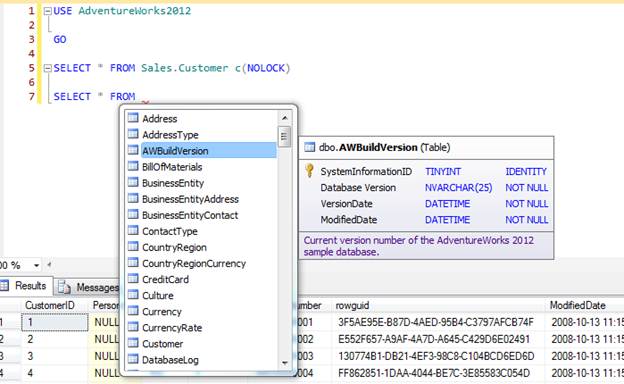
It will give all the details with excellent intellisense. It will automatically format the code
You can write the code very fast using this.
You can see the complete tutorial of this in the below link
http://www.devart.com/dbforge/sql/sqlcomplete/sql-complete-demo.html
Thanks Pinal for this information
At last this is the Must Tool for sql server Resources.
Please check and let us know if you have any concerns on this.
Thanks for viewing this.
Regards,
Chaitanya
Visit site: http://www.sqlblogging.com
Send an Email: sqlblogging
Twitter: @chaitanya512
Throw Statement in Sql server 2012
In 2012, raise error is replaced by throw statement
If we executed the below script, we will have the raise error statement that will catch error
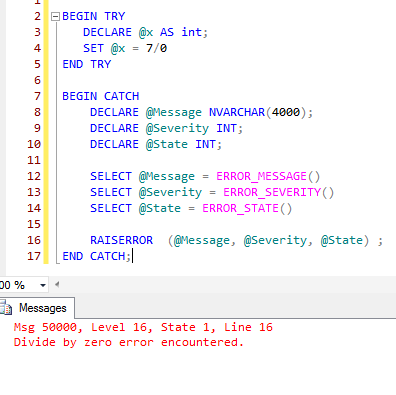
Raise error have some limitation it will not flow the control to the catch block in some severities. Please execute the below query to see the limitation
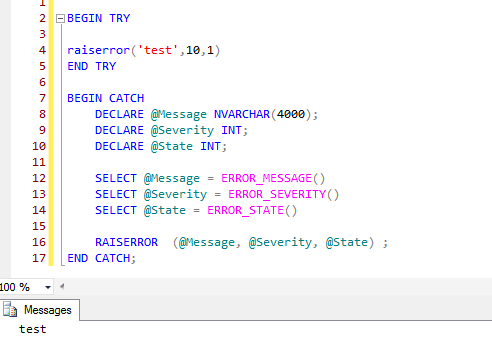
For severity 10, it will not flow the control.
So we don’t have error raised.
Throw will eliminate these limitations.
Syntax of throw:
THROW [ { error_number | @local_variable },
{ message | @local_variable },
{ state | @local_variable } ]
[ ; ]
Parameters:
Error_number:
Is a constant or variable that represents the exception. error_number is int and must be greater than or equal to 50000 and less than or equal to 2147483647.
The error_number parameter does not have to be defined in sys.messages
Message:
Is an string or variable that describes the exception. message is nvarchar(2048).
State:
Is a constant or variable between 0 and 255 that indicates the state to associate with the message. state is tinyint.
There is no severity parameter. The exception severity is always set to 16.
We have to specify throw statement inside begin try with parameters
We should not specify throw without parameters in try block
Throw statement should end with semi colon

My Article on Biztalk Flat file processing
Below is the article I have written on BizTalk flat file processing
Please check and let us know if you have any concerns on this.
Thanks for viewing this.
Regards,
Chaitanya
Visit site: http://www.sqlblogging.com
Send an Email: sqlblogging
Twitter: @chaitanya512
Sql Server Development Series – Table Design Day 7 of 60
Entire Data file is divided into 8kb physical chunks called pages
Why we are dividing this files into pages à for easy of organizing the data.
Group of 8 consecutive pages is called extent

What is in the page
Page is consists page header
And it consists of location of page, address, and owner, pointer to previous page or next page
Extent is logical grouping of the pages.
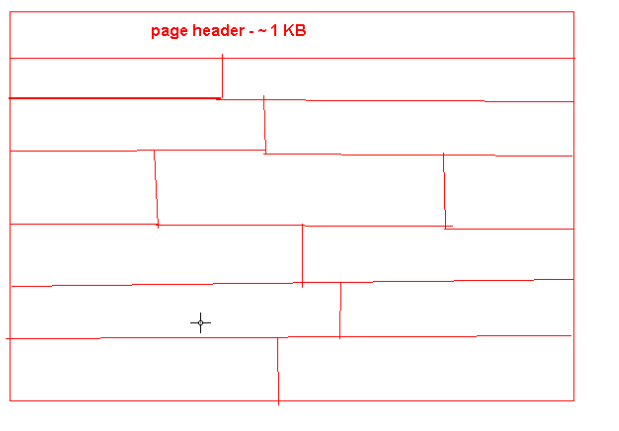
Page fragmentation:
If the pages of the table are located at different places, then it will cause the page level fragmentations
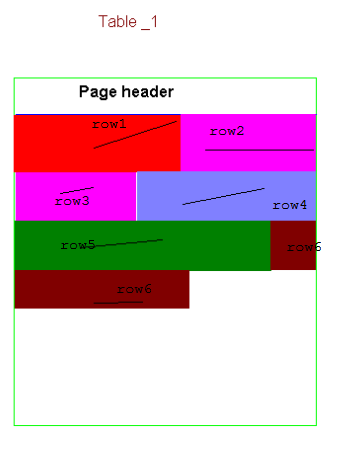
One page should be allocated to particular object only. A single page cannot store the information of 2 tables. If you have table 1(t1) data in 3 pages and last 3 page is not full, then you have created the table 2(t2) then it will use new page, not the 3rd page which is free and of table 1(t1). Single object can resides on different pages.

This page and extent management of sql server is different from other rdbms products but expect from Sybase. As the roots of sql server is from Sybase only.
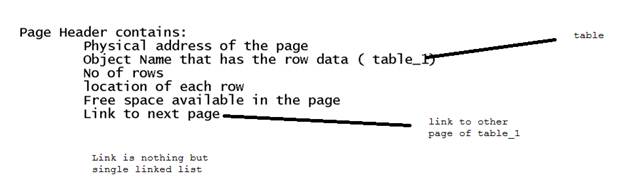
We have 2 types of fragmentation
1. Inter page fragmentation : when a data is deleted from the page
2. Across pages fragmentation: when the pages of table is spitted across different locations
Important point: A Row cannot be span over multiple pages
How we can eliminate this limitation
Sql server will store only 1023 columns and another 1 column is used for replication
If the row is >7.1 kb, then the solution is below one
Other than integer, character data we have image, textual, xml which will not use the page concept
-

- image006
-

- image007
Due to this fragmentation will occur, but the space that will left blank will be used for future purpose, if the row 1 is updated with some more data, then it will use that space.
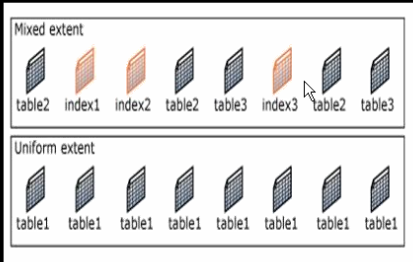
This is high level explanation of how the data is organized.
We will see the internals of pages, records in next article.
Please check and let us know if you have any concerns on this.
Thanks for viewing this.
Regards,
Chaitanya
Visit site: http://www.sqlblogging.com
Send an Email: sqlblogging
Twitter: @chaitanya512
Script for finding All Tables count in User Defined Databases in Sq Server 2k,2k5,2k8,2k12 etc
Hi All,
Below is the script for the All Table count for instance.
We have excluded the system databases
DECLARE @Sql NVARCHAR(2000)
DECLARE @Dbname NVARCHAR(200)
DECLARE @Name VARCHAR(150)
Learn your Favorite Subject on Pluralsight for Free. Limited to one day
Pluarsight is one famous online training site which is giving the offer of learning your favorite technology subject.
But this offer is valid for only one. And you should have the twitter account for this.
Link for this is http://bit.ly/V8tEjq
Please check and let us know if you have any concerns on this.
Thanks for viewing this.
Regards,
Chaitanya
Visit site: http://www.sqlblogging.com
Send an Email: sqlblogging
Twitter: @chaitanya512
Sql Server Development Series – DataBase Design Practice Day 6 of 60
Create a new User defined data base.
We can do these object creation using
1. SSMS
2. Through t-SQL Script
We will go through the first SSMS option
Go to run and type SSMS and log in to sql server instance and
Right click on databases options, you will get like below
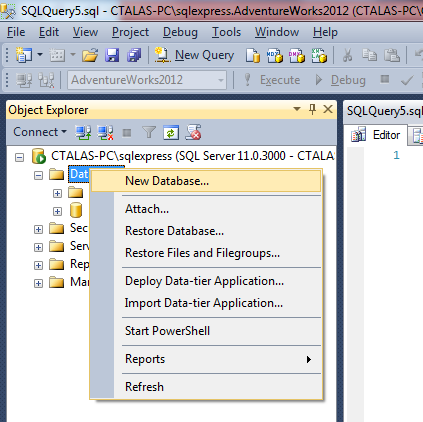
We got below window
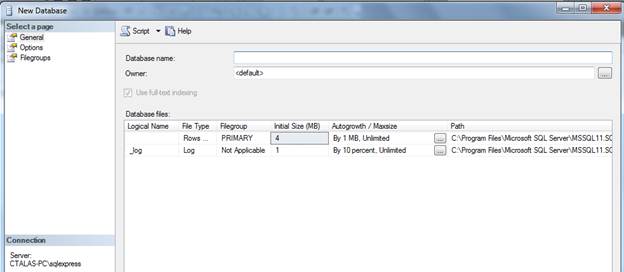
Type Database Name, you will see the logical name also changed as per our given Name
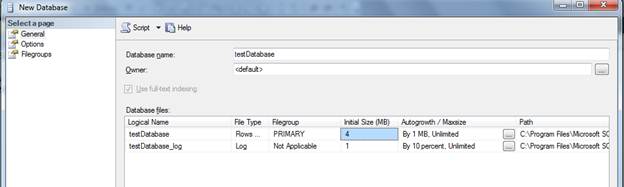
But we can change the logical name, it’s not a problem

Click ok. It will create the database.
We can also do this database creation using the below command
create database testdataBase_script
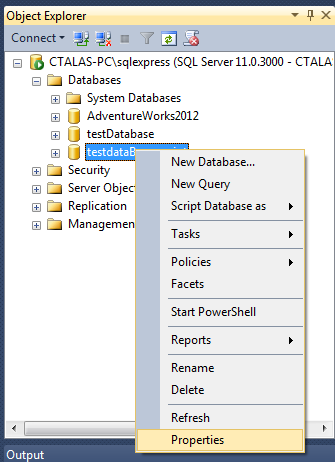
If we go to properties of newly created Database, by right click on Database and select options
And you go to files option, you will have below window
You will have the files information for this Database
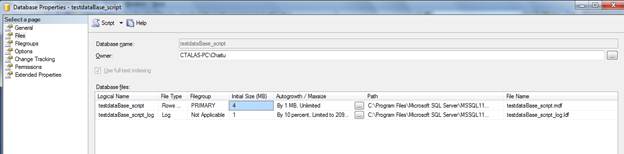
Logical name of the file is unique to the Database.
You can have the same file name in the other database
Location:
By default, if you did not specify the location, it will create the file in the sql server system databases locations
C:Program FilesMicrosoft SQL ServerMSSQL11.SQLEXPRESSMSSQLDATA
There is the difference in the size of the files that were created though the command and UI
Whenever we are creating the database, we will give the name of the file.
Location, initial size, maximum size, auto growth
Initial size:
What is the size of the file when it was created?
Maximum size: we can specify this in the below window using UI

You will get the below window

Auto growth: if the initial file size is full, then sql server will allocate the specified MB as per option setting.
We have below set below option

If initial log size is 4 MB, and it is full, then sql server will allocate 10 MB,
If that is also full (14MB) then it allocates another 10 MB.
If 94 MB is full, then it will allocate 6 MB, as the max size is 100 MB.
If 100 MB is full, then it will allocate the data to any other files in the same file group.
If no files are there in the same file group in which this file was exist, then sql server will not allow the User to perform the write operations and it is used only for read operations.
If we have done the update also, then sql server will not allow that operation as sql server needs the memory for internal fragmentation
Create a new database banking _system.
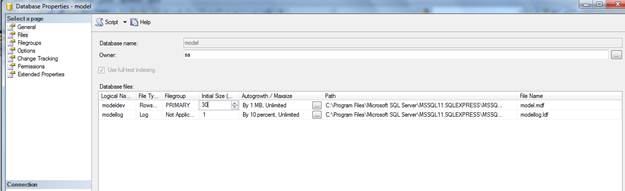
We can change the initial size of the file whenever creating the database.
As the new Database creation is done from Model DB template, go to model DB, then give initial size as below
We can create the different files for the database
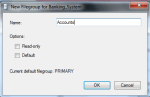
If we need the new file groups, click like below
-
- image018
-
- image017
Give the file group name and Click OK.
Like that, add the new files for the Banking_System
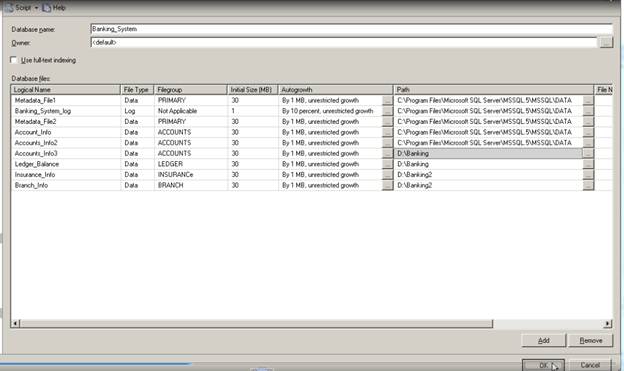
In the path, we given the directory names, but that Directories should exists in the System.
Sql server will not create the directories.
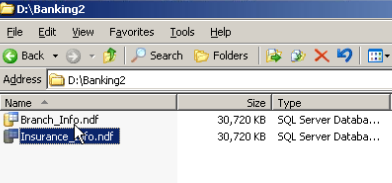
Click on OK, we will have database created and files are on the directories like below
Limitations of creating Files and file groups through UI

We can have the primary file group files in different folders other than system databases defined folder
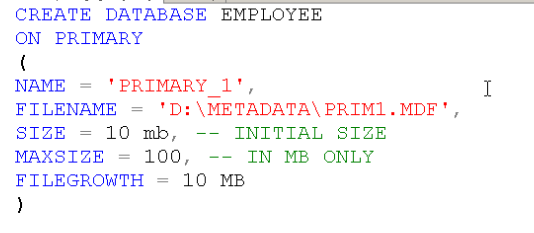
You can create the file group that have .MDF file also using the script
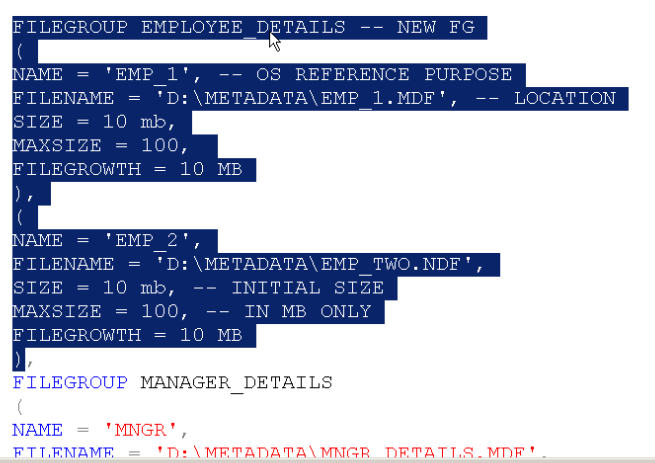
We cannot give the name for the primary file group as it is default one
Below statement will add the file to the default file group i.e. primary
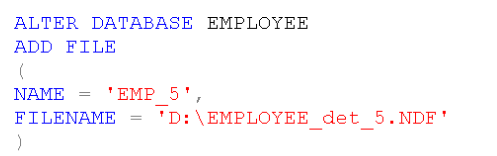
We can add the file to file group like below

A filegroup can be there with no files also.
Later we can add the files

Create one database University using the below script
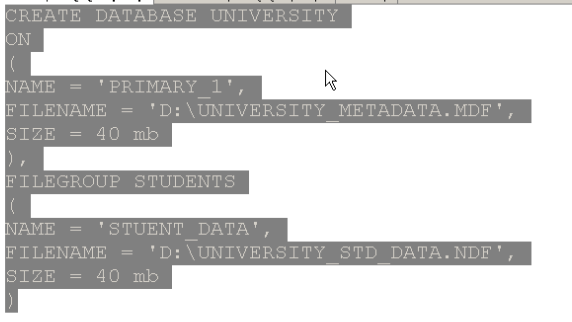
I did not mention the log file info, but we have the log file created for this database
Why it was created is due to model database
Please check and let us know if you have any concerns on this.
Thanks for viewing this.
Regards,
Chaitanya
Visit site: http://www.sqlblogging.com
Send an Email: sqlblogging@outlook.com
Twitter: @chaitanya512
Sql Server Development Series – DataBase Design Day 5 of 60
Below concepts, we will discuss in this article.
- What is SQL Server Database?
- What does SQL Server Database contain?
- Database Architecture
- Files and File groups
- Understanding Log Files
- Database Design Considerations
- System Databases
- Resource Database
- Types of SQL Server Databases
What is SQL Server Database?
- A Database in SQL Server is made up of a collection of tables. These tables contain tables and other objects that are defined to support activities performed with the data.
- At physical level, the Database is can be seen as a collection of simple files.
- Each database can store either interrelated or unrelated data.
What does Database contain?
- A database consists of :
1. Data
2. Different Objects useful for managing the Data
- Data is physically stored in specific objects called : TABLES
- There are tens of Database Objects that are needed for easy retrieval, working with and securing the data in a database.
Database Architecture
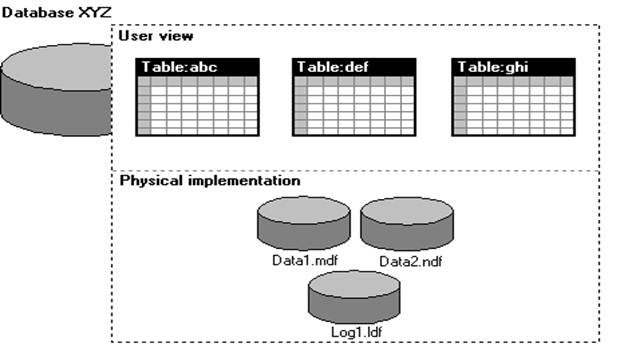
Data is stored in tables logically and physically it was stored in Files
We should not have the files separately in 2 different machines for a single database
Database is collection of Minimum 2 files
1. Data file( represented as .MDF)- all the data and meta data is stored here
2. Log file(represented as .LDF): all the Audit Records are stored here
Audit: which operation is performed, which user is doing operations etc.
Whenever a new database is created, we have the MDF created initially which have the meta data and LDF created for audit information
Depending on size of the Database, we can have the multiple data files.
These data files are organized as
1. Primary data file : contains the User defined data and Meta data
2. Secondary data file : contains the User defined data and Meta data
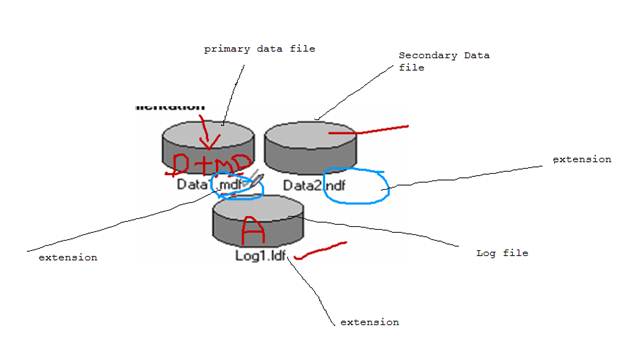
These data files can be having any extension.
We can have the data files with any extension, but it is Microsoft convention not a rule
Another convention is MDF files have Data +Meta Data
NDF files have only Data. It is not a rule, but we can have the Data + Meta Data in the NDF
Database can have 32,767 files
NDF file is mandatory
Files and File Groups
Data files can be grouped together in FILEGROUPS for allocation and administration purposes.
Logical related group of files are file groups
Ex:
employee details in employee group
Manager details in employee group
We can have min 1 file group and max 32767 file groups for database and for 1 file group is having 32767 files
§ Primary data file is in primary file group and this group was created when creating the data base
§ Every data file should belong to file group
§ Log files should not belong to file group
Understanding Log Files:
Assume your database as a Big Apartment, for apartment we have the watchmen
Depending up on the apartment size, we have watch men.
A minimum 1 watch man is there and they will audit all the information of persons who is coming and leaving.
Whenever any theft happened, we can go to watchmen he will check the log records and identify the UN authorized person in that time lines. He will not tell anything if the theft happened before 2 years.
So think of Log file as watch men and apartment as Database and each floor as File group and each flat as file.
Your transaction log file should not belong to any file group. Your watchmen should not belong to any file. (Just for understanding)
We should not split the data files and log file separately.
Think of your apartment, your watchmen is working outside (Not possible right)
System Databases
Whenever sql server is installed, we have default databases created.
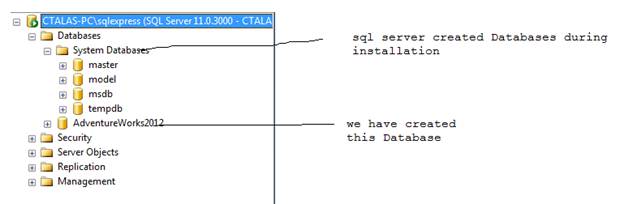
- master : Records all the system-level information for an instance of SQL Server.
i. Ex: instance name, edition, collation etc. all the Meta data information level at instance level. It also stores the Meta data for the newly created databases
- model: Used as the template for all databases created on the instance of SQL Server.
1. Template for the new Database creation.
- msdb : Used by SQL Server Agent for scheduling alerts and jobs.
a. Scheduling and administrative information
- tempdb : Workspace for holding temporary objects or intermediate result sets.
1. For day to day operation we need this tempDB
Where these files will be seen.
Go to databases, select properties and select files, and we can see the files below

Take the path of file and go to there, we can have the files
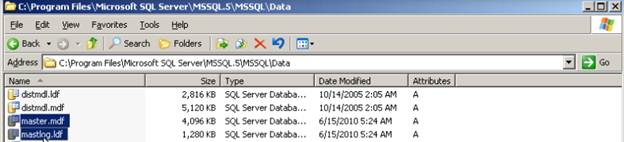
Master database is entry of Instance
We have another system database is there, but it is hidden
Resource Database:
In addition to the FOUR system databases discussed previously, a separate system database called “Resource” database is also installed. But this database cannot be seen in SSMS for security reasons

In sql server 2000, we have the system objects in master database and any one can go and update.
In sql server 2005, we have system objects in master database, but the source is coming from resource database
System objects are physically persisted in the Resource database
We don’t have direct access resource expect master database.
If we open the resource database .mdf file using any tool, we don’t get anything. This was much protected with encrypted format
Precautions for Database design:
1. Only one database is allowed per database file, but a single database can span multiple files.
2. Transaction logs must reside on their own file. There could be more than one transaction file per database.
3. Transaction log files are filled up one at a time.
4. When you create a database and do not specify the size of the log file, the log file will be 25% of the database file but minimum is 1MB by default


 SQL BLOGGING

