What you can and can’t do with the Message box Database server
Hi Folks,
Below is the article which explained well by the BizTalk core engine team w.r.t what you can do and you cannot do with Message Box Database
Regards,
Chaitanya
Visit site: http://www.sqlblogging.com
Send an Email: sqlblogging
Twitter: @chaitanya512
What you can and can’t do with the Message box Database server
Hi Folks,
Below is the article which explained well by the BizTalk core engine team w.r.t what you can do and you cannot do with Message Box Database
Regards,
Chaitanya
Visit site: http://www.sqlblogging.com
Send an Email: sqlblogging
Twitter: @chaitanya512
BizTalk 2010 Supportability with .NET Framework 4.5
Hi Folks,
Recently one user went into an issue after installing 4.5
After un installing the .Net Framework 4.5 issue got resolved.
Below is the pre requisite information for BizTalk Server. You can download the document.
http://www.microsoft.com/en-us/download/details.aspx?id=11503
Please let us know if you have other options
Please check and let us know if you have any concerns on this.
Thanks for viewing this.
Regards,
Chaitanya
Visit site: http://www.sqlblogging.com
Send an Email: sqlblogging
Twitter: @chaitanya512
data files and filegroups per database…
Hi All,
Use the below code to get the data files and groups information per database
SELECT
COUNT (*) AS [DataFiles],
COUNT (DISTINCT data_space_id) AS [Filegroups],4
SUM (size) AS [Size]
FROM sys.master_files
WHERE [type_desc] = N’ROWS’ — filter out log files/data_space_id 0
AND [database_id] > 4 — filter out system databases
AND [FILE_ID] != 65537 — filter out FILESTREAM
GROUP BY [database_id];
GO
Please check and let us know if you have any concerns on this.
Thanks for viewing this.
Regards,
Chaitanya
SCRIPT finding the Size of required tables in Sql Server Database
Hi All,
Today we got one requirement to find the size of given tables in sql database
We have written the below script and its working fine
USE AdventureWorks2012
GO
SELECT t.name
AS
TableName,
p.rows
AS RowCounts,
Sum(((( Cast(a.used_pages AS DECIMAL(18, 4)) * 8192 ) / 1024 ) / 1024 )) AS ‘File Size (MB)’,
Sum(((( Cast(a.used_pages AS DECIMAL(18, 4)) * 8192 ) / 1024 ) / 1024 ) / 1024)AS ‘File Size (GB)’,
Sum((((( Cast(a.used_pages AS DECIMAL(18, 4)) * 8192 ) / 1024 ) / 1024 ) / 1024 / 1024 ))AS ‘File Size (TB)’
FROM sys.tables t
INNER JOIN sys.indexes i
ON t.object_id = i.object_id
INNER JOIN sys.partitions p
ON i.object_id = p.object_id
AND i.index_id = p.index_id
INNER JOIN sys.allocation_units a
ON p.partition_id = a.container_id
WHERE t.name IN(‘ErrorLog’,’DatabaseLog’)
AND t.is_ms_shipped = 0
AND i.object_id > 255
GROUP BY t.name,
p.rows
ORDER BY t.name
Result:

We can get the size of tables in MB,GB’s and TB’s
Thanks for viewing this.
Regards,
Chaitanya
Visit site: http://www.sqlblogging.com
Send an Email: sqlblogging
Importing data from excel to Sql server table
importing data from excel to Sql server table
in support operations common task is importing the data from excel sheet to Sql server table
business will give some master data , we need to load the data in Sql server tables. in that scenario how we can do this task very quickly
open the excel sheet that contains the data like this
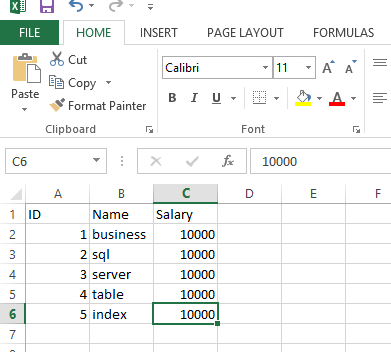
Save this file with csv format
Create a table for the data insertion, if table is already there, then no need of file creation
As we don’t have table for holding this data, iam creating file
USE tempdb
GO
CREATE TABLE CSVtable
(ID INT,
Name varchar(20),
salary money
)
GO
Run the below script
BULK
INSERT CSVtable
FROM ‘E:test.csv’
WITH
(
FIELDTERMINATOR = ‘,’,
ROWTERMINATOR = ‘n’,
FIRSTROW=2
)
GO

We can see the data in the table now
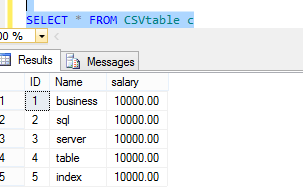
Thanks for viewing this.
Regards,
Chaitanya
Visit site: http://www.sqlblogging.com
Send an Email: sqlblogging
Increment the string value letter by letter for every row
Hi ,
yesterday my friend asked me how to display the string letter by letter in sql server
we have string function substring used here
below is the script for this
use tempdb
go
if object_id(‘tempdb..#temp’) is not null
begin
drop table #temp
end
go
– declaring the variable to store the string
declare @test varchar(100)
set @test=’chaitanya’ — assigning the value to the variable
declare @count int
select @count=len(@test)
declare @i int
set @i=1
create table #temp
(
column1 varchar(100)
)
declare @result varchar(100)
declare @j int
set @j=0
while(@i <=@count)
begin
select @result =substring(@test,@j,@i+1)
insert #temp(column1)
select @result
set @i=@i+1
end
select * from #temp
Result:
c
ch
cha
chai
chait
chaita
chaitan
chaitany
chaitanya
Please let me know if you have any concerns or any suggestions
Please check and let us know if you have any concerns or any suggestion on this
Thanks for viewing this.
Regards,
Chaitanya
Visit site: http://www.sqlblogging.com
Send an Email: sqlblogging
Size of your Database in MB,GB,TB
Hi All,
Below is the script for finding the database Size in MB,GB,TB
I am taking the adventure works DB as sample example
USE master
Go
SELECT DB_NAME(database_id) AS DatabaseName,
Name AS Logical_Name,
Physical_Name
,SUM((((CAST([size] as DECIMAL(18,4)) * 8192) /1024) /1024)) as ‘File Size (MB)’
,sum((((CAST([size] as DECIMAL(18,4)) * 8192) /1024) /1024)/1024) as ‘File Size (GB)’
,sum(((((CAST([size] as DECIMAL(18,4)) * 8192) /1024) /1024) /1024/1024)) as ‘File Size (TB)’
FROM sys.master_files
WHERE DB_NAME(database_id) IN(‘AdventureWorks2012’)
GROUP BY DB_NAME(database_id),Name ,Physical_Name WITH ROLLUP
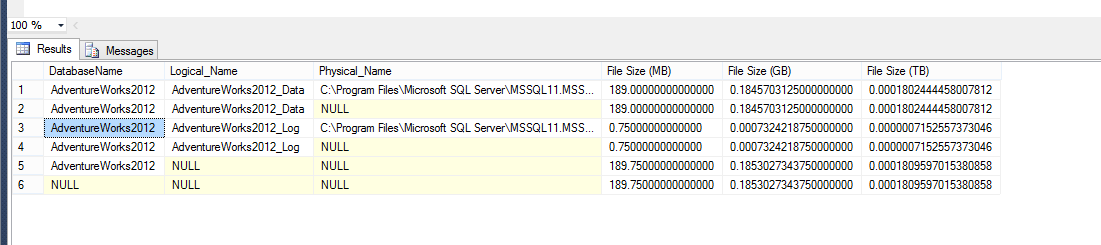
Please check and let us know if you have any concerns on this.
Thanks for viewing this.
Regards,
Chaitanya
Visit site: http://www.sqlblogging.com
Send an Email: sqlblogging
How can we Find Last Date Time Updated for Any Table
Solution:
Update for table is applicable in 2 ways
1. Structure Changes
2. Data changes
first we will check the schema changes
use the below script for this
USE AdventureWorks12
GO
CREATE TABLE Test123
(ID INT,
COL VARCHAR(100))
GO
INSERT INTO Test123
SELECT 1,’First’
UNION ALL
SELECT 2,’Second’
GO
select * from Test123
Result:

if you modify the structure of table i.e using DDL command or GUI, we can see the modified date information using below query
select modify_date,* from sys.objects where type=’u’ and name=’Test123′
if the data is updated or inserted or deleted in the table and table has no lastupdated column to track the information , how we can get those information
below is the example for this
create table testupdate(id int ,name varchar(10))
INSERT INTO testupdate
SELECT 1,’First’
UNION ALL
SELECT 2,’Second’
GO
select * from testupdate
SELECT GETDATE()
SELECT OBJECT_NAME(OBJECT_ID) AS DatabaseName, last_user_update,*
FROM sys.dm_db_index_usage_stats
WHERE database_id = DB_ID( ‘AdventureWorks2012’)
AND OBJECT_ID=OBJECT_ID(‘testupdate’)
Screen shots

Please check and let us know if you have any concerns on this.
Thanks for viewing this.
Regards,
Chaitanya
Visit site: http://www.sqlblogging.com
Send an Email: sqlblogging
Check the Object definition with out writing sp_helptext
Hi All,
Generally Sp_helptext can be used to check the definition of the objects like procedure,trigger,view,UDF,cursor. This is useful for the developer to check the code , for support professions to troubleshoot the issues.
Syntax for this is
Sp_helptext Object Name
Normally we need to write the sp_helptext for every object, now we can eliminate this by simple setting
Go to SSMS –tools-options—key board—query shortcuts and write sp_helptext for ctrl+0. You can take any short cut value

Select the any procedure and type control +0 , you can get the stored procedure definition
Please check and let us know if you have any concerns on this.
Thanks for viewing this.
Regards,
Chaitanya
Visit site: http://www.sqlblogging.com
Send an Email: sqlblogging


 SQL BLOGGING