Virtualization Basics
Cloud computing and virtualization are not the same. Virtualization is component in cloud.
Virtualization: we are separating the operating system from hard ware
Cloud computing: we are separating applications from hard ware
In olden days, when we are installing the OS , it will bind to the physical hardware.
Means device drivers s/w is linked to hard ware. It’s not possible to take the hard disk(contains the OS and put it into the other system
In virtualization, it will provide the layer on top of Hard ware, so we can install OS instance on the layer
This is called as instance of operating system
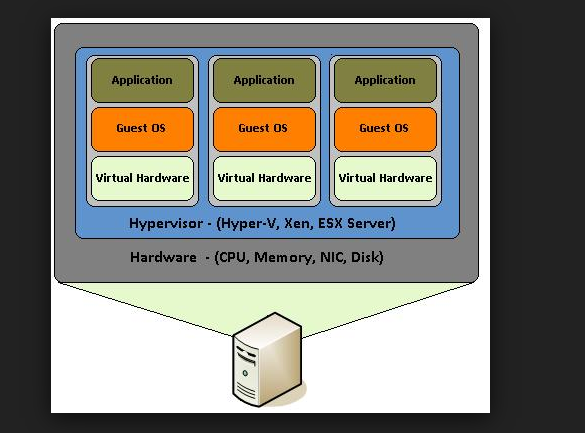
The layer is called hypervisor
There r 2 types of hypervisors
1.Type 1 Hypervisors
You have a blank computer, and you installed hypervisor and you can install OS instances on to that Hypervisor
These are real enterprise servers and it is like below.
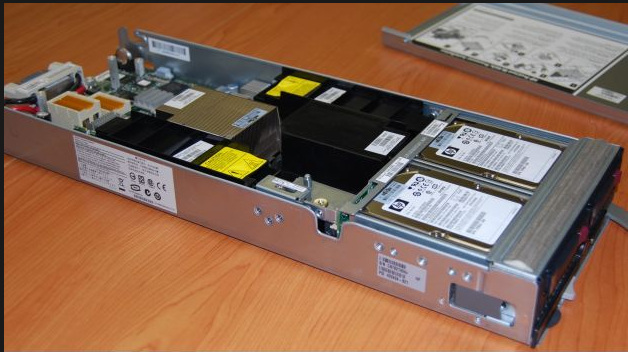
You can put this physical server like this into the rack.
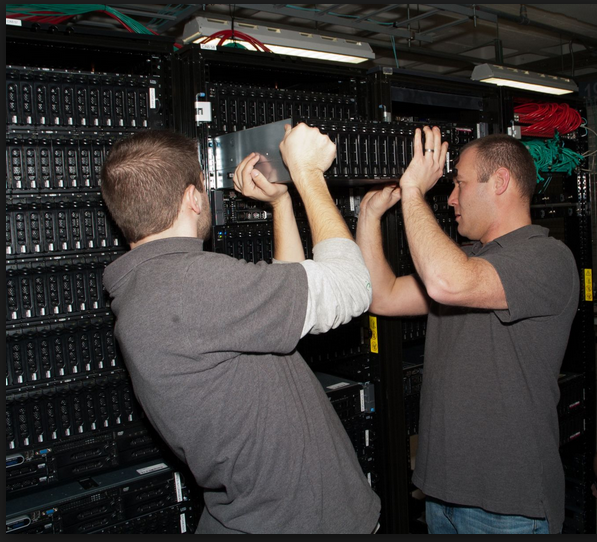
One rack may consists of many physical servers.
When you installed the hypervisor s/w.. By putting CD, you have only seen in the screen like IP address, storage info etc.
You can connect this physical server to network and get the IP address
How can access this hypervisor s/w , this can be accessed by using the management console that is installed on the other computer with the IP address.
Using this management s/w you can install the OS on to the hypervisor.
You can install the windows server 2012 OS into this physical server, if this server down you can copy this OS instance from one physical server to other physical server in the same RACK.

Management s/w can do:
1. Automatically OS instance to other physical which is having required amount of resources if the current server does not meet that much requests.
It will turn on the physical server and move the OS instances to that
2. It will do fault tolerance
If your physical server is down, it will automatically moves the OS instances to other server without no down time.
3. over allocation:
We can allocate the more than the amount of RAM to the OS instances than that exists In physical server
Ex: your physical server have 16 GB of RAM, but you can allocate the 32GB for 3 instances.
How:
We can allocate 12 GB for 1 ,12 GB for 2 ,8 GB.
What Hypervisor will do is if first server is needed huge resources during morning time, it will allocate 12 GB of RAM and other 2GB ,for 2 and 2 GB for 3rd.
After the load is over, it will take that RAM and give it to the other.
Lot of type 1 Hypervisors are there.
1. Citrix
2. VM ware
3. Microsoft Hyper V
These Hypervisors are free, but the management s/w is chargeable.
2.Type 2 Hypervisors
We have OS, then on to that OS, you can install hypervisor like virtual box, virtual pc,VM ware and new instances can be installed in to this hyper visors.
You don’t need the management software in this case. You can open the OS instance like an Window and you can play with it.
Products:
1. Virtual Box from oracle
2. Virtual PC from MS
These are free, if you want to use advances features you need pay for that
If your 2 virtual instances are allocated with the 4GB and 2 GB RAM, if you have 8GB RAM system, they will take the total 8GB and your host computer run on 2GB and may cause system crash.
It will be used for small organizations
Converting to Virtualizations:
Now converting the existing normal OS to virtual instances are easy.
You will have the conversion tools that will be there in the CD’s and you can boot this CD into this OS for which you want to convert them to Virtual instances virtual hard drive . It will take the instance . You can simply use this CD for creating this instance.
Different products have different virtual hard drive formats
Below are the types of Virtualization
Software
· Operating system-level virtualization, hosting of multiple virtualized environments within a single OS instance.
· Application virtualization and workspace virtualization, the hosting of individual applications in an environment separated from the underlying OS. Application virtualization is closely associated with the concept of portable applications.
· Service virtualization, emulating the behavior of dependent (e.g., third-party, evolving, or not implemented) system components that are needed to exercise an application under test (AUT) for development or testing purposes. Rather than virtualizing entire components, it virtualizes only specific slices of dependent behavior critical to the execution of development and testing tasks.
Memory
· Memory virtualization, aggregating random-access memory (RAM) resources from networked systems into a single memory pool
· Virtual memory, giving an application program the impression that it has contiguous working memory, isolating it from the underlying physical memory implementation
Storage
· Storage virtualization, the process of completely abstracting logical storage from physical storage
· Distributed file system, any file system that allows access to files from multiple hosts sharing via a computer network
· Virtual file system, an abstraction layer on top of a more concrete file system, allowing client applications to access different types of concrete file systems in a uniform way
· Storage hypervisor[further explanation needed]
· Virtual disk drive, a computer program the emulates a disk drive such as a hard disk drive or optical disk drive (see comparison of disc image software)
Data
· Data virtualization, the presentation of data as an abstract layer, independent of underlying database systems, structures and storage.
· Database virtualization, the decoupling of the database layer, which lies between the storage and application layers within the application stack over all.
Network
· Network virtualization, creation of a virtualized network addressing space within or across network subnets
· Virtual private network (VPN), a network protocol that replaces the actual wire or other physical media in a network with an abstract layer, allowing a network to be created over the Internet
Regards,
Chaitanya
sql server equality operator will not work with strings with trailining spaces
Hi All,
sql server equality operator will not work with strings with trailining spaces.
below is the script for this. Please check at your end using query explorer
it will work fine for the leading space strings also
declare @string varchar(100)
set @string=’mssqlbuzz’
select len(@string) as [string without spaces]
set @string=’mssqlbuzz ‘
select LEN(@string) as [string with trailing spaces]
set @string=’ mssqlbuzz’
select LEN(@string) as [string with leading spaces]
result:

Regards,
Chaitanya
Visit site: https://mssqlbuzz.wordpress.com
Send an Email : mssqlbuzz
getting DTS Packages logs and Status Using T-sql in seconds
Hi All,
For support people:
We can find the legacy DTS Packages logs and Status information using the below scriot
select
pklog.name as PackageName ,
stlog.stepname as StepName ,
stlog.stepexecutionid as StepExecutionID ,
stlog.starttime as StepStartTime ,
stlog.endtime as StepEndTime ,
stlog.errorcode as StepErrorCode ,
stlog.errordescription as StepErrorDescription
from
msdb.dbo.sysdtssteplog stlog
left join
msdb.dbo.sysdtspackagelog pklog
on stlog.lineagefull = pklog.lineagefull
where
stlog.errorcode <> 0
and stlog.starttime > DATEADD (day, -15, getdate())
order by
stlog.starttime
thanks for viewing
Regards,
Chaitanya
Visit site: https://mssqlbuzz.wordpress.com
Send an Email : mssqlbuzz
Procedure to check Views defined for the table
Below is the Procedure for checking the views that are defined for the table.
–Creating the procedure:
CREATE PROCEDURE VIEWS_IN_TABLE
@TABLENAME VARCHAR(200)
AS
SELECT VIEW_SCHEMA, VIEW_NAME FROM INFORMATION_SCHEMA.VIEW_TABLE_USAGE
WHERE TABLE_NAME = @TABLENAME;
GO
–Testing the procedure
EXEC VIEWS_IN_TABLE
ADDRESS;
GO
Regards,
Chaitanya,
Webiste : https://mssqlbuzz.wordpress.com/
To Send Mail : mssqlbuzz
Error FIX : Browse Cube: XML for Analysis parser: The LocaleIdentifier property is not overwritable and cannot be assigned a new value
Hi All,
After cube is deployed using SSAS, when we are trying to browse the cube, we are getting the below error
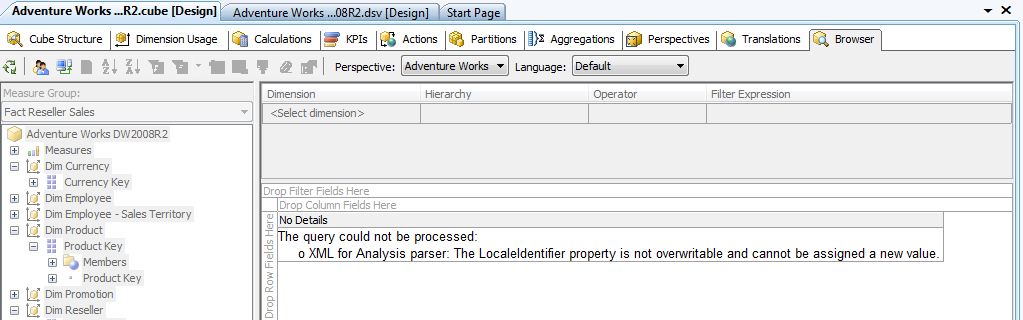
Temporary fix for this issue is change the Language option to English United States above the error

Regards,
Chaitanya,
Webiste : https://mssqlbuzz.wordpress.com/
To Send Mail : mssqlbuzz
Script to find the PK and FK relation ship for the table
Hi All,
Today I wrote the script to find the primary key and foreign key for the table and Below is the script
select distinct sc.name+’.’+so.name as TableName,so2.name as ReferencedTable,so1.name ‘primary key Constraint name’,fc.CONSTRAINT_NAME as ‘Foreign Key constraint name’,col.COLUMN_NAME as ‘Primary Key Column’,
co2.COLUMN_NAME as ‘foreign key column’
from sys.objects so with (nolock)
inner join
sys.objects so1 (nolock)
inner join
sys.schemas sc(nolock)
on so1.schema_id=sc.schema_id
on so.[object_id]=so1.parent_object_id
and so.[type]=’u’
and so1.[type]=’PK’
inner join
INFORMATION_SCHEMA.REFERENTIAL_CONSTRAINTS fc (nolock)
on fc.UNIQUE_CONSTRAINT_NAME=so1.name
inner join
sys.foreign_keys sfo (nolock)
on sfo.name=fc.CONSTRAINT_NAME
inner join
sys.objects so2(nolock)
on so2.object_id=sfo.parent_object_id
inner join
INFORMATION_SCHEMA.CONSTRAINT_COLUMN_USAGE col(nolock)
on
col.CONSTRAINT_NAME=fc.UNIQUE_CONSTRAINT_NAME
inner join
INFORMATION_SCHEMA.CONSTRAINT_COLUMN_USAGE co2 (nolock)
on co2.CONSTRAINT_NAME=fc.CONSTRAINT_NAME
Result:

Please check and suggest the best way for doing this
Thanks for viewing.
Regards,
Chaitanya,
Webiste : https://mssqlbuzz.wordpress.com/
To Send Mail : mssqlbuzz
checking the Text of the stored Procedure in all the Databases
Hi All,
We have the one procedure sp_MSforeachdb which is used to execute the script in all the databases at a time.
Below is the script for getting the strored Procedures defintion in all the databases.
EXECUTE master.sys.sp_MSforeachdb ‘USE [?]; select @@SERVERNAME as servername,DB_NAME() as [Database],so.name,sc.text
from sysobjects (nolock) so inner join
syscomments(nolock) sc
on
sc.id=so.id
where so.type=”p”’
Result:
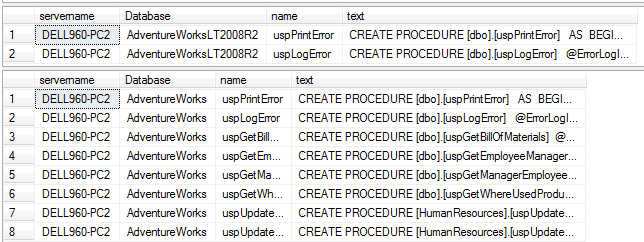
but the Procedure sp_MSforeachdb is un documented stored Procedure and there us no Gaurranty from Microsoft for future versions usage and this is Microsoft internal purpose only
if you want stored procedure definition from database, use the below script
use YouRdatabase
select @@SERVERNAME as servername,DB_NAME() as [Database],so.name,sc.text
from sysobjects (nolock) so inner join
syscomments(nolock) sc
on
sc.id=so.id
where so.type=’p’
Result:

Thanks for viewing and let us know if you have other options also .
Regards,
Chaitanya,
Webiste : https://mssqlbuzz.wordpress.com/
To Send Mail : mssqlbuzz
Changing the compatibility level of database
Hi All,
Changing the database compatibility level
1) Using t-Sql
Syntax:
ALTER DATABASE database_name
SET COMPATIBILITY_LEVEL = { 80 | 90 | 100 }
Arguments
database_name
Is the name of the database to be modified.
COMPATIBILITY_LEVEL {80 | 90 | 100 }
Is the version of SQL Server with which the database is to be made compatible. The value must be one of the following:
80 = SQL Server 2000
90 = SQL Server 2005
100 = SQL Server 2008
For all installations of SQL Server 2008, the default compatibility level is 100. Databases created in SQL Server 2008 are set to this level unless the model database has a lower compatibility level. When a database is upgraded to SQL Server 2008 from any earlier version of SQL Server, the database retains its existing compatibility level if it is at least 80. Upgrading a database with a compatibility level below 80 sets the database to compatibility level 80. This applies to both system and user databases. Use ALTER DATABASE to change the compatibility level of the database. To view the current compatibility level of a database, query the compatibility_level column in the sys.databases catalog view.
Using Compatibility Level for Backward Compatibility
Compatibility level affects behaviors only for the specified database, not for the entire server. Compatibility level provides only partial backward compatibility with earlier versions of SQL Server. Use compatibility level as an interim migration aid to work around version differences in the behaviors that are controlled by the relevant compatibility-level setting. If existing SQL Server applications are affected by behavioral differences in SQL Server 2008, convert the application to work properly. Then use ALTER DATABASE to change the compatibility level to 100. The new compatibility setting for a database takes effect when the database is next made current (whether as the default database on login or on being specified in a USE statement).
Best Practices
Changing the compatibility level while users are connected to the database can produce incorrect result sets for active queries. For example, if the compatibility level changes while a query plan is being compiled, the compiled plan might be based on both the old and new compatibility levels, resulting in an incorrect plan and potentially inaccurate results. Furthermore, the problem may be compounded if the plan is placed in the plan cache and reused for subsequent queries. To avoid inaccurate query results, we recommend the following procedure to change the compatibility level of a database:
Set the database to single-user access mode by using ALTER DATABASE SET SINGLE_USER.
Change the compatibility level of the database.
Put the database in multiuser access mode by using ALTER DATABASE SET MULTI_USER.
Ex:

2) Using SSMS to change the compatibility level of data base
Right Click on the database you want to change compatibility level
Select options and change the compatibility level and click on OK
We can see the compatibility level of data base using the SSMS
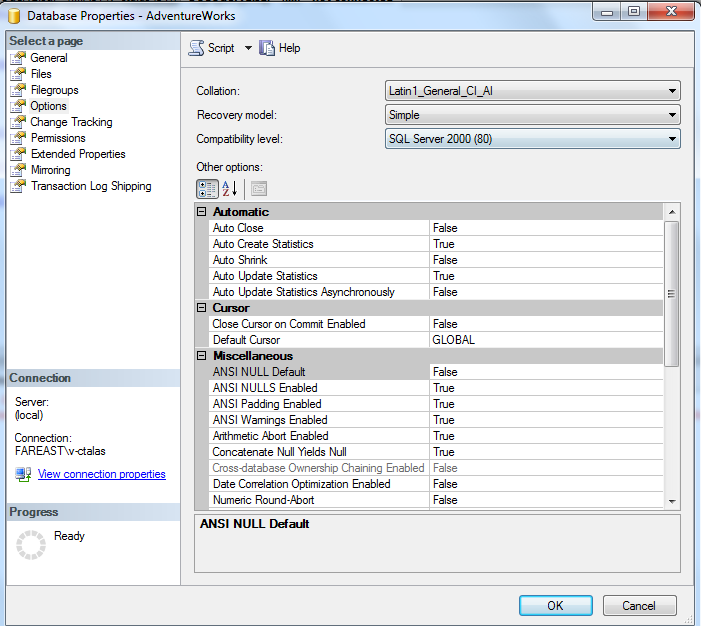
And using the t-sql

Thanks for viewing.
Reference :http://msdn.microsoft.com/en-us/library/bb510680.aspx
Regards,
Chaitanya,
Webiste : https://mssqlbuzz.wordpress.com/
To Send Mail : mssqlbuzz
to see the Job details in Sql server through t-SQL
Hi All,
If you want to see the jobs status with out going to sql server agent, please run the below query
use msdb
go
select distinct j.Name as "Job Name", j.description as "Job Description", h.run_date as LastStatusDate,
case h.run_status
when 0 then ‘Failed’
when 1 then ‘Successful’
when 3 then ‘Cancelled’
when 4 then ‘In Progress’
end as JobStatus
from sysJobHistory h, sysJobs j
where j.job_id = h.job_id and h.run_date =
(select max(hi.run_date) from sysJobHistory hi where h.job_id = hi.job_id)
order by 1
And if you want to see the dtspackages that are installed in your sql server, run the below query
select * from msdb..sysdtspackages
If you have other options, please post, I will post in the thread.
Thanks for viewing.
Regards,
Chaitanya,
Webiste : https://mssqlbuzz.wordpress.com/
To Send Mail : mssqlbuzz
SQL server Mirroring Status through TSQL
Hi All,
Below is the query used to find the mirroring status in sql server using t-sql
select * from sys.database_mirroring (nolock)dm
inner join sys.databases(nolock)db
on db.database_id=dm.database_id
and name=’AdventureWorks’
where adventure works is the name of database
Example:

Please check and let us know if you have any doubts.
Thanks for viewing.
Regards,
Chaitanya,
Webiste : https://mssqlbuzz.wordpress.com/
To Send Mail : mssqlbuzz


 SQL BLOGGING