@@CONNECTIONS and @@MAX_CONNECTIONS in sql server
How to find number of connection attempts to sql server since last restart
@@CONNECTIONS: Global variable is used for finding this information
Syntax:
Select @@CONNECTIONS
Return Typeàinteger
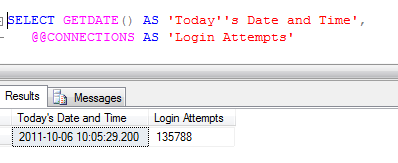
After Sql server instance is restarted we have these many attempts are made to connect to sql server instance and these attempts are success or failed
And it is non-Deterministic as it may return different results each time they are called with a specific set of input values.
We have another global variable @@MAX_CONNECTIONS and this is used to check how many connections can be done to sql server simultaniously
Syntax:
Select @@MAX_CONNECTIONS
Return Typeàinteger
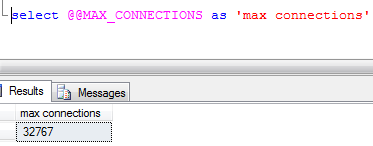
Simultaniosly users can open 32767 connctions to sql server instance
The actual number of user connections allowed also depends on the version of SQL Server installed and the limitations of your application(s) and hardware
Regards,
Chaitanya,
Webiste : https://mssqlbuzz.wordpress.com/
To Send Mail : mssqlbuzz
Searching the strings with leading spaces and trailing spaces in the sql server
Hi Folks,
We have issues in the production at our end where the master table is update with leading spaces and it is causing the incorrect results as it master table and configuration is present in those tables.
I quickly checked the leading spaces in the table using the below query
We have created sample tables for this demo
use tempdb
go
create table #tempo
(
id int,
name varchar(100)
)
insert #tempo
select 1,’chaitu’
union all
select 2,’pradee’
union all
select ‘3’,’ krishna’
select * from #tempo

Below is the query for getting the leading spaces in the name column
select * from #tempo where LEFT(name,1)=”
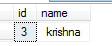
For trailing spaces
use tempdb
go
create table #tempo
(
id int,
name varchar(100)
)
insert #tempo
select 1,’chaitu’
union all
select 2,’pradee’
union all
select ‘3’,’krishna ‘ à trailing space is inserted
select * from #tempo

Below is the query for getting the tralining spaces in the name column
select * from #tempo where right(name,1)=”

Please let us know if you have other options
Thanks for viewing.
Regards,
Chaitanya,
Get the jobs details in sql server and their status
Hi All,
Please use the below script in the Sql server management studio to see the status of Jobs running on Sql server instance
Use msdb
go
select distinct j.Name as "Job Name", j.description as "Job Description", h.run_date as LastStatusDate,
case h.run_status
when 0 then ‘Failed’
when 1 then ‘Successful’
when 3 then ‘Cancelled’
when 4 then ‘In Progress’
end as JobStatus
from sysJobHistory h, sysJobs j
where j.job_id = h.job_id and h.run_date =
(select max(hi.run_date) from sysJobHistory hi where h.job_id = hi.job_id)
order by 1
Please let us know if you have other options
Thanks for viewing.
Regards,
Chaitanya
SQL Server Management Studio Shortcuts
Hi Folks,
Below are the SQL Server Management Studio Shortcuts
Basic Editing Shortcuts
File Shortcuts
View Shortcuts
Query Shortcuts
Window Shortcuts
|
Advanced Editing Shortcuts
Bookmarks Shortcuts
Function Keys
Intellisense Shortcuts
|
Please check and let us know if you have any concerns
Unicode characters issue in sql server
Yesterday when we got an issue such that Greek characters are going to customer with? Characters
ex:
String: “how are you ”
Greek language is Γεια σου τι κάνεις
We have checked all the Procedures and found the issue that the one procedure is taking this greek letters are storing the data in the table variable like below
declare @tablevariable table
(
id int primary key identity(1,1),
stringcolumn varchar(100)
)
insert @tablevariable values (N’Γεια σου τι κάνεις’)
select * from @tablevariable
Result:
Ge?a s?? t? ???e??
So we identified the issue and this is due to the stringcolumn data type and stringcolumn is using the data type varchar and it is the ASCII standard one and it is not supporting the UNICODE language
Nvarchar is the Unicode supported datatype
Below are the Unicode character data type
nchar
Fixed-length Unicode data with a maximum length of 4,000 characters.
nvarchar
Variable-length Unicode data with a maximum length of 4,000 characters.
ntext
Variable-length Unicode data with a maximum length of 2^30 – 1 (1,073,741,823) characters.
Ex:
declare @tablevariable table
(
id int primary key identity(1,1),
stringcolumn nvarchar(max)
)
insert @tablevariable values (N’Γεια σου τι κάνεις’)
select * from @tablevariable
Result:
Γεια σου τι κάνεις
Please use the N before the string so that it will be identified as Unicode
Please let us know if you have any concerns on this.
Thanks for viewing
Number of ways to view the tables and views in the sql server
sp_tables is the procedure used for getting the tables and views information in sql server current data base
sp_tables [ [ @table_name = ] ‘name’ ]
[ , [ @table_owner = ] ‘owner’ ]
[ , [ @table_qualifier = ] ‘qualifier’ ]
[ , [ @table_type = ] “type” ]
[ , [@fUsePattern = ] ‘fUsePattern’];
@table_qualifier-database name
@table_owner is the schema name
@table_type- it takes only 3 arguments and will give ouput based on that TABLE, SYSTEMTABLE, and VIEW
[@fUsePattern- for pattern matching
Ex:
exec sp_tables @Table_Type = ”’VIEW”’
exec sp_tables @Table_Type = ”’TABLE”’
normally we have the used below queries for retruing the tables information and views information from the database
first and best option is information schema
for tables
SELECT [TABLE_NAME]
FROM INFORMATION_SCHEMA.tables
For views
SELECT [TABLE_NAME]
FROM INFORMATION_SCHEMA.views
Alternatively, the INFORMATION_SCHEMA.TABLES system view can also be used to return user views.
SELECT TABLE_NAME
FROM INFORMATION_SCHEMA.TABLES
WHERE TABLE_TYPE = ‘VIEW’
The INFORMATION_SCHEMA.TABLES system view returns both view and user tables. To return just user views, the TABLE_TYPE needs to be checked for a value of ‘VIEW’.
The third way of getting a list of user views is by querying the different system views, namely, the sys.views, sys.objectsand dbo.sysobjects.
For views:
Select * from sys.views
SELECT [Name] FROM [sys].[objects] WHERE [type] = ‘U’
SELECT [Name] FROM [dbo].[sysobjects] WHERE [xtype] = ‘U’
For tables:
select * from sys.tables
SELECT [Name] FROM [sys].[objects] WHERE [type] = ‘U’
SELECT [Name] FROM [dbo].[sysobjects] WHERE [xtype] = ‘U’
Please check and let us know if you have any concerns on this
thanks for reading
difference between set and select statement in sql server
**** Please Don’t run the below scripts in Production ****
Variables are used to store the values for use in the scripts, procedures etc
Declraing the varibale in sql server
DECLARE @variableName datatype
Ex: DECLARE SETVariable INT
We can declare number of variables in the same statement of declare keyword.
Ex:
DECLARE @SETVariable INT,@SETVariable2 int, @SELECTVariable INT,@SELECTVariable2
After declaring the variable, we are assigning the values to variables using the set and Select statements
Select is used here for 2 purposes in sql server
First assigning the value to variable and next used to select data from a database.
Syntax of set variable
SET @SETVariable = 1
Syntax of Select variable
SELECT @SELECTVariable = 2
Difference between Set and Select
Set Statement
1.Its an ANSI standard for variable assignment
2. We can assign Value to variable at a time
Ex: SET @SETVariable = 1 ( Valid)
SET @SETVariable = 1,@SETVariable2=2 ( Not Valid)
3. When assigning from a query and the query returns no result, SET will assign a Null value to the variable.
use tempdb
go
create table #temp
(
var1 int,
var2 int)
I am not inserting the data in the #temp table
DECLARE @SETVariable INT
set @SETVariable=(select var1 from #temp)
select @SETVariable
Result: Null
4. When assigning from a query that returns more than one value, SET will fail with an error.
use tempdb
go
create table #temp
(
var1 int,
var2 int)
iam inserting the data and we will see how this statment works
insert #temp
select 1,1
union all
select 2,2
union all
select 3,3
DECLARE @SETVariable INT
set @SETVariable=select var1 from #temp
print @SETVariable
Result:
Incorrect syntax near the keyword ‘select’.
SELECT Statement
1. Non-ANSI standard when assigning variables.
2. Can assign values to more than one variable at a time.
Ex:
DECLARE @SELECTVariable INT,@SELECTVariable2 int,@SETVariable2 int
SELECT @SELECTVariable = 2,@SELECTVariable2=3
select @SELECTVariable,@SELECTVariable2
result: we are getting the results here as values are assigned to the @SELECTVariable and @SELECTVariable2
3. When assigning from a query and the query returns no result, SELECT will not make the assignment and therefore not change the value of the variable.
use tempdb
go
drop table #temp
create table #temp
(
var1 int,
var2 int)
I am not inserting the data in the #temp table
DECLARE @SELECTVariable INT
select @SELECTVariable=2
select @SELECTVariable=var1 from #temp
select @SELECTVariable
as there is no data in the var1 column of #temp, we are getting the what value is there in the @SELECTVariable variable i.e 2
4. When assigning from a query that returns more than one value, SELECT will assign the last value returned by the query and hide the fact that the query returned more than one row.
Iam insering the data in the #temp table and we will see how this works
insert #temp
select 1,1
union all
select 2,2
union all
select 3,3
(3 row(s) affected)
If we run the below query,
DECLARE @SELECTVariable INT
select @SELECTVariable=2
select @SELECTVariable=var1 from #temp
select @SELECTVariable
we will get the last value of the var1 column i.e 3
Please let us know if you have any other information on this
Thanks for viewing
adding the error message to the event viewer through t-sql
We have the extended stored procedure in the sql server master database
go to object exploerer-> databases-> system databases-> programmability->extended stored procedures
Extended stored procedures are created and loaded using DLL’s (which are created in C/C++), and offer more independent functionality than standard procedures (such as access to the Win32 API, services, direct disk/network etc), and because they’re compiled externally as dynamic linking libraries (DLL’s) and these are very faster
sending the error message to the event viewer functionality is supported by one of the extended Procedure xp_logevent
which is used to send the user defined message to the event viewer through the t-sql
syntax:
xp_logevent {error_number, ‘message’} [, ‘severity’]
The error_number parameter is a user-defined error number greater than 50,000. The message parameter is the actual message that will be shown in the event viewer. Lastly, severity is an optional parameter containing one of three character strings that represents how bad the error that occurred was. The three possible values are INFORMATIONAL, WARNING, and ERROR. If you don’t include this parameter, the INFORMATIONAL is used.
Example:
Exec master..xp_logevent 65000, “User defined Error message”, WARNING
or
use master
exec xp_logevent 65000, “User defined Error message”, INFORMATIONAL

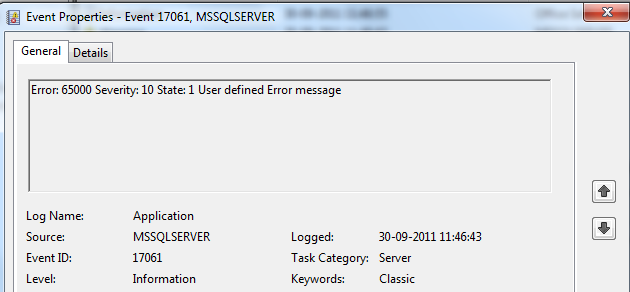
Next, run event viewer (Start -> Programs -> Administrative Tools -> Event Viewer) and click on the application log node. Look at the top couple of lines and find an entry with a source of “MSSQLSERVER”; double-click on it. It should load a property page showing our error message, number, and severity, like this:
you will see the message .

if we double click on these , they are like below
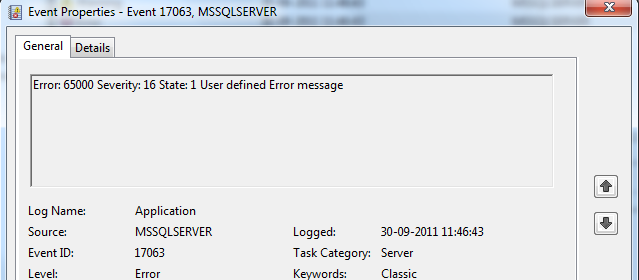

Please let us know if you have any other options for this..
thanks for viewing
increment the string value letter by letter for every row
Hi ,
This is my first post in this blog. yesterday my friend asked me how to display the sting letter by letter in sql server
we have string function substring used here
below is the script for this
use tempdb
go
if object_id(‘tempdb..#temp’) is not null
begin
drop table #temp
end
go
— declaring the variable to store the string
declare @test varchar(100)
set @test=’chaitanya’ — assigning the value to the variable
declare @count int
select @count=len(@test)
declare @i int
set @i=1
create table #temp
(
column1 varchar(100)
)
declare @result varchar(100)
declare @j int
set @j=0
while(@i <=@count)
begin
select @result =substring(@test,@j,@i+1)
insert #temp(column1)
select @result
set @i=@i+1
end
select * from #temp
–result
c
ch
cha
chai
chait
chaita
chaitan
chaitany
chaitanya
Please let me know if you have any concerns or any suggestions
Regards,
Chaitanya

 SQL BLOGGING