My Article on Biztalk Flat file processing
Below is the article I have written on BizTalk flat file processing
Please check and let us know if you have any concerns on this.
Thanks for viewing this.
Regards,
Chaitanya
Visit site: http://www.sqlblogging.com
Send an Email: sqlblogging
Twitter: @chaitanya512
Sql Server Development Series – Table Design Day 7 of 60
Entire Data file is divided into 8kb physical chunks called pages
Why we are dividing this files into pages à for easy of organizing the data.
Group of 8 consecutive pages is called extent

What is in the page
Page is consists page header
And it consists of location of page, address, and owner, pointer to previous page or next page
Extent is logical grouping of the pages.
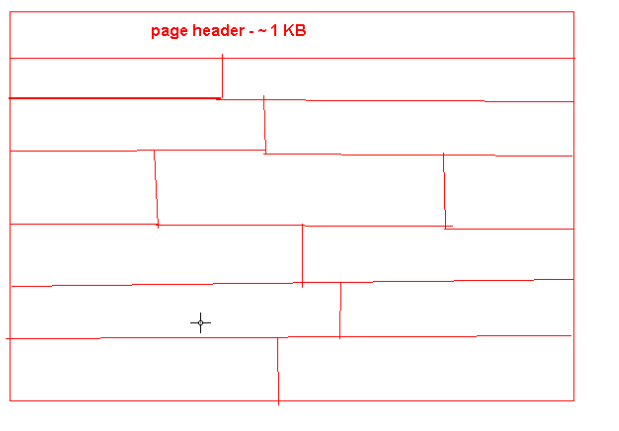
Page fragmentation:
If the pages of the table are located at different places, then it will cause the page level fragmentations

One page should be allocated to particular object only. A single page cannot store the information of 2 tables. If you have table 1(t1) data in 3 pages and last 3 page is not full, then you have created the table 2(t2) then it will use new page, not the 3rd page which is free and of table 1(t1). Single object can resides on different pages.

This page and extent management of sql server is different from other rdbms products but expect from Sybase. As the roots of sql server is from Sybase only.
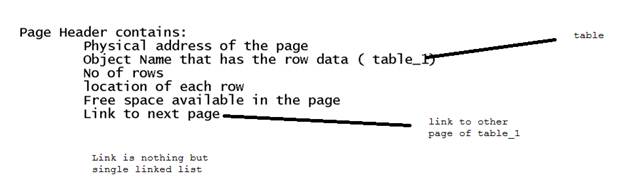
We have 2 types of fragmentation
1. Inter page fragmentation : when a data is deleted from the page
2. Across pages fragmentation: when the pages of table is spitted across different locations
Important point: A Row cannot be span over multiple pages
How we can eliminate this limitation
Sql server will store only 1023 columns and another 1 column is used for replication
If the row is >7.1 kb, then the solution is below one
Other than integer, character data we have image, textual, xml which will not use the page concept
-

- image006
-

- image007
Due to this fragmentation will occur, but the space that will left blank will be used for future purpose, if the row 1 is updated with some more data, then it will use that space.
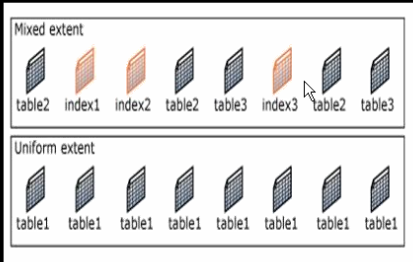
This is high level explanation of how the data is organized.
We will see the internals of pages, records in next article.
Please check and let us know if you have any concerns on this.
Thanks for viewing this.
Regards,
Chaitanya
Visit site: http://www.sqlblogging.com
Send an Email: sqlblogging
Twitter: @chaitanya512
Script for finding All Tables count in User Defined Databases in Sq Server 2k,2k5,2k8,2k12 etc
Hi All,
Below is the script for the All Table count for instance.
We have excluded the system databases
DECLARE @Sql NVARCHAR(2000)
DECLARE @Dbname NVARCHAR(200)
DECLARE @Name VARCHAR(150)
Learn your Favorite Subject on Pluralsight for Free. Limited to one day
Pluarsight is one famous online training site which is giving the offer of learning your favorite technology subject.
But this offer is valid for only one. And you should have the twitter account for this.
Link for this is http://bit.ly/V8tEjq
Please check and let us know if you have any concerns on this.
Thanks for viewing this.
Regards,
Chaitanya
Visit site: http://www.sqlblogging.com
Send an Email: sqlblogging
Twitter: @chaitanya512
Sql Server Development Series – DataBase Design Day 5 of 60
Below concepts, we will discuss in this article.
- What is SQL Server Database?
- What does SQL Server Database contain?
- Database Architecture
- Files and File groups
- Understanding Log Files
- Database Design Considerations
- System Databases
- Resource Database
- Types of SQL Server Databases
What is SQL Server Database?
- A Database in SQL Server is made up of a collection of tables. These tables contain tables and other objects that are defined to support activities performed with the data.
- At physical level, the Database is can be seen as a collection of simple files.
- Each database can store either interrelated or unrelated data.
What does Database contain?
- A database consists of :
1. Data
2. Different Objects useful for managing the Data
- Data is physically stored in specific objects called : TABLES
- There are tens of Database Objects that are needed for easy retrieval, working with and securing the data in a database.
Database Architecture
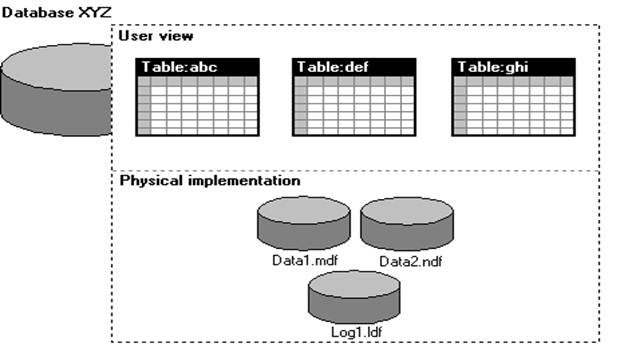
Data is stored in tables logically and physically it was stored in Files
We should not have the files separately in 2 different machines for a single database
Database is collection of Minimum 2 files
1. Data file( represented as .MDF)- all the data and meta data is stored here
2. Log file(represented as .LDF): all the Audit Records are stored here
Audit: which operation is performed, which user is doing operations etc.
Whenever a new database is created, we have the MDF created initially which have the meta data and LDF created for audit information
Depending on size of the Database, we can have the multiple data files.
These data files are organized as
1. Primary data file : contains the User defined data and Meta data
2. Secondary data file : contains the User defined data and Meta data
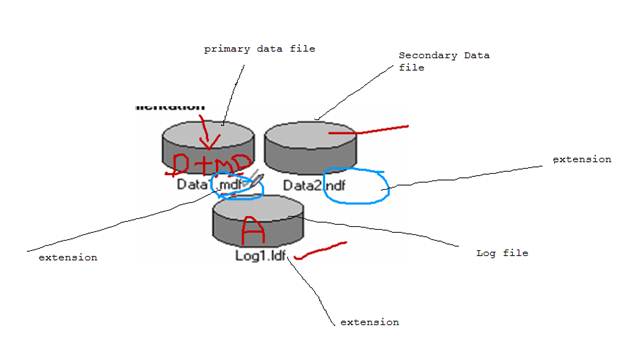
These data files can be having any extension.
We can have the data files with any extension, but it is Microsoft convention not a rule
Another convention is MDF files have Data +Meta Data
NDF files have only Data. It is not a rule, but we can have the Data + Meta Data in the NDF
Database can have 32,767 files
NDF file is mandatory
Files and File Groups
Data files can be grouped together in FILEGROUPS for allocation and administration purposes.
Logical related group of files are file groups
Ex:
employee details in employee group
Manager details in employee group
We can have min 1 file group and max 32767 file groups for database and for 1 file group is having 32767 files
§ Primary data file is in primary file group and this group was created when creating the data base
§ Every data file should belong to file group
§ Log files should not belong to file group
Understanding Log Files:
Assume your database as a Big Apartment, for apartment we have the watchmen
Depending up on the apartment size, we have watch men.
A minimum 1 watch man is there and they will audit all the information of persons who is coming and leaving.
Whenever any theft happened, we can go to watchmen he will check the log records and identify the UN authorized person in that time lines. He will not tell anything if the theft happened before 2 years.
So think of Log file as watch men and apartment as Database and each floor as File group and each flat as file.
Your transaction log file should not belong to any file group. Your watchmen should not belong to any file. (Just for understanding)
We should not split the data files and log file separately.
Think of your apartment, your watchmen is working outside (Not possible right)
System Databases
Whenever sql server is installed, we have default databases created.
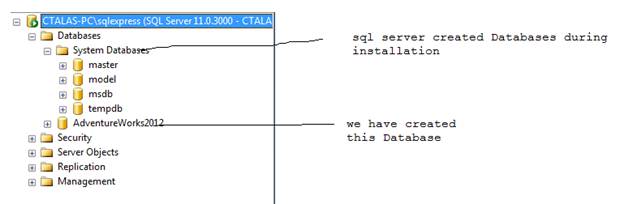
- master : Records all the system-level information for an instance of SQL Server.
i. Ex: instance name, edition, collation etc. all the Meta data information level at instance level. It also stores the Meta data for the newly created databases
- model: Used as the template for all databases created on the instance of SQL Server.
1. Template for the new Database creation.
- msdb : Used by SQL Server Agent for scheduling alerts and jobs.
a. Scheduling and administrative information
- tempdb : Workspace for holding temporary objects or intermediate result sets.
1. For day to day operation we need this tempDB
Where these files will be seen.
Go to databases, select properties and select files, and we can see the files below

Take the path of file and go to there, we can have the files
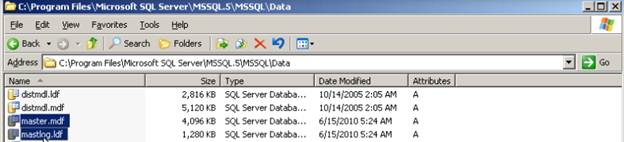
Master database is entry of Instance
We have another system database is there, but it is hidden
Resource Database:
In addition to the FOUR system databases discussed previously, a separate system database called “Resource” database is also installed. But this database cannot be seen in SSMS for security reasons

In sql server 2000, we have the system objects in master database and any one can go and update.
In sql server 2005, we have system objects in master database, but the source is coming from resource database
System objects are physically persisted in the Resource database
We don’t have direct access resource expect master database.
If we open the resource database .mdf file using any tool, we don’t get anything. This was much protected with encrypted format
Precautions for Database design:
1. Only one database is allowed per database file, but a single database can span multiple files.
2. Transaction logs must reside on their own file. There could be more than one transaction file per database.
3. Transaction log files are filled up one at a time.
4. When you create a database and do not specify the size of the log file, the log file will be 25% of the database file but minimum is 1MB by default
Auto recovering of your queries in query editor
Hi All,
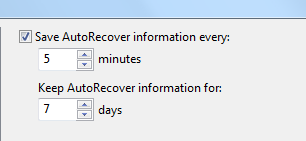
Sql server will automatically save the information for every five minutes. You can set this to 1 minute to reduce the work loss
Go to tools menuàoptionsàEnvironmentàAuto Recover
Set the save auto recovery information every 1 Minute.
Default it is 5 minutes.
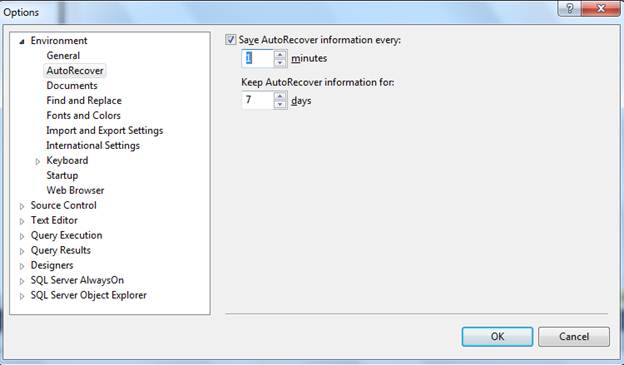
The location of this Auto Recover document is located in “My DocumentsSQL Server Management StudioBackup FilesSolution [n]”.
The [n] represents an integer that corresponds to how many SSMS IDE windows you have open
If you open 2 instances, N will be 2
For each instances, the number of query editors opens will be saved for every 1 minute
Open the folder mentioned above and open a new SSMS IDE and Query window and start typing
SELECT statement .
After about 1 minute, you will see a new file prefixed with “~AutoRecover.~vsXXXX.sql”. created
If you close the window, sql server will delete these files. And these files will be there in this folder up to 7 days.
Please check and let us know if you have any concerns on this.
Thanks for viewing this.
Regards,
Chaitanya
Visit site: http://www.sqlblogging.com
Send an Email: sqlblogging
Want Query results in separate tab?
Hi All,
If you want query results in the separate tab of query result window follow the below options.
Go to Tools à optionsàQuery resultsàsql serveràResults to Grid
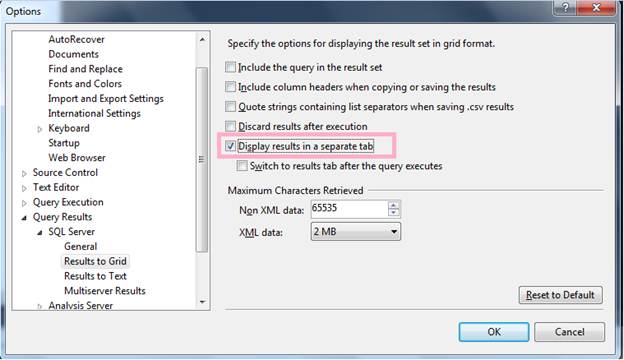
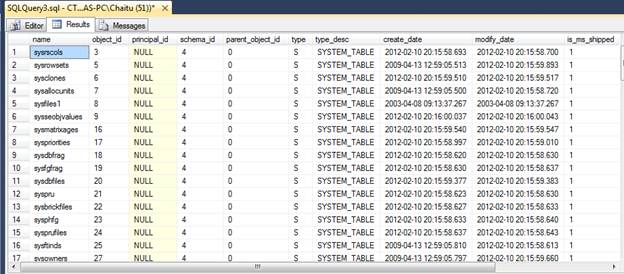
You will get the query results in separate tab
Please check and let us know if you have any concerns on this.
Thanks for viewing this.
Regards,
Chaitanya
Visit site: http://www.sqlblogging.com
Send an Email: sqlblogging@outlook.com
Activity Monitor – Gem of Sql Server
Activity Monitor:
Previously we have this feature in management tab of sql server
Now it was moved to top of the SSMS

Or you can invoke using the at server level

I have ran below query to open a session

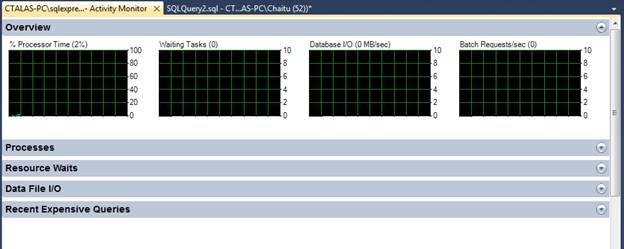
And I am opening the activity monitor, now we can see the processes and their information
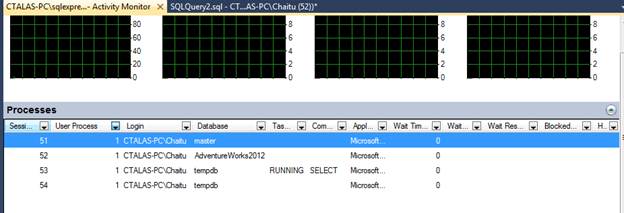
We can kill the process from activity monitor also.
You can see the not only the processes, you can see below features also.
Please check and let us know if you have any concerns on this.
Thanks for viewing this.
Regards,
Chaitanya
Visit site: http://www.sqlblogging.com
Send an Email: sqlblogging@outlook.com
Bulk Insert command Explaination for loading data from text or csv file in to Sql Server
Hi All,
To insert the data from file to sql server we are using
1. BCP utility
2. Bulk insert
3. Open rowset
Today we will discuss the Bulk Insert command
It imports a data from the file like flat file, CSV file into the database
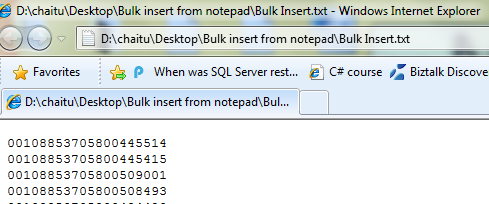
We have text file like below

In order to load the data from the text file into sql server table, first we need to create the table
CREATE TABLE Empbulkinsert
(
empno int,
empname varchar(10),
salary money
)
And we are using the below command for loading the data from the file to sql server table
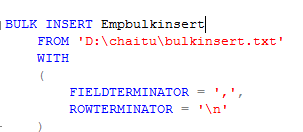
In the above file, we have seen for every field is separated by Comma (,) and every row is separated by enter
Execute the script so that, we will got
Result:
-

- image0036
-

- image0054
You can see the syntax of the bulk insert command

Reference http://msdn.microsoft.com/en-us/library/ms188365(v=SQL.90).aspx
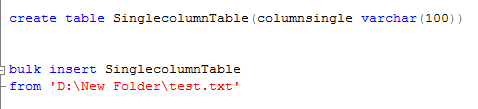
If the file is containing only single column of data
You can use the bulk insert command without using with key word
If you have the column names in the file,
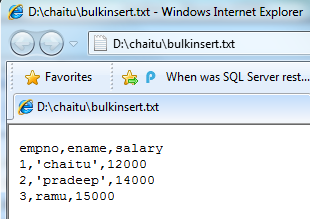
And we are trying to loading in to sql server, we got the below error

To fix this, we have first row argument, specify from which line number the data is coming

We can also specify how many errors you want to allow before considering that the BULK INSERT failed
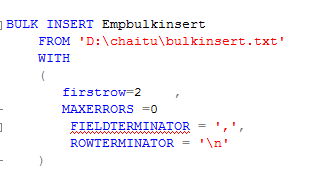
From above if error is greater than >0, then bulk insert operation failed
We can use the arguments above to perform validations
We can import the data from the remote system using \ServernameSharenamePathFilename
BULK INSERT AdventureWorks2008R2.Sales.SalesOrderDetail
FROM ‘\computer2salesforcedailyordersneworders.txt’;
Tomorrow we will discuss about Open rowset provider.
Please check and let us know if you have any concerns on this.
Thanks for viewing
Regards,
Chaitanya,
Webiste : https://mssqlbuzz.wordpress.com/
To Send Mail : mssqlbuzz@gmail.com
how to hide system objects in object explorer in sql server
Hi folks,
When I am searching in MSDN , I found this and posting this in the blog.
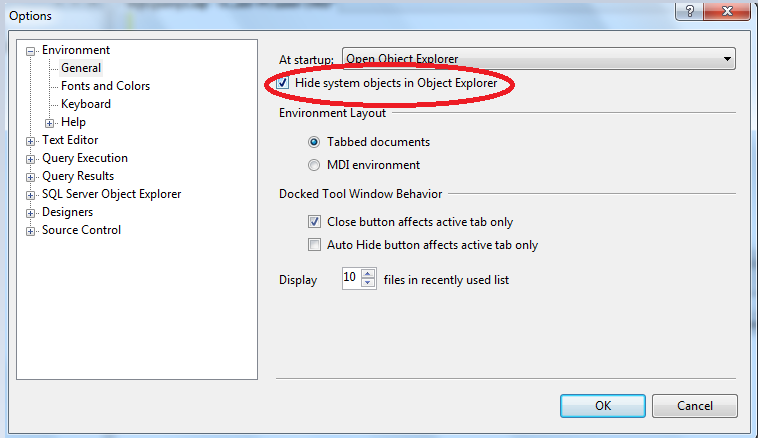
To hide system objects in Object Explorer
On the Tools menu, click Options.

On the Environment/General page, select Hide system objects in Object Explorer, and then click OK.
In the SQL Server Management Studio dialog box, click OK to acknowledge that SQL Server Management Studio must be restarted for this change to take affect.
Close and reopen SQL Server Management Studio.
Thanks for viewing
Regards,
Chaitanya
Visit site: https://mssqlbuzz.wordpress.com
Send an Email : mssqlbuzz


 SQL BLOGGING