BizTalk 2010 Supportability with .NET Framework 4.5
Hi Folks,
Recently one user went into an issue after installing 4.5
After un installing the .Net Framework 4.5 issue got resolved.
Below is the pre requisite information for BizTalk Server. You can download the document.
http://www.microsoft.com/en-us/download/details.aspx?id=11503
Please let us know if you have other options
Please check and let us know if you have any concerns on this.
Thanks for viewing this.
Regards,
Chaitanya
Visit site: http://www.sqlblogging.com
Send an Email: sqlblogging
Twitter: @chaitanya512
Importing data from excel to Sql server table
importing data from excel to Sql server table
in support operations common task is importing the data from excel sheet to Sql server table
business will give some master data , we need to load the data in Sql server tables. in that scenario how we can do this task very quickly
open the excel sheet that contains the data like this
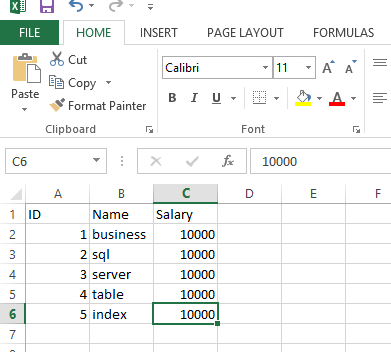
Save this file with csv format
Create a table for the data insertion, if table is already there, then no need of file creation
As we don’t have table for holding this data, iam creating file
USE tempdb
GO
CREATE TABLE CSVtable
(ID INT,
Name varchar(20),
salary money
)
GO
Run the below script
BULK
INSERT CSVtable
FROM ‘E:test.csv’
WITH
(
FIELDTERMINATOR = ‘,’,
ROWTERMINATOR = ‘n’,
FIRSTROW=2
)
GO

We can see the data in the table now
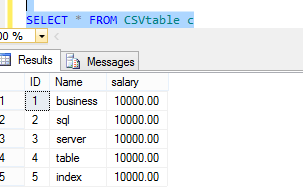
Thanks for viewing this.
Regards,
Chaitanya
Visit site: http://www.sqlblogging.com
Send an Email: sqlblogging
Increment the string value letter by letter for every row
Hi ,
yesterday my friend asked me how to display the string letter by letter in sql server
we have string function substring used here
below is the script for this
use tempdb
go
if object_id(‘tempdb..#temp’) is not null
begin
drop table #temp
end
go
– declaring the variable to store the string
declare @test varchar(100)
set @test=’chaitanya’ — assigning the value to the variable
declare @count int
select @count=len(@test)
declare @i int
set @i=1
create table #temp
(
column1 varchar(100)
)
declare @result varchar(100)
declare @j int
set @j=0
while(@i <=@count)
begin
select @result =substring(@test,@j,@i+1)
insert #temp(column1)
select @result
set @i=@i+1
end
select * from #temp
Result:
c
ch
cha
chai
chait
chaita
chaitan
chaitany
chaitanya
Please let me know if you have any concerns or any suggestions
Please check and let us know if you have any concerns or any suggestion on this
Thanks for viewing this.
Regards,
Chaitanya
Visit site: http://www.sqlblogging.com
Send an Email: sqlblogging
Size of your Database in MB,GB,TB
Hi All,
Below is the script for finding the database Size in MB,GB,TB
I am taking the adventure works DB as sample example
USE master
Go
SELECT DB_NAME(database_id) AS DatabaseName,
Name AS Logical_Name,
Physical_Name
,SUM((((CAST([size] as DECIMAL(18,4)) * 8192) /1024) /1024)) as ‘File Size (MB)’
,sum((((CAST([size] as DECIMAL(18,4)) * 8192) /1024) /1024)/1024) as ‘File Size (GB)’
,sum(((((CAST([size] as DECIMAL(18,4)) * 8192) /1024) /1024) /1024/1024)) as ‘File Size (TB)’
FROM sys.master_files
WHERE DB_NAME(database_id) IN(‘AdventureWorks2012’)
GROUP BY DB_NAME(database_id),Name ,Physical_Name WITH ROLLUP
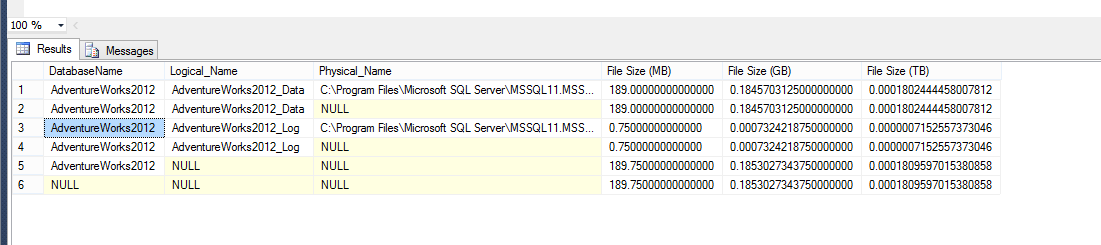
Please check and let us know if you have any concerns on this.
Thanks for viewing this.
Regards,
Chaitanya
Visit site: http://www.sqlblogging.com
Send an Email: sqlblogging
How can we Find Last Date Time Updated for Any Table
Solution:
Update for table is applicable in 2 ways
1. Structure Changes
2. Data changes
first we will check the schema changes
use the below script for this
USE AdventureWorks12
GO
CREATE TABLE Test123
(ID INT,
COL VARCHAR(100))
GO
INSERT INTO Test123
SELECT 1,’First’
UNION ALL
SELECT 2,’Second’
GO
select * from Test123
Result:

if you modify the structure of table i.e using DDL command or GUI, we can see the modified date information using below query
select modify_date,* from sys.objects where type=’u’ and name=’Test123′
if the data is updated or inserted or deleted in the table and table has no lastupdated column to track the information , how we can get those information
below is the example for this
create table testupdate(id int ,name varchar(10))
INSERT INTO testupdate
SELECT 1,’First’
UNION ALL
SELECT 2,’Second’
GO
select * from testupdate
SELECT GETDATE()
SELECT OBJECT_NAME(OBJECT_ID) AS DatabaseName, last_user_update,*
FROM sys.dm_db_index_usage_stats
WHERE database_id = DB_ID( ‘AdventureWorks2012’)
AND OBJECT_ID=OBJECT_ID(‘testupdate’)
Screen shots

Please check and let us know if you have any concerns on this.
Thanks for viewing this.
Regards,
Chaitanya
Visit site: http://www.sqlblogging.com
Send an Email: sqlblogging
Check the Object definition with out writing sp_helptext
Hi All,
Generally Sp_helptext can be used to check the definition of the objects like procedure,trigger,view,UDF,cursor. This is useful for the developer to check the code , for support professions to troubleshoot the issues.
Syntax for this is
Sp_helptext Object Name
Normally we need to write the sp_helptext for every object, now we can eliminate this by simple setting
Go to SSMS –tools-options—key board—query shortcuts and write sp_helptext for ctrl+0. You can take any short cut value

Select the any procedure and type control +0 , you can get the stored procedure definition
Please check and let us know if you have any concerns on this.
Thanks for viewing this.
Regards,
Chaitanya
Visit site: http://www.sqlblogging.com
Send an Email: sqlblogging
Sargability and Non-Sargability in Sql Server
Hi All,
We always listen the words like sargable, non- sargable in performance tuning. Below is the small understanding of those words
Queries which avoid WHERE clauses are non-sargable. If a WHERE clause is sargable, this means that it can take advantage of a useful index (assuming one is available) to speed completion of the query.
If a WHERE clause is non-sargable, this means that the WHERE clause (or at least part of it) cannot take advantage of an index, instead performing a table/index scan, which may cause the query’s performance to suffer.
Non-sargable search arguments in the WHERE clause, such as “IS NULL”, “<>”, “!=”, “!>”, “!<”, “NOT”, “NOT EXISTS”, “NOT IN”, “NOT LIKE”, and “LIKE ‘%500’” generally prevents (but not always) the query optimizer from using a useful index to perform a search.
In addition, expressions that include a function on a column, expressions that have the same column on both sides of the operator, or comparisons against a column (not a constant), are not sargable.
But not every WHERE clause that has a non-sargable expression in it is doomed to a table/index scan. If the WHERE clause includes both sargable and non-sargable clauses, then at least the sargable clauses can use a useful index (if one exists) to help access the data quickly
I will send the detailed explanation on this with example in next article.
Regards,
Chaitanya
Searching the strings with leading spaces and trailing spaces in the sql server
Hi Folks,
We have issues in the production at our end where the master table is update with leading spaces and it is causing the incorrect results as it master table and configuration is present in those tables.
I quickly checked the leading spaces in the table using the below query
We have created sample tables for this demo
use tempdb
go
create table #tempo
(
id int,
name varchar(100)
)
insert #tempo
select 1,’chaitu’
union all
select 2,’pradee’
union all
select ‘3’,’ krishna’
select * from #tempo

Below is the query for getting the leading spaces in the name column
select * from #tempo where LEFT(name,1)=”

For trailing spaces
use tempdb
go
create table #tempo
(
id int,
name varchar(100)
)
insert #tempo
select 1,’chaitu’
union all
select 2,’pradee’
union all
select ‘3’,’krishna ‘ à trailing space is inserted
select * from #tempo

Below is the query for getting the trailing spaces in the name column
select * from #tempo where right(name,1)=”

Please let us know if you have other options
Please check and let us know if you have any concerns on this.
Thanks for viewing this.
Regards,
Chaitanya
Visit site: http://www.sqlblogging.com
Send an Email: sqlblogging
Twitter: @chaitanya512
Sql Server Formatting tool- Must for every Sql Server Resource
Sql Server Auto formatting tool
Today I saw the post of Pinal Dave in http://blog.sqlauthority.com and got to know one excellent tool for formatting the sql server and intellisense
You can download this tool from the below website
http://www.devart.com/dbforge/sql/sqlcomplete/download.html
install this tool and it will integrate with your SSMS and you can see the difference of using the SSMS
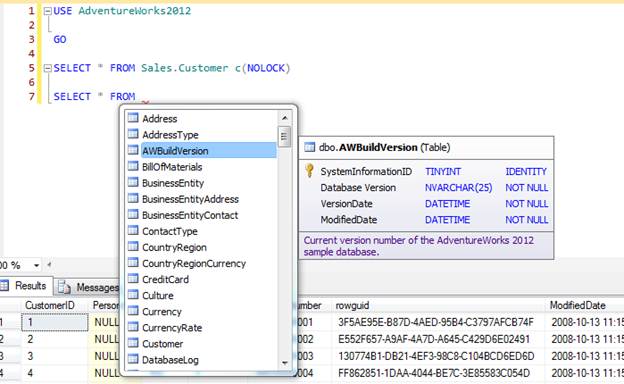
It will give all the details with excellent intellisense. It will automatically format the code
You can write the code very fast using this.
You can see the complete tutorial of this in the below link
http://www.devart.com/dbforge/sql/sqlcomplete/sql-complete-demo.html
Thanks Pinal for this information
At last this is the Must Tool for sql server Resources.
Please check and let us know if you have any concerns on this.
Thanks for viewing this.
Regards,
Chaitanya
Visit site: http://www.sqlblogging.com
Send an Email: sqlblogging
Twitter: @chaitanya512
Throw Statement in Sql server 2012
In 2012, raise error is replaced by throw statement
If we executed the below script, we will have the raise error statement that will catch error
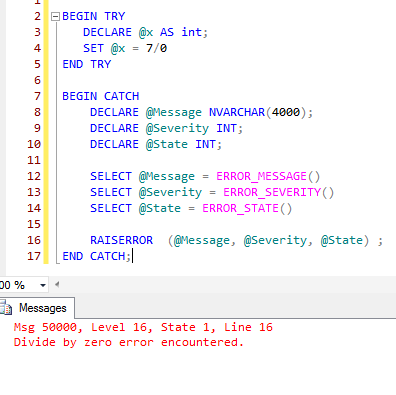
Raise error have some limitation it will not flow the control to the catch block in some severities. Please execute the below query to see the limitation
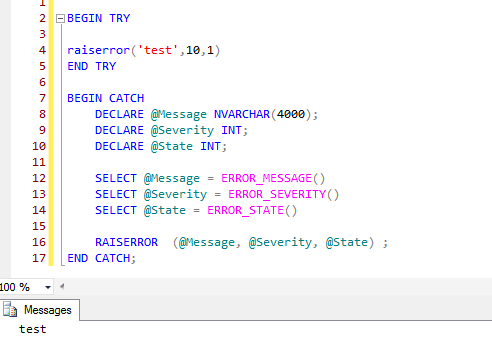
For severity 10, it will not flow the control.
So we don’t have error raised.
Throw will eliminate these limitations.
Syntax of throw:
THROW [ { error_number | @local_variable },
{ message | @local_variable },
{ state | @local_variable } ]
[ ; ]
Parameters:
Error_number:
Is a constant or variable that represents the exception. error_number is int and must be greater than or equal to 50000 and less than or equal to 2147483647.
The error_number parameter does not have to be defined in sys.messages
Message:
Is an string or variable that describes the exception. message is nvarchar(2048).
State:
Is a constant or variable between 0 and 255 that indicates the state to associate with the message. state is tinyint.
There is no severity parameter. The exception severity is always set to 16.
We have to specify throw statement inside begin try with parameters
We should not specify throw without parameters in try block
Throw statement should end with semi colon


 SQL BLOGGING

