Finding CPU consuming Sql Server transactions
Here is the below query to identify.
Top 20 CPU consuming Sql Server transactions
SELECT TOP 20
qs.sql_handle,
qs.execution_count,
qs.total_worker_time AS Total_CPU,
total_CPU_inSeconds = –Converted from microseconds
qs.total_worker_time/1000000,
average_CPU_inSeconds = –Converted from microseconds
(qs.total_worker_time/1000000) / qs.execution_count,
qs.total_elapsed_time,
total_elapsed_time_inSeconds = –Converted from microseconds
qs.total_elapsed_time/1000000,
st.text,
qp.query_plan
from
sys.dm_exec_query_stats as qs
CROSS APPLY sys.dm_exec_sql_text(qs.sql_handle) as st
cross apply sys.dm_exec_query_plan (qs.plan_handle) as qp
ORDER BY qs.total_worker_time desc
Regards,
Chaitanya
Certificate Status check across servers
If you want to check the certificate status for server, below is the script for that.
$ScriptBlockContent ={param ($Location)
Set-Location $Location
$certs =get-childitem
$certarr=@()
foreach ($cer in $certs )
{
$Error.Clear();
$arr+=[pscustomobject]@{ Location=$Location
isCertValid=$cer |Test-Certificate;
Cause=$Error[0];
thumbprint= $cer.Thumbprint;
Name=$cer.FriendlyName
Subject=$cer|select -expand subject
SubjectName=$cer.SubjectName
SignatureAlgorithm=$cer.SignatureAlgorithm
SerialNumber=$cer.SerialNumber
PublicKey=$cer.PublicKey
Issuer=$cer.Issuer
IssuerName=$cer.IssuerName
NotAfter=$cer.NotAfter
}
}
$certarr
}
$Location=’Cert:\LocalMachine\My’
$certlist=Invoke-Command -ComputerName ‘Server1′,’Server2’ -ScriptBlock $ScriptBlockContent -ArgumentList $Location
$certlist | ?{$_.isCertValid -eq $false}|Out-gridview
Regards,
Chaitanya
Importing BizTalk Application bindings
Hi All,
This is the continuation for the below blog post.
once you exported the bindings , you can copy the entire folder and try to run the below script.
In the same script folder.
If any error occurs , it halts the processing.
#region WriteLog function
function WriteLog($LogMessage, $LogDateTime, $LogType)
{
write-host
“$LogType, [“+ $LogDateTime +”]: “+ $LogMessage | Add-Content -Path $MainLogFilepath
}
$BiztalkSrvInfo = @{
‘MgmtDbname’=Get-CimInstance MSBTS_GroupSetting -namespace root\MicrosoftBizTalkServer|select MgmtDbName
‘MgmtDbServerName’=Get-CimInstance MSBTS_GroupSetting -namespace root\MicrosoftBizTalkServer|select MgmtDbServerName
}
$Obj = New-Object -TypeName PSObject -Property $BiztalkSrvInfo
$MgmtDbServerName = $Obj.MgmtDbServerName.MgmtDbServerName
$MgmtDbname = $Obj.MgmtDbname.MgmtDbName
$scriptpath = $MyInvocation.MyCommand.Path
$dir = Split-Path $scriptpath
$inputFiles = “$dir\Bindings\”
$LogFilepath = “$Dir\Logs\”
if(!(Test-Path $LogFilepath))
{
New-Item -ItemType directory -Path $LogFilepath
}
$LogFile = “$LogFilepath\ImportLogfile.txt”
TRY
{
Get-ChildItem -path $inputFiles -Filter *.xml -Recurse |ForEach-Object -Process{
$Actfilepath = $_.FullName
$filename = $_.BaseName
$LogDateTime = get-date
Write-host “***Starting Importing of Bindings for Application : $filename in” + $inputFiles “folder” -ForegroundColor Cyan
$run = “BTSTask.exe ImportBindings /Source:$Actfilepath /ApplicationName:$filename /Server:$MgmtDbServerName /Database:$MgmtDbname”
Invoke-Expression $run | Add-Content $LogFile
if ($LASTEXITCODE -eq 1)
{
$LogMessage = throw $_.Exception.Message
}
$LogDateTime = get-date
Write-host “Finished Extracting of Bindings for Application : $filename in ” + $inputFiles “folder” -ForegroundColor green
}
}
CATCH
{
$_.Exception.Message|Add-Content $LogFile
}
Let me know if you have any questions.
Regards,
Chaitanya
Export Application bindings from the any BizTalk server, by providing the Application Names
Hi All,
You can export BizTalk Application bindings by using the below PowerShell script.
Simply give the application Names and it creates folder called Input files in your script folder incase if it does not exists and copies the files to that folders.
#region WriteLog function
function WriteLog($LogMessage, $LogDateTime, $LogType)
{
write-host
“$LogType, [“+ $LogDateTime +”]: “+ $LogMessage | Add-Content -Path $MainLogFilepath
}
$BiztalkSrvInfo = @{
‘MgmtDbname’=Get-CimInstance MSBTS_GroupSetting -namespace root\MicrosoftBizTalkServer|select MgmtDbName
‘MgmtDbServerName’=Get-CimInstance MSBTS_GroupSetting -namespace root\MicrosoftBizTalkServer|select MgmtDbServerName
}
$Obj = New-Object -TypeName PSObject -Property $BiztalkSrvInfo
$MgmtDbServerName = $Obj.MgmtDbServerName.MgmtDbServerName
$MgmtDbname = $Obj.MgmtDbname.MgmtDbName
$scriptpath = $MyInvocation.MyCommand.Path
$dir = Split-Path $scriptpath
$BindingFileDestinationPath = “$dir\Bindings\”
if(!(Test-Path $BindingFileDestinationPath))
{
New-Item -ItemType directory -Path $BindingFileDestinationPath
}
$LogFilepath = “$Dir\Logs\”
if(!(Test-Path $LogFilepath))
{
New-Item -ItemType directory -Path $LogFilepath
}
$LogFile = “$LogFilepath\ExportLogfile.txt”
$ApplicationObj = “Application1″,” Application2″,” Application3 ” # give the list of Application Names here that you want to export
TRY
{
$ApplicationObj |ForEach-Object -Process{
$ApplicationName = $_
$BindingFilePath = $BindingFileDestinationPath + $ApplicationName + “.xml”
$LogDateTime = get-date
Write-host “***Starting Extracting of Bindings for Application : $ApplicationName in” + $BindingFileDestinationPath “folder” -ForegroundColor Cyan
$run = “BTSTask.exe ExportBindings /Destination:’$BindingFilePath’ /ApplicationName:’$ApplicationName'”
Invoke-Expression $run | Add-Content $LogFile
if ($LASTEXITCODE -eq 1)
{
$LogMessage = throw $_.Exception.Message
}
$LogDateTime = get-date
Write-host “Finished Extracting of Bindings for Application : $ApplicationName in ” + $BindingFileDestinationPath “folder” -ForegroundColor green
}
}
CATCH
{
$_.Exception.Message|Add-Content $LogFile
}
Regards,
Chaitanya
BizTalk Server 2013 R2 CU5 is available
Hotfixes that are included in cumulative update package 5 for BizTalk Server 2013 R2
The Microsoft Knowledge Base articles that discuss these hotfixes are published as the hotfixes become available. For more information about the BizTalk Server issues, click the following article numbers to go to articles in the Microsoft Knowledge Base.
BizTalk Server Adapter
BizTalk Server EDI\AS2
BizTalk Server Administration Tools and Management APIs
| KB article number | Description |
| 3202894 | FIX: You cannot change the Tracking QueryTimeout value when you use BizTalk Server 2013 R2 |
Source: MSDN
Regards,
Chaitanya
search large files in the folders or network locations
Hi All,
If you want to search large files in the folders or network locations, below is the PowerShell code.
workflow DirectoryCheck {
param([string[]]$FileShares,[int] $days ,[int] $sizeinMB)
$t=(get-date).adddays(-$days)
foreach –parallel -throttlelimit $fileshare.count ($Fileshare in $FileShares)
{
$DirArr = @()
$DirArr = Get-ChildItem -Path $Fileshare -Recurse -Directory | ? {$_.lastwritetime -ge $t }
foreach –parallel -throttlelimit 50 ($dir in $DirArr)
{
Get-ChildItem -Path $dir.FullName -File | ?{ $_.Length/1MB -ge $sizeinMB}| sort Length -desc | select Name,fullname, length, lastwritetime -First 100 -ExcludeProperty PSSourceJobInstanceId,PSComputerName
}
}
}
directorycheck -FileShares "C:\work\","D:\work" -days 800 -sizeinMB 1 |Out-GridView
get-childitem works really slowly if you have network locations to check. Below is the more information on that
https://blogs.msdn.microsoft.com/powershell/2009/11/04/why-is-get-childitem-so-slow/
I will post one more optimized script in upcoming posts.
Regards,
Chaitanya
Sql Server 2016 new Features.
In simple terms, below are the new features for Sql server 2016 for developers.
Ø DROP IF EXISTS (DIE)
Ø SESSION_CONTEXT
Ø Dynamic data masking(DDM)
Ø Row level security (RLS)
Ø Always encrypted
Ø Stretch database
Ø Temporal
Ø JSON
Ø Query Store
Ø PolyBase
Ø R integration
PowerShell formatting issue in Function or Workflow
Hi All,
If you see below error . you might be calling the format function in function or some workflow.
The object of type "Microsoft.PowerShell.Commands.Internal.Format.FormatStartData" is not
valid or not in the correct sequence. This is likely caused by a user-specified "format-list" command which is
conflicting with the default formatting
Wrong work flow code:
workflow parallelEventCheck {
param(
[String[]]$ComputerName,
[string]$EventMessage,
[string[]]$ApplicationList
)
foreach –parallel ($Appname in $ApplicationList)
{
inlinescript{
Get-EventLog -LogName $Using:Appname -Newest 10 -Message "*$Using:EventMessage*" |format-table # don’t use like this
}
}
}#parallelEventCheck
parallelEventCheck -PSComputerName `
Server1,Server2
-EventMessage Error `
-ApplicationList ‘Application’,’System’ |out-gridview
Correct work flow code:
workflow parallelEventCheck {
param(
[String[]]$ComputerName,
[string]$EventMessage,
[string[]]$ApplicationList
)
foreach –parallel ($Appname in $ApplicationList)
{
inlinescript{
Get-EventLog -LogName $Using:Appname -Newest 10 -Message "*$Using:EventMessage*"
}
}
}#parallelEventCheck
parallelEventCheck -PSComputerName `
Server1,Server2
-EventMessage Error `
-ApplicationList ‘Application’,’System’ |format-table # don’t use the format command in function . you can pipe the function output to format command.
Regards,
Chaitanya
Conditional Formatting is not visible in Power report
Hi All,
I have this issue when trying to format some columns based on the values in that.
Below things needs to be fixed for this issue to be resolved.
1. Value must be decimal number /whole number upon which you want to apply formatting.
2. If you still do not they see the conditional formatting even if you followed step 1 means follow this step.
Right click on the value and you will see below window.
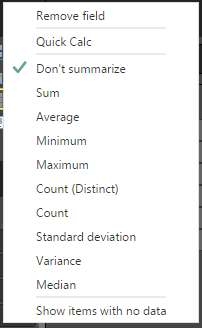
Select sum and again right click on that value, you could see conditional formatting

That’s it.
Regards,
Chaitanya
How to find Active Sql Clustered Node using t-Sql
Hi All,
Often we used to login into nodes, to find active clustered node for Sql server instance.
Run below query in Sql server instance query window.
SELECT SERVERPROPERTY(‘ComputerNamePhysicalNetBIOS’)
Its easy way to get the information.
Regards,
Chaitanya

 SQL BLOGGING