BizTalk Health monitor V4 released
Hi All,
BizTalk Health monitor V4 released. Below is the link where you can find more information
New features.
§ Monitoring Profiles with UI based configuration (Old “Monitoring Profile” is now renamed with “Health Check Profile”)
§ Schedule your report collection with a Windows service (Windows Task option is still available)
§ New “Trace Log” node to quickly display the log of an analyze. Build to show insights in report collection failures.
§ Compatible with and Updated for BizTalk Server 2016
§ Better user experience by allowing Queries and Rules lists to be displayed in full screen mode.
§ Improved repositories auto-update feature
§ More robust. Fixed crash issue on MMC termination.
Download link for BHMv4 – https://www.microsoft.com/en-us/download/details.aspx?id=43716
Regards,
Chaitanya
[Fix]BizTalk Rules not working
Hi All,
We had one issue in our environment, where BizTalk rules were not getting fired.
We are able to process same rules in another environment.
After troubleshooting, we found the issue with BizTalk rule engine static support. In our rule, we use .net static class to fetch some information.
For that, we need to create the registry entry. This is must for BizTalk rules that uses .net static classes
https://msdn.microsoft.com/en-us/library/aa950269.aspx
regards,
Chaitanya
What’s new in BizTalk 2016
MSDN Source link:
https://msdn.microsoft.com/en-us/library/mt670742.aspx
| Feature | Description |
| Support for newer platforms | BizTalk Server 2016 adds support for the following Microsoft platforms:
– Visual Studio 2015 |
| SQL Server 2016 AlwaysOn Availability Groups | Support includes:
– Using on-premises and in Microsoft Azure IaaS virtual machines |
| BizTalk Server Azure VMs in production | BizTalk Server Azure virtual machines are now fully supported for production environments. Using SQL Server 2016 AlwaysOn, a highly available solution is now possible. |
| Logic App adapter | Connect to your Logic Apps hosted in Azure, and get access to all the connectors including Salesforce, SharePoint, CRM Online, and more. For example, you can receive an order in BizTalk Server, connect to your Logic App, and update Salesforce. |
| FTP adapter | SYST command is no longer required. When you configure the FTP adapter on a receive location or send port, there is a property called FTP Server Type. Using this property, you choose the FTP server you want; which determines if SYST is required.
As a result of this change, there are more "supported" FTP servers. |
| SFTP adapter | SFTP adapter is re-engineered to use WinSCP to connect to SFTP; which allows support for more SFTP servers. Client-side logging and additional encryption ciphers are also new. |
| Allow import of tracking settings | When importing a binding a file, you can choose to import (or not import) the tracking properties enabled on your orchestrations, send ports, and so on. This is a global setting (set at the Group level) so you can set this feature in your different environments. For example, you can import the existing tracking properties for your Development environments, and don’t import the tracking properties for your Production environments. |
| Shared Access Signature (SAS) | You can use SAS authentication for the Service Bus connection with the BasicHttpRelay, NetTcpRelay, BasicHttp, and WebHttpadapters.
WCF-BasicHttpRelay adapter SB-Messaging adapter now includes the steps to get Access Control (ACS) values using PowerShell. |
| Ordered delivery on dynamic ports | – Includes the adapters that support ordered delivery on static send ports – You can enable the ordered delivery option in the BizTalk Administration console |
| SHA-2 hash functions | SHA-2 is fully supported, including:
|
| Compile your maps | Choose to compile your maps using XslTransform or XslCompiledTransform |
| Schema window | In the BizTalk mapper, the Schema dialog window is now resizable |
| Office web components (OWC) | Office web components (OWC) is now an optional installation component. |
| Adapters and Accelerators | Improvements and changes include:
– SAP adapter now uses SAP Connector for .NET (NCo), while still supporting the classic RFC SDK. WCF-SAP adapter support for the SAP .NET Connector provides more details. |
| Import/export parties | Changes include:
– The import and export option is separated from the Application. For example, you can export a party without exporting the application. You can import a party without importing the application. |
| BizTalk Administration | In addition to a more modern look and feel, some additional changes include:
– Configure the settings for multiple hosts/host instances simultaneously. For example, you can set the .NET CLR settings for multiple host instances simultaneously. |
Deprecated & Removed List
| Program | Status | Replacement |
| RFID Mobile | Removed | None |
| RFID Server | Removed | None |
| SharePoint SSOM/Web Service adapter | Removed | Use the CSOM (Client Side Object Model) option. |
| SOAP adapter | Deprecated | WCF-BasicHttp Adapter |
| Old SQL adapter | Deprecated | WCF-based SQL adapter in the BizTalk Adapter Pack |
| UDDI | Removed | None |
Regards,
Chaitanya
Deleting BizTalk Party using PowerShell
Hi All,
Below is the sample script for that.
$BizTalkGroupMgmtDbServerFullName = get-wmiobject MSBTS_GroupSetting -namespace root\MicrosoftBizTalkServer | select-object -expand MgmtDbServerName
$BizTalkGroupMgmtDbName = get-wmiobject MSBTS_GroupSetting -namespace root\MicrosoftBizTalkServer | select-object -expand MgmtDbName
if($BizTalkGroupMgmtDbServerFullName)
{
$BizTalkGroupMgmtDbServerFullNameArr = $BizTalkGroupMgmtDbServerFullName.Split(",")
$BizTalkGroupMgmtDbServerName = $BizTalkGroupMgmtDbServerFullNameArr[0]
}
[void] [System.reflection.Assembly]::LoadWithPartialName("Microsoft.BizTalk.ExplorerOM")
$Catalog = New-Object -TypeName Microsoft.BizTalk.ExplorerOM.BtsCatalogExplorer
$Catalog.ConnectionString = "SERVER=$BizTalkGroupMgmtDbServerName;DATABASE=$BizTalkGroupMgmtDbName;Integrated Security=SSPI"
$party = "PartyName"
Write-Host "Started Removing Party : ‘$Party’"
$partyinfo = $Catalog.parties[$Party]
$Catalog.RemoveParty($partyinfo);
$Catalog.SaveChanges();
You might receive this error in this process.
Exception calling "SaveChanges" with "0" argument(s): "The transaction associated with the current connection has completed but has not been disposed. The transaction must be disposed before the connection can
be used to execute SQL statements."
Please check the MSDTC timeout setting. It should be more than a minute.
Regards,
Chaitanya
BizTalk 2016 Roadmap
Hi All,
You can Check this link https://www.microsoft.com/en-us/download/details.aspx?id=50408 which was released in December,it has discription of roadmap for BizTalk Server 2016, SQL Server 2016, Windows Server 2016 and Azure Integration.
Here is Microsoft word:
This roadmap explains our holistic approach to integration and the key product offerings that contribute to our integration capabilities. It details our vision and ambition as well as our strategy to address the challenges and opportunities for integration we see in the years ahead.
Regards,
Chaitanya
BizTalk Server 2013 CU3 is now available
Hi All,
Please check for download instructions of CU3 for- BizTalk Server 2013 and Adapter pack updates in below links.
BizTalk Server 2013 CU3:
http://support.microsoft.com/kb/3088676
BizTalk Adapter Pack 2013 CU2:
http://support.microsoft.com/kb/3100564
Regards,
Chaitanya
How to access BizTalk Application Resources via BiztalkMgmtDB
There are 2 types of assemblies in BizTalk Applications
1. .Net Assemblies will be having the type System.BizTalk:Assembly
2. BizTalk Assemblies will be having the type ‘System.BizTalk:BizTalkAssembly’
Below is the query to access the biztalk resources programmatically in sql server, so that you can compare the assemblies across groups.
You cannot find out .net assembliies of type System.BizTalk:Assembly in bts_assembly table. This is the only place you could find this information
SELECT [luid] ‘AssemblyInfo’
FROM [BizTalkMgmtDb].[dbo].[adpl_sat] sat
WHERE sat.sdmtype IN ( ‘System.BizTalk:Assembly’,
‘System.BizTalk:BizTalkAssembly’ )
Please let me know if you have any questions.
Regards,
Chaitanya
PowerShell Script to raise Custom Event ID in case if Orchestration is suspended in BizTalk Server
Hi All,
Below is the power shell script for generating the event ID in the event viewer in case if any BizTalk orchestration is in suspended mode.
As of now, this script only useful for one orchestration checking at a time, in future I will modify and update the PowerShell script for publishing the events for multiple orchestrations at a time.
Copy the below script and save it in note pad with .PS1 extension and schedule a task job if you want to run on daily basis.
Below is the website link on how to Use the Windows Task Scheduler to Run a Windows PowerShell Script
For below script to be successful, you must create a linked server between BiztalkMgmtDB and biztalkmsgboxdb if both databases are residing in different servers.
I am writing different power shell script to make use of WMI instead of using Linked servers and I will update the blog in future posts.
$sqlText = “—————————-Start of Script————————————————————————–
SET NOCOUNT ON
SET TRANSACTION ISOLATION LEVEL READ COMMITTED
SET DEADLOCK_PRIORITY LOW
declare @ErrorOrchCount int,@ErrorMsg varchar(100)
SELECT
@ErrorOrchCount= Count(o.nvcName)
FROM [BizTalkMsgboxDb]..[Instances] AS i WITH (NOLOCK)
JOIN [BizTalkMgmtDb]..[bts_Orchestration] AS o WITH (NOLOCK) ON i.uidServiceID = o.uidGUID
WHERE o.nvcName =’OrchestrationName’ # Give the Orchestration Name
and i.nState not in (2,8)
GROUP BY o.nvcName, i.nState
if (@ErrorOrchCount >0)
begin
set @ErrorMsg=’Orchestration is in Suspended Mode’
end
else
Begin
set @ErrorMsg=Null;
END
”
#Provide the SQL Server Name on which sql statements needs to be executed
$serverName= “servername”
$QueryTimeout = 120
$ConnectionTimeout = 30
#Action of connecting to the Database and executing the query and returning results if there were any.
$conn=New-Object System.Data.SqlClient.SQLConnection
$ConnectionString = “Server={0};Database={1};Integrated Security=True;Connect Timeout={2}” -f $ServerName,$DatabaseName,$ConnectionTimeout
$conn.ConnectionString=$ConnectionString
$conn.Open()
$cmd=New-Object system.Data.SqlClient.SqlCommand($sqlText,$conn)
$cmd.CommandTimeout=$QueryTimeout
$reader = $cmd.ExecuteReader()
while ($reader.Read()) {
$OrchStatus =$Reader.GetValue($1)
}
if ($OrchStatus)
{
Write-EventLog –LogName Application –Source “OrchestrationException” –EntryType Error –EventID 5012 #event id that you want to raise for SCOM to recognize
–Message “ Orchestration is in Suspended Mode.”
}
Please let me know if you have any questions.
Regards,
Chaitanya
Virtualization Basics
Cloud computing and virtualization are not the same. Virtualization is component in cloud.
Virtualization: we are separating the operating system from hard ware
Cloud computing: we are separating applications from hard ware
In olden days, when we are installing the OS , it will bind to the physical hardware.
Means device drivers s/w is linked to hard ware. It’s not possible to take the hard disk(contains the OS and put it into the other system
In virtualization, it will provide the layer on top of Hard ware, so we can install OS instance on the layer
This is called as instance of operating system
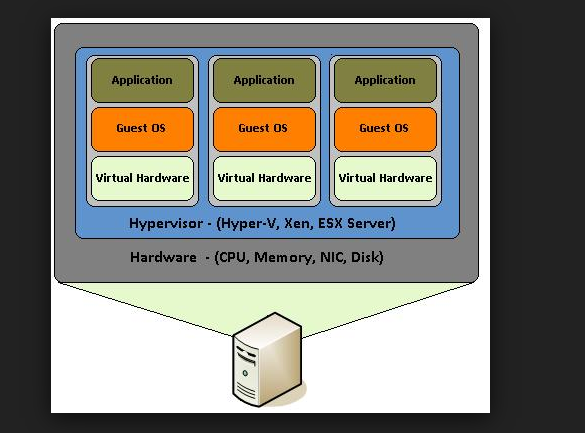
The layer is called hypervisor
There r 2 types of hypervisors
1.Type 1 Hypervisors
You have a blank computer, and you installed hypervisor and you can install OS instances on to that Hypervisor
These are real enterprise servers and it is like below.
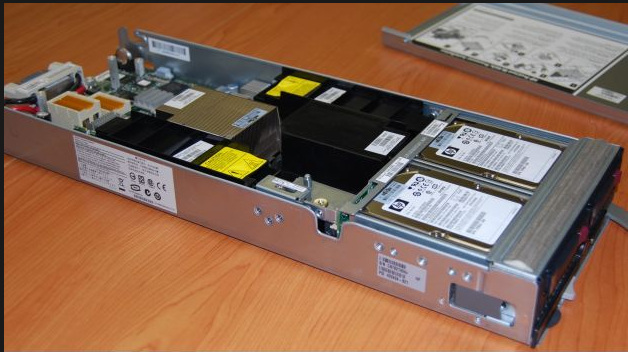
You can put this physical server like this into the rack.
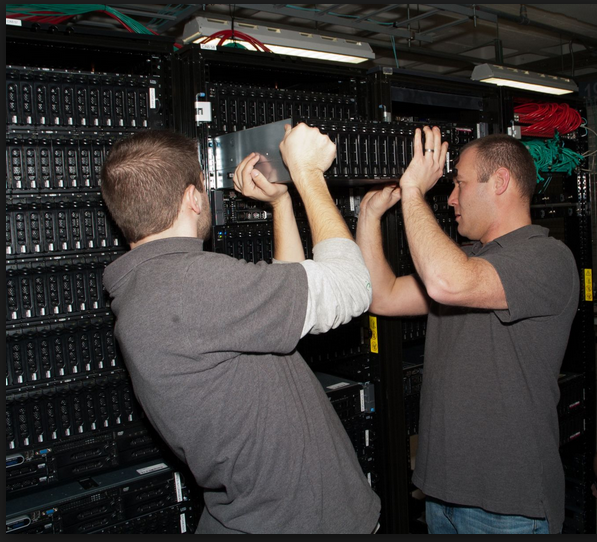
One rack may consists of many physical servers.
When you installed the hypervisor s/w.. By putting CD, you have only seen in the screen like IP address, storage info etc.
You can connect this physical server to network and get the IP address
How can access this hypervisor s/w , this can be accessed by using the management console that is installed on the other computer with the IP address.
Using this management s/w you can install the OS on to the hypervisor.
You can install the windows server 2012 OS into this physical server, if this server down you can copy this OS instance from one physical server to other physical server in the same RACK.

Management s/w can do:
1. Automatically OS instance to other physical which is having required amount of resources if the current server does not meet that much requests.
It will turn on the physical server and move the OS instances to that
2. It will do fault tolerance
If your physical server is down, it will automatically moves the OS instances to other server without no down time.
3. over allocation:
We can allocate the more than the amount of RAM to the OS instances than that exists In physical server
Ex: your physical server have 16 GB of RAM, but you can allocate the 32GB for 3 instances.
How:
We can allocate 12 GB for 1 ,12 GB for 2 ,8 GB.
What Hypervisor will do is if first server is needed huge resources during morning time, it will allocate 12 GB of RAM and other 2GB ,for 2 and 2 GB for 3rd.
After the load is over, it will take that RAM and give it to the other.
Lot of type 1 Hypervisors are there.
1. Citrix
2. VM ware
3. Microsoft Hyper V
These Hypervisors are free, but the management s/w is chargeable.
2.Type 2 Hypervisors
We have OS, then on to that OS, you can install hypervisor like virtual box, virtual pc,VM ware and new instances can be installed in to this hyper visors.
You don’t need the management software in this case. You can open the OS instance like an Window and you can play with it.
Products:
1. Virtual Box from oracle
2. Virtual PC from MS
These are free, if you want to use advances features you need pay for that
If your 2 virtual instances are allocated with the 4GB and 2 GB RAM, if you have 8GB RAM system, they will take the total 8GB and your host computer run on 2GB and may cause system crash.
It will be used for small organizations
Converting to Virtualizations:
Now converting the existing normal OS to virtual instances are easy.
You will have the conversion tools that will be there in the CD’s and you can boot this CD into this OS for which you want to convert them to Virtual instances virtual hard drive . It will take the instance . You can simply use this CD for creating this instance.
Different products have different virtual hard drive formats
Below are the types of Virtualization
Software
· Operating system-level virtualization, hosting of multiple virtualized environments within a single OS instance.
· Application virtualization and workspace virtualization, the hosting of individual applications in an environment separated from the underlying OS. Application virtualization is closely associated with the concept of portable applications.
· Service virtualization, emulating the behavior of dependent (e.g., third-party, evolving, or not implemented) system components that are needed to exercise an application under test (AUT) for development or testing purposes. Rather than virtualizing entire components, it virtualizes only specific slices of dependent behavior critical to the execution of development and testing tasks.
Memory
· Memory virtualization, aggregating random-access memory (RAM) resources from networked systems into a single memory pool
· Virtual memory, giving an application program the impression that it has contiguous working memory, isolating it from the underlying physical memory implementation
Storage
· Storage virtualization, the process of completely abstracting logical storage from physical storage
· Distributed file system, any file system that allows access to files from multiple hosts sharing via a computer network
· Virtual file system, an abstraction layer on top of a more concrete file system, allowing client applications to access different types of concrete file systems in a uniform way
· Storage hypervisor[further explanation needed]
· Virtual disk drive, a computer program the emulates a disk drive such as a hard disk drive or optical disk drive (see comparison of disc image software)
Data
· Data virtualization, the presentation of data as an abstract layer, independent of underlying database systems, structures and storage.
· Database virtualization, the decoupling of the database layer, which lies between the storage and application layers within the application stack over all.
Network
· Network virtualization, creation of a virtualized network addressing space within or across network subnets
· Virtual private network (VPN), a network protocol that replaces the actual wire or other physical media in a network with an abstract layer, allowing a network to be created over the Internet
Regards,
Chaitanya
BizTalk 2013 r2 CU1 update
Hi All,
BizTalk 2013 r2 CU1 update is available. Please install in your DIT , SIT environments and check if it is breaking any code and do the regression testing.
https://support.microsoft.com/en-us/kb/3055198
below are fixes that were covered.
BizTalk Server management tools and business tools
BizTalk Server B2B support
BizTalk Server Accelerators
BizTalk Server Adapters
BizTalk Server Design Tools
BizTalk Server Message Runtime, Pipelines, and Tracking
Regards,
Chaitanya


 SQL BLOGGING