Hi All,
I have this issue when trying to format some columns based on the values in that.
Below things needs to be fixed for this issue to be resolved.
1. Value must be decimal number /whole number upon which you want to apply formatting.
2. If you still do not they see the conditional formatting even if you followed step 1 means follow this step.
Right click on the value and you will see below window.
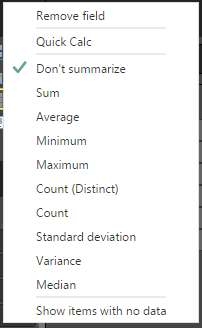
Select sum and again right click on that value, you could see conditional formatting

That’s it.
Regards,
Chaitanya


 SQL BLOGGING