Hi All,
Below is one of the procedure in PowerShell to populate GAC information from servers to Database.
First create one database and one table for storing the servers GAC assemblies
CREATE DATABASE testdb
go
USE [testDB]
GO
/****** Object: Table [dbo].[gacassemblies_test] Script Date: 9/9/2015 5:54:45 PM ******/
SET ANSI_NULLS ON
GO
SET QUOTED_IDENTIFIER ON
GO
SET ANSI_PADDING ON
GO
CREATE TABLE [dbo].[gacassemblies_test](
[servername] [varchar](50) NULL,
[AssemblyName] [varchar](max) NULL,
[AssemblyVersion] [varchar](max) NULL,
[AssemblyUpdatetime] [varchar](50) NULL
) ON [PRIMARY] TEXTIMAGE_ON [PRIMARY]
GO
SET ANSI_PADDING OFF
GO
Once you have created Database and table in which you want to store the assemblies from your group of servers. Below is the powershell script for getting GAC assemblies from given location.
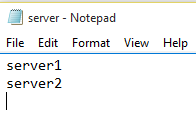
Create a text file that contains server information like below. Don’t make any spaces in the file.
# Power Shell Script
$Output = @();
function truncatetable
{
$conn.open()
$cmd.commandtext = "Truncate table gacassemblies_test"
$cmd.executenonquery()
$conn.close()
}
truncatetable
function Get-AssemblyVersionNumber($assembly)
{
$Assemblydetails = [System.Reflection.Assembly]::Loadfile($assembly)
$AssemblyName = $Assemblydetails.GetName()
$Assemblyversion = $AssemblyName.version
return $AssemblyName
}
$location="C:GAC_Server"
$server=gc "$locationserver.txt" # to give servers information
$path = ‘c$WindowsMicrosoft.NETassemblyGAC_MSIL’ # to get .Net 4 Assemblies
foreach ($sr in $server)
{
$Output=$null
$Output = @();
$Dll= Get-ChildItem "\$sr$path" -Recurse | where {$_.extension -eq ".dll"}
Foreach ($f in $Dll)
{
$assembly=$f.FullName
$gacassembly= Get-AssemblyVersionNumber $assembly
$Output += $gacassembly
}
#$Output | Export-csv $OutputFilePath -NoTypeInformation
$conn = New-Object System.Data.SqlClient.SqlConnection
$conn.ConnectionString = "Data Source=localhost;Initial Catalog=testdb;Integrated Security=SSPI;"
$cmd = New-Object System.Data.SqlClient.SqlCommand
$cmd.connection = $conn
Foreach ($outputrecord in $Output)
{
$conn.open()
$cmd.commandtext = "INSERT INTO gacassemblies_test (servername,AssemblyName,AssemblyVersion) VALUES(‘{0}’,'{1}’,'{2}’)" -f $sr,$outputrecord.Name,$outputrecord.Version
$cmd.executenonquery()
$conn.close()
}
}
Copy PowerShell script into notepad and save it with ps1 extension. And also servers information in server.txt file.

Run the PowerShell script using PowerShell ISE or PowerShell command prompt.
You will get all the assemblies from servers to database.
Regards,
Chaitanya


 SQL BLOGGING