Below concepts, we will discuss in this article.
- What is SQL Server Database?
- What does SQL Server Database contain?
- Database Architecture
- Files and File groups
- Understanding Log Files
- Database Design Considerations
- System Databases
- Resource Database
- Types of SQL Server Databases
What is SQL Server Database?
- A Database in SQL Server is made up of a collection of tables. These tables contain tables and other objects that are defined to support activities performed with the data.
- At physical level, the Database is can be seen as a collection of simple files.
- Each database can store either interrelated or unrelated data.
What does Database contain?
- A database consists of :
1. Data
2. Different Objects useful for managing the Data
- Data is physically stored in specific objects called : TABLES
- There are tens of Database Objects that are needed for easy retrieval, working with and securing the data in a database.
Database Architecture
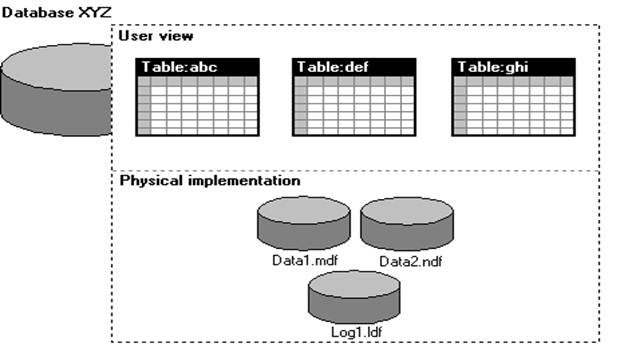
Data is stored in tables logically and physically it was stored in Files
We should not have the files separately in 2 different machines for a single database
Database is collection of Minimum 2 files
1. Data file( represented as .MDF)- all the data and meta data is stored here
2. Log file(represented as .LDF): all the Audit Records are stored here
Audit: which operation is performed, which user is doing operations etc.
Whenever a new database is created, we have the MDF created initially which have the meta data and LDF created for audit information
Depending on size of the Database, we can have the multiple data files.
These data files are organized as
1. Primary data file : contains the User defined data and Meta data
2. Secondary data file : contains the User defined data and Meta data
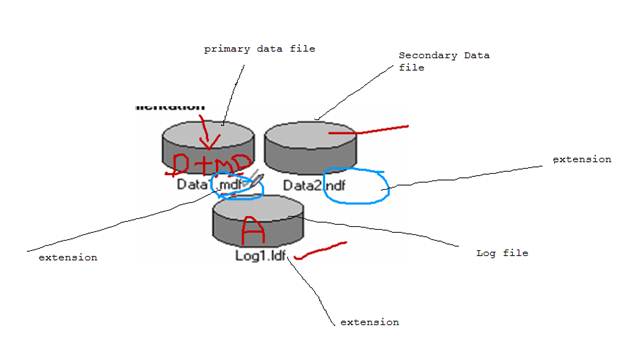
These data files can be having any extension.
We can have the data files with any extension, but it is Microsoft convention not a rule
Another convention is MDF files have Data +Meta Data
NDF files have only Data. It is not a rule, but we can have the Data + Meta Data in the NDF
Database can have 32,767 files
NDF file is mandatory
Files and File Groups
Data files can be grouped together in FILEGROUPS for allocation and administration purposes.
Logical related group of files are file groups
Ex:
employee details in employee group
Manager details in employee group
We can have min 1 file group and max 32767 file groups for database and for 1 file group is having 32767 files
§ Primary data file is in primary file group and this group was created when creating the data base
§ Every data file should belong to file group
§ Log files should not belong to file group
Understanding Log Files:
Assume your database as a Big Apartment, for apartment we have the watchmen
Depending up on the apartment size, we have watch men.
A minimum 1 watch man is there and they will audit all the information of persons who is coming and leaving.
Whenever any theft happened, we can go to watchmen he will check the log records and identify the UN authorized person in that time lines. He will not tell anything if the theft happened before 2 years.
So think of Log file as watch men and apartment as Database and each floor as File group and each flat as file.
Your transaction log file should not belong to any file group. Your watchmen should not belong to any file. (Just for understanding)
We should not split the data files and log file separately.
Think of your apartment, your watchmen is working outside (Not possible right)
System Databases
Whenever sql server is installed, we have default databases created.
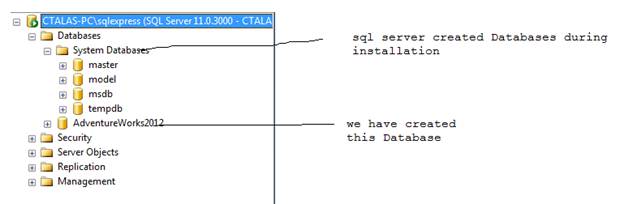
- master : Records all the system-level information for an instance of SQL Server.
i. Ex: instance name, edition, collation etc. all the Meta data information level at instance level. It also stores the Meta data for the newly created databases
- model: Used as the template for all databases created on the instance of SQL Server.
1. Template for the new Database creation.
- msdb : Used by SQL Server Agent for scheduling alerts and jobs.
a. Scheduling and administrative information
- tempdb : Workspace for holding temporary objects or intermediate result sets.
1. For day to day operation we need this tempDB
Where these files will be seen.
Go to databases, select properties and select files, and we can see the files below

Take the path of file and go to there, we can have the files
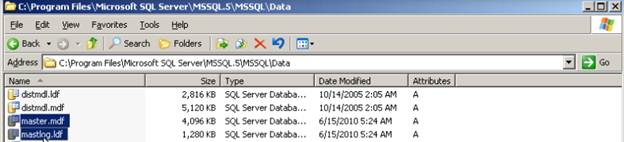
Master database is entry of Instance
We have another system database is there, but it is hidden
Resource Database:
In addition to the FOUR system databases discussed previously, a separate system database called “Resource” database is also installed. But this database cannot be seen in SSMS for security reasons

In sql server 2000, we have the system objects in master database and any one can go and update.
In sql server 2005, we have system objects in master database, but the source is coming from resource database
System objects are physically persisted in the Resource database
We don’t have direct access resource expect master database.
If we open the resource database .mdf file using any tool, we don’t get anything. This was much protected with encrypted format
Precautions for Database design:
1. Only one database is allowed per database file, but a single database can span multiple files.
2. Transaction logs must reside on their own file. There could be more than one transaction file per database.
3. Transaction log files are filled up one at a time.
4. When you create a database and do not specify the size of the log file, the log file will be 25% of the database file but minimum is 1MB by default


 SQL BLOGGING