Hi Folks,
Below is the discussion on the Sql server configuration manager
Mainly it is used for playing with the services.
1. Starting and stopping of service
2. Password change
3. Configure the startup mode of services
4. Enabling the database with single user mode or multi user mode
This is the sql server tool for playing with the sql server services
Another way to go to run -> services. MSC
We have sql server services in this
Don’t start sql server services all if we don’t have requirement as each service will consume minimum of 50mb and max of 8GB
Apart from the services, we have network configuration in the Sql server configuration manager(SCM)
Network configuration in SCM is like below

TCP/IP:
We are mainly using the TCP/IP protocol mostly called transmission control protocol /internet protocol
Coming to the protocols, this are used for data communication between client and server and this data is of encrypted TDS packets
We have already discussed this in the below post
if you have trusted internet connection you can connect to the sql server using the TCP/IP protocol
client and server will talk to each other using TDS packets and TCP/IP protocol is used for converting the data in to encrypted packets
Named Pipes:
if we are using the client and server in the same machine, we can use the named Pipes
it is also applicable for machines across the LAN
Shared memory:
clients and server can use the common memory and these are in single machine
before sql server 2005, we have option to install client components or server components
VIA-virtual access
mainly for internet and it is very faster, but not much secure than TCP/IP protocall
we can define protocols independently for each instance of sql server
by default
shared memory and TCP/IP protocol is enabled and others are in disabled mode and we can change it as part of requirement
how the sql server will check these protocols in the order
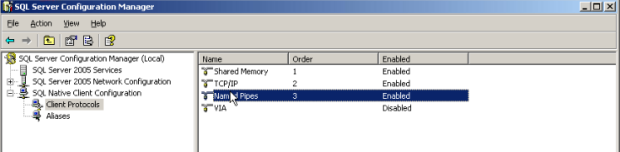
We have the client protocols in the sql native client configuration and it is defined with order
First shared memory is with 1st order, so sql server will check the shared memory and if the client is not in same machine, then sql server will skip this and check the TCP/IP and if TCP/IP is not working then sql server will go to named pipes
We can change the order of these protocols in configuration manager
Aliases:
An alias is an alternate name that can be used to make a connection. The alias encapsulates the required elements of a connection string, and exposes them with a name chosen by the user. To create an alias for the Microsoft SQL Server clients on this computer, right-click Aliases in the console pane, and then click New Alias. To configure an existing alias for the SQL Server clients on this computer, click Aliases in the console pane, right-click the desired existing alias in the details pane, and then click Properties.
Configuring client aliases for SQL Server
1. Open SQL Server Configuration Manager, and expand the SQL Native Client Configuration node.
2. Right-click Aliases, and then click New Alias.
3. In the Alias Name box, type the alias you wish to use when connecting to the database server.
4. In the Port No field, type the port number that you assigned to your SQL Server instance.
5. In the Server field, type the name of your database server.
6. Click Apply, and then click OK.
Alternatively
Start, Run, clicnfg
Enable TCP/IP protocol
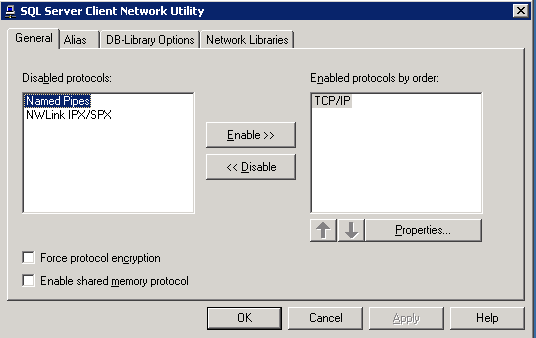
Select properties
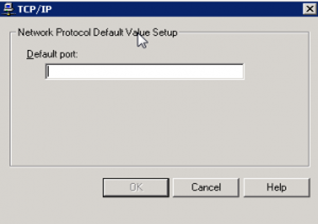
Select Alias Tab

Please check and let us know if you have any concerns on this.
Thanks for viewing this.
Regards,
Chaitanya
Visit site: http://www.sqlblogging.com
Send an Email: sqlblogging@outlook.com


 SQL BLOGGING

