It is mainly for DBA’s and useful for developers and support folks and it covers exam (70-431)
From sql server 2005, Microsoft changed lot in sql server product
Before there is no integration of developers and DBA‘s and now MS introduced integration of Developers and DBA’s
3 types of roles in sql server
1. DBA
2. Developers
3. Users
Roles of DBA:
Managing, monitoring and changing the health performance, reliability, security of the system
Developer will develop the objects in sql server
Users will use the results from the sql server
Roles and responsibilities are same for the developers and DBA’s but in 2000 DBA‘s uses enterprise manager for admin tasks and developers used query analyzer
Now in 2005, these are gone and they are integrated into sql server management studio
Sql server 2005 breaking all the records of bench mark testing and there is 7% increase in performance
Over oracle 10g and 37% lower cost so many people will get the product at low cost
We can install different instances of sql server on one server
In one machine, we can have the sql server 2000 instance, sql server express instance, sql server 2005 test instance like that
SQL Server from beginning:
1987:-
Sybase company created the Sybase sql server for Unix ,at the time oracle is the having the biggest database in the industry.so Microsoft decided to partner with Sybase
1993 – 4.2.1 version:-
They developed the Sybase sql server i.e. integrated with Windows NT 3.1 operating system
Most of code is for Sybase developed and this Sybase sql server is coded for Unix also called Sybase sql 4.0
1995:-
MS and Sybase divided and MS developed the own sql server of version 6.0 for Windows NT 3.1 and 3.5
But the code is Sybase code and Microsoft decided to use their own code. Introduced the replication concept
1996:-
MS released 6.5 version with better features with integration with windows NT 4.o and it is poor in performance, but lots of new features
1999-7.0 version:-
Microsoft did the new code (all MS code)
New GUI, OLAP, Data ware houses,scalable,fast,reliable
Sql server 2000: 8.0 Version:- with many enhancements like analysis services
SQL Server 2005: 9.0 version:-Code Name (Yukon)
Reporting services, service broker, SSMS. Here everything is touched.
SQL Server 2008: 10.0 Version:-Code Name (Katmai)
File Stream Data, Data Compression, Log Stream Compression, Language-Integrated Query, Spatial data, User-Defined Table Type, hierarchy ID, New Collations, Sparse Columns
SQL Server 2008 R2: 10.5 Version:-Code Name (Kilimanjaro )
SQL Server 2008 R2 includes a number of new services, including Power Pivot for Excel and SharePoint, Master Data Services,
Stream Insight, Report Builder 3.0, and Reporting Services Add-in for SharePoint, Master Data services, hierarchies, Multi Server Management
SQL Server 2012: 11.0 Version:-Code Name (Denali)
File Table, Statistical Semantic Search, Improved Full text Search, new and enhanced spatial data types, Paging, new Throw Statement, Sequence Object, and new Functions for development.
Sql Server tools and components:
Management tools:
1. Sql server management studio
Here the sql server enterprise manager and sql server query analyser in sql server 2000 are integrated and developed this tool.
2. Sql server configuration manager
It will replace the client network utility, server network utility and service manager in the sql server 2000

And these three tools are integrated and replaced by the sql server configuration manager like below from sql server 2005 onwards
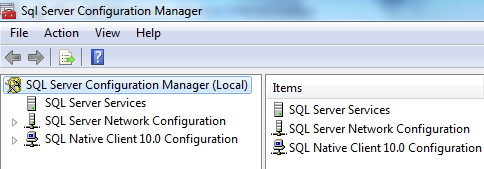
I explained about this tool in my blog
https://sqlblogging.com/2011/10/05/sql-server-configuration-manager-tool-explanation/
Development tools:
1. SSMS (sql server management studio) for writing the queries and creating the objects in sql Server.
2. Business intelligence development studio: for developing SSIS, SSRS,SSAS applications Called as BIDS
Performance tools:
1. Database engine tuning advisor:
The Database Engine Tuning Advisor enables you to tune databases for improved query processing. Database Engine Tuning Advisor examines how queries are processed in the databases you specify and then it recommends how you can improve query processing performance by modifying physical design structures such as indexes, indexed views, and partitioning.
It replaces the Index Tuning Wizard from Microsoft SQL Server 2000, and offers many new features. For example, Database Engine Tuning Advisor provides two user interfaces: a graphical user interface (GUI) and the dta command prompt utility. The GUI makes it easy to quickly view the results of tuning sessions, and the dta utility makes it easy to incorporate Database Engine Tuning Advisor functionality into scripts for automated tuning. In addition, Database Engine Tuning Advisor can take XML input, which offers more control over the tuning process.
2. Sql Server Profiler :
Microsoft SQL Server Profiler is a graphical user interface to SQL Trace for monitoring an instance of the Database Engine or Analysis Services. You can capture and save data about each event to a file or table to analyze later. For example, you can monitor a production environment to see which stored procedures are affecting performance by executing too slowly etc.

Sqlcmd is the sql version of command line tools: it replaces the Osql. Osql is completely gone
Before Sql DMO (data management objects) is the object library for sql server and now it is replaced with SMO (sql management objects) .
Components of Sql server:
1. Database engine: it is not changed for execution
2. SSAS (SQL server analysis services): we can develop multi-dimensional objects such as cubes etc.
3. SSIS (sql server integration services): for developing ETL packages
4. SSRS (sql server reporting services): for developing the reports
5. SSNS (sql server notification services): send the notifications to anybody on any device
And it is removed in sql server 2008
6. SQL server service broker: it like the message queuing system which keeps the messages and other application will pick those messages and process
In configuration tools, we have tools like

1. Sql server configuration manager:
I already posted one post on this
https://sqlblogging.com/2011/10/05/sql-server-configuration-manager-tool-explanation/
2. Notification services command prompt
For managing notification services. It is removed in sql server 2008
3. Reporting services configuration: we can configure the reporting services instances here
If you open this tool, you will get like below

We can connect to the report server instance and manage the properties
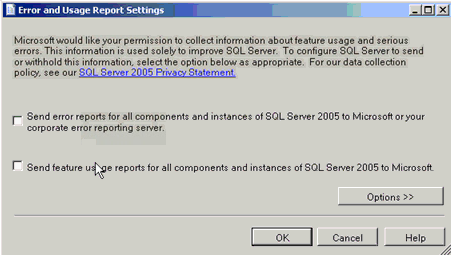
4. Sql server error and usage reporting:
We can send the errors to the Microsoft that are occurred in sql server by using this tool
Sql server surface area configuration Manager:
It will do all the checks and Surface area reduction is a security measure that involves stopping or disabling unused components
It is removed in sql server 2008
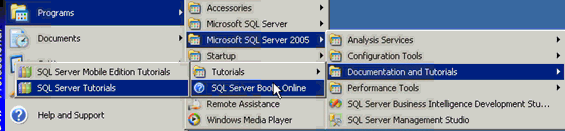
We can have the documentation and tutorials: and it has mobile edition tutorial and sql server tutorial and sql server tutorials and sql server books online for learning
BIDS:

SSMS:
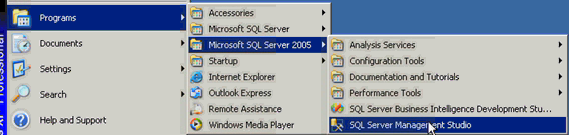
We can register the server s here in the SSMS so that we will query and manage them whenever you want
In sql server 2000, we have register servers like this
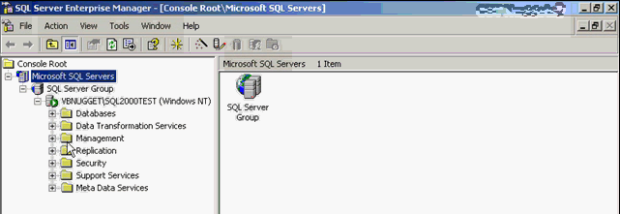
We can query and manage these servers.
Here Green mark represent the server is connected
In SSMS(from Sql server 2005) for registration of servers, go to view and registered servers you got window like below
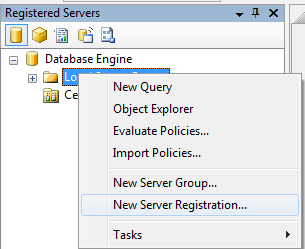
By clicking and register the server
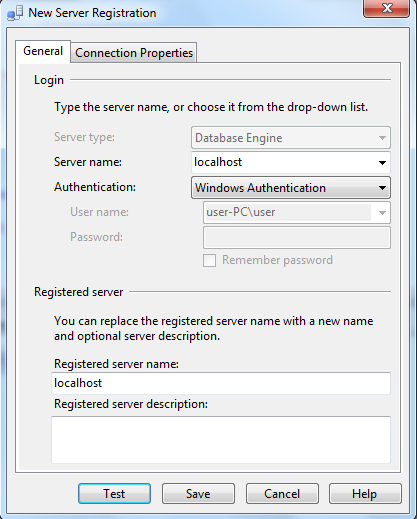
Save it and you can see the registered servers like below

Here Green symbol means the server is up and running fine, but we are not connected to the server
So to connect right click on registered server and new query so that it is connect to server and shown in the right window
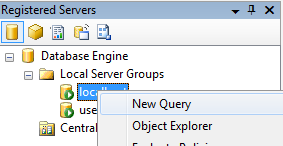
If we go to any database and see the reports of database, follow like below
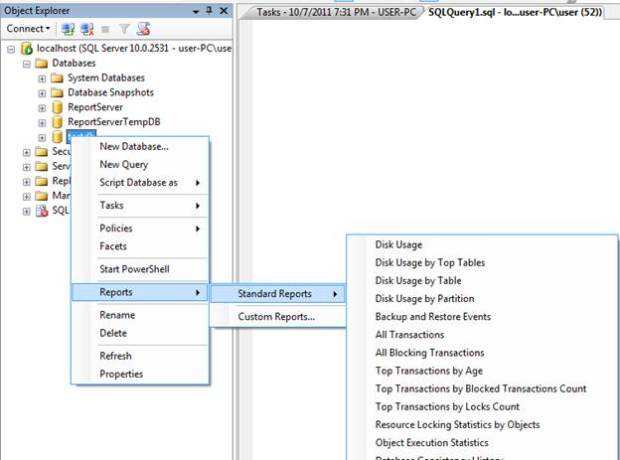
These are reports, and we have bunch of reports and gives the all details about the database
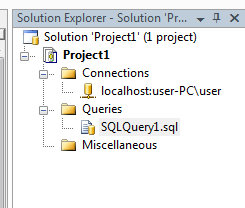
Solution explorer: it is used to for maintaining the projects
For creating the projects, file-> new-> projects-> select the project type and —- and click ok. You will get the project in the solution explorer in the right side and it is like below
Running the queries in ssms is very easy, go to database and right click and select new query
And you can create the queries and execute the queries
Please check and let us know if you have any concerns on this.
Thanks for viewing this.
Regards,
Chaitanya
Visit site: http://www.sqlblogging.com
Send an Email: sqlblogging@outlook.com

 SQL BLOGGING