Hi All,
Changing the database compatibility level
1) Using t-Sql
Syntax:
ALTER DATABASE database_name
SET COMPATIBILITY_LEVEL = { 80 | 90 | 100 }
Arguments
database_name
Is the name of the database to be modified.
COMPATIBILITY_LEVEL {80 | 90 | 100 }
Is the version of SQL Server with which the database is to be made compatible. The value must be one of the following:
80 = SQL Server 2000
90 = SQL Server 2005
100 = SQL Server 2008
For all installations of SQL Server 2008, the default compatibility level is 100. Databases created in SQL Server 2008 are set to this level unless the model database has a lower compatibility level. When a database is upgraded to SQL Server 2008 from any earlier version of SQL Server, the database retains its existing compatibility level if it is at least 80. Upgrading a database with a compatibility level below 80 sets the database to compatibility level 80. This applies to both system and user databases. Use ALTER DATABASE to change the compatibility level of the database. To view the current compatibility level of a database, query the compatibility_level column in the sys.databases catalog view.
Using Compatibility Level for Backward Compatibility
Compatibility level affects behaviors only for the specified database, not for the entire server. Compatibility level provides only partial backward compatibility with earlier versions of SQL Server. Use compatibility level as an interim migration aid to work around version differences in the behaviors that are controlled by the relevant compatibility-level setting. If existing SQL Server applications are affected by behavioral differences in SQL Server 2008, convert the application to work properly. Then use ALTER DATABASE to change the compatibility level to 100. The new compatibility setting for a database takes effect when the database is next made current (whether as the default database on login or on being specified in a USE statement).
Best Practices
Changing the compatibility level while users are connected to the database can produce incorrect result sets for active queries. For example, if the compatibility level changes while a query plan is being compiled, the compiled plan might be based on both the old and new compatibility levels, resulting in an incorrect plan and potentially inaccurate results. Furthermore, the problem may be compounded if the plan is placed in the plan cache and reused for subsequent queries. To avoid inaccurate query results, we recommend the following procedure to change the compatibility level of a database:
Set the database to single-user access mode by using ALTER DATABASE SET SINGLE_USER.
Change the compatibility level of the database.
Put the database in multiuser access mode by using ALTER DATABASE SET MULTI_USER.
Ex:

2) Using SSMS to change the compatibility level of data base
Right Click on the database you want to change compatibility level
Select options and change the compatibility level and click on OK
We can see the compatibility level of data base using the SSMS
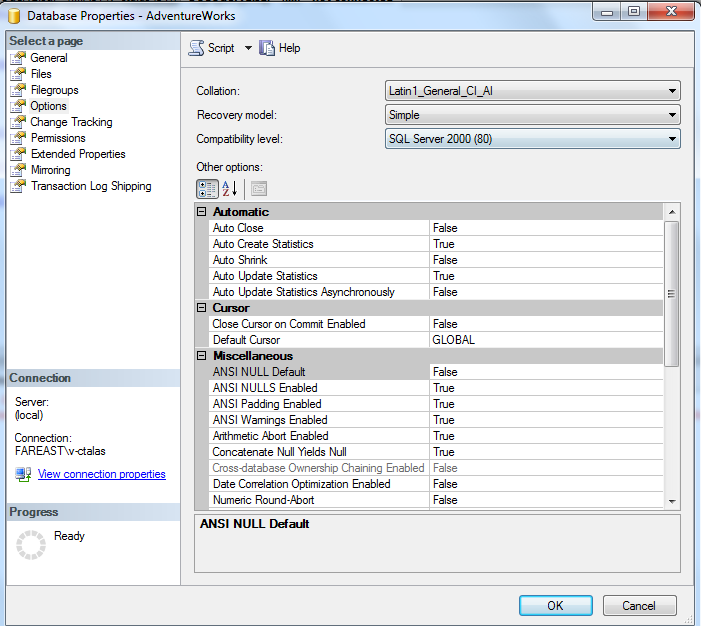
And using the t-sql

Thanks for viewing.
Reference :http://msdn.microsoft.com/en-us/library/bb510680.aspx
Regards,
Chaitanya,
Webiste : https://mssqlbuzz.wordpress.com/
To Send Mail : mssqlbuzz


 SQL BLOGGING